Participant
February 7, 2017
Question

minimize button overlaps with okay button

  • February 7, 2017
  • 1 reply
  • 711 views

screenshot in Samsung Galaxy Note 10.1
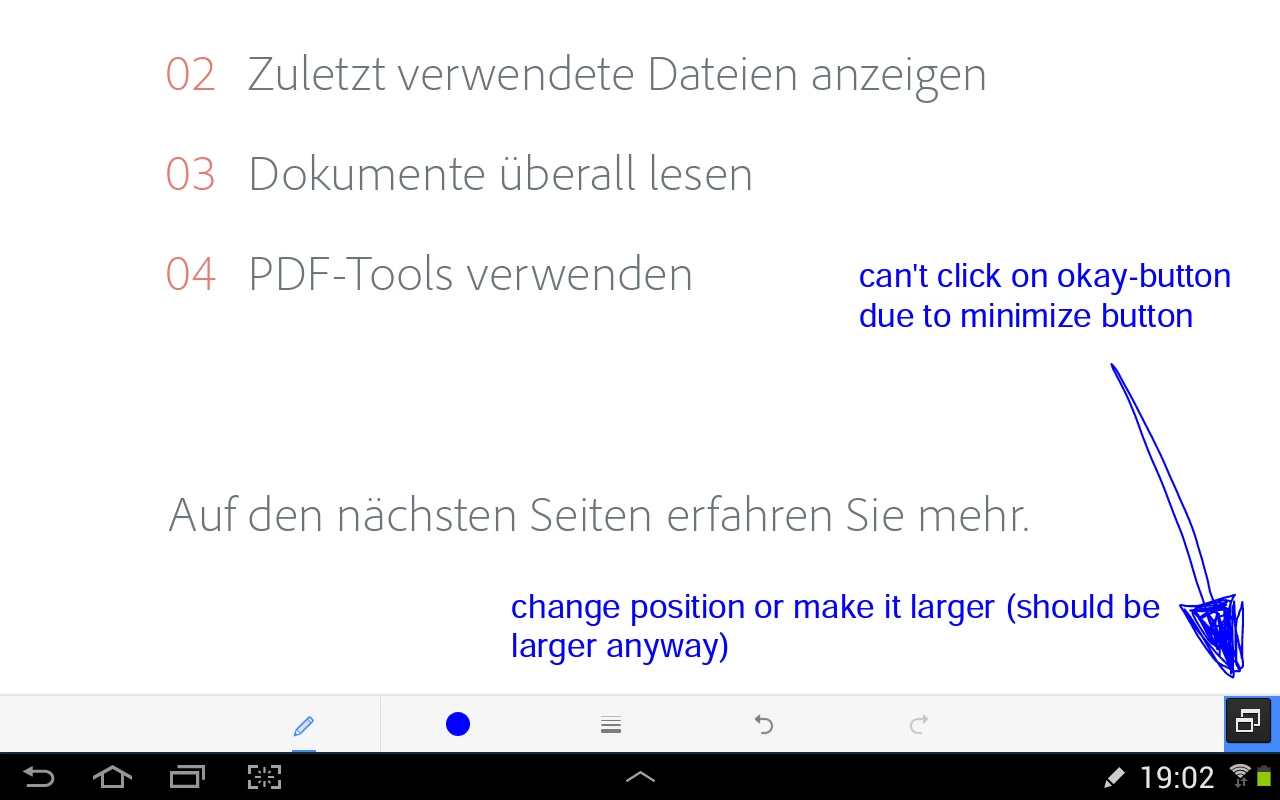
what can I do?

can you fix this problem?

This topic has been closed for replies.

1 reply

AkanchhaS8194121
Legend
February 8, 2017

Hi Bammbam,

Is it a Adobe Acrobat Reader mobile application you are working on or a inbuilt pdf app of the device?

We are unable to understand the message appearing in the screenshot.

Could you please help us with the more information?

Regards,

Akanchha

BammbamAuthor
Participant
February 8, 2017

it is the latest Adobe Acrobat Reader App downloaded from the Google Playstore. I can't click on the blue 'check-button' in the bottom-right corner because of the minimize button. The minimize button belongs to the Android operating system I think and its position can't be changed.

I think therefore the blue 'check-button' should either be larger or at a different position.

AkanchhaS8194121
Legend
February 9, 2017

Have you tried uninstalling and reinstalling the application?

Please try once and see if that helps, because there isn't any specific setting that we could change in Adobe Acrobat Reader.

this seems to be a display issue only.