
Inspiring
April 10, 2019
Question

UI elements keeps changing

  • April 10, 2019
  • 1 reply
  • 1008 views

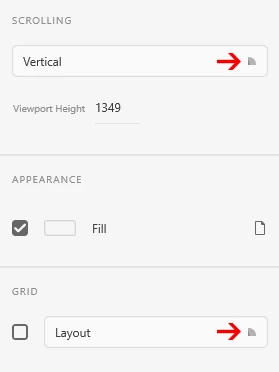
I keep getting these icons instead of the expected arrows from time to time. It often happens right after an update and it occurs sometimes in just random documents. When I open another document I can get arrows and these things you see here at the same time too. Also, the color picker icon goes away and is replaced by a small gray box. These things happens repeatedly with no apparent time pattern. I have no issues like these in any other Adobe app, its always XD only. Everything is up to date on W10 with NVIDIA GeForce GTX 1050
This topic has been closed for replies.

1 reply

Atul_Saini
Legend
April 10, 2019

Hi Perrybrus,

Thanks for sharing your feedback about these elements. I see what you are talking about, could you please check it on another device and share the screenshot? Meanwhile, I'll investigate it here at my end.

Thanks,

Atul_Saini

perrybrusAuthor
Inspiring
April 10, 2019

I'm using two CC installations on my license and they are both on W10. The other one runs on NVIDIA GeForce RTX 2070 and the same issue occurs on both systems. I've asked a colleague about the same topic and he confirms that he also is experiencing the same XD UI issues from time to time.  

Atul_Saini
Legend
April 10, 2019

Thanks for confirming the details, would you mind sharing the screenshot if this happens again on another device?

Thanks,

Atul_Saini