

Audio spectrum not using complete mask
Hey Guys,
for a event we are hosting I am creating several short leaders for the keynote speakers. Each keynote speaker gets it's own music track based on the main track but with one instrument (played live) in the spotlight. Speaker 1 with have more violin, speaker 2 harp, speaker 3 trumpet etc.
For that reason I want to create a audio spectrum that traces the outline of his photo (PNG). There are things that I cannot seem to get working.
1 - the audio spectrum is cut of halve way the mask. So it stops on top of his head and doesn't go any further.
I tried several ways to create the mask; I drawn a shape layer and converted it to a mask and used that....same problem.
I autotraced the PNG with numerous settings and used that mask. In this method I get about 7 - 10 masks. 1 is the best that I can expose using the frequency bands. But that one also cuts off halve way his head.
Hope you guys can solve this.
Here is a screenshot.
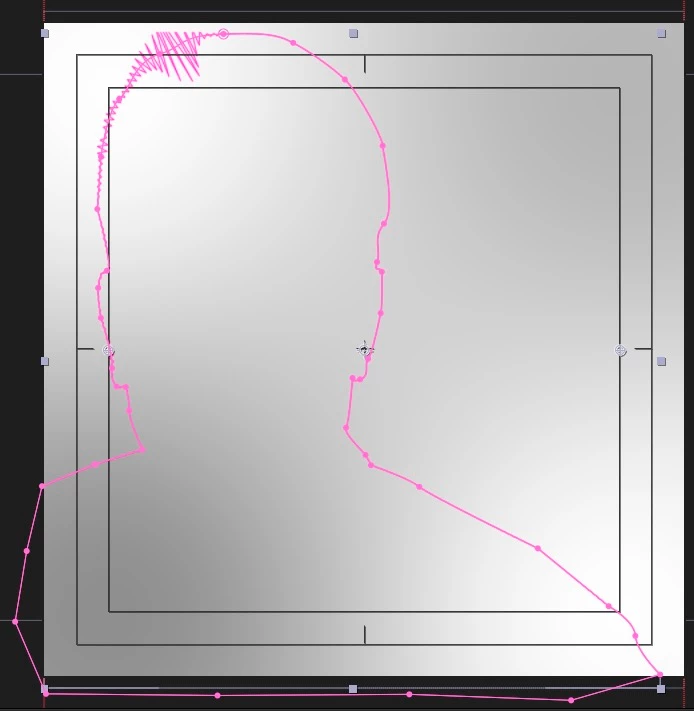
2 - I would love the outline to reveal itself like it is drawn for the left to the right. Including the audio spectrum offcourse 😉
With a normal shape layer this is easy by setting start and end. With a linear wipe effect I can almost create that but not exactly following the line.
Should I precomp it and mask the precomp and animate the mask?
Hope you guys can help.
Thanx in advance!!!
Kind regards,
Marc
 AdChoices