
Participant
October 14, 2021
Answered

Clamping wiggle expression

  • October 14, 2021
  • 1 reply
  • 1036 views

Hi all, I'm trying to wiggle a layer only on the y-axis, but restrict it between values 444 and 466.


This is the expression I am using:


org=value;
temp=wiggle (9,40);
[org[0],temp[1]];

yClamp=clamp(transform.position[1],444,466);
[transform.position[0],yClamp];


The first three lines work for the y-axis wiggle, and the last two lines work to clamp the layer's position, but the two expression aren't working together. I'm not getting any error messages from After Effects. Is there an easy solution to this? Thanks.
This topic has been closed for replies.
Correct answer Rick Gerard

Your wiggle result (line 3) has not been defined as a variable that can be added to the resulting array. The whole structure does not make much sense. 


Wiggle takes the current value and moves it between two values. The difference between 444 and 466 is 22 and half of that is 11. Halfway between is 455 so all you have to do is set the position to any value for x, 455 in the timeline then use this for your expression:


w = wiggle(9, 10);
mov = [value[0], w[1]];


If you want a hard clamp then you could write the expression like this:


w = wiggle(9, 11);
[value[0], clamp(w[1], 444, 466)]


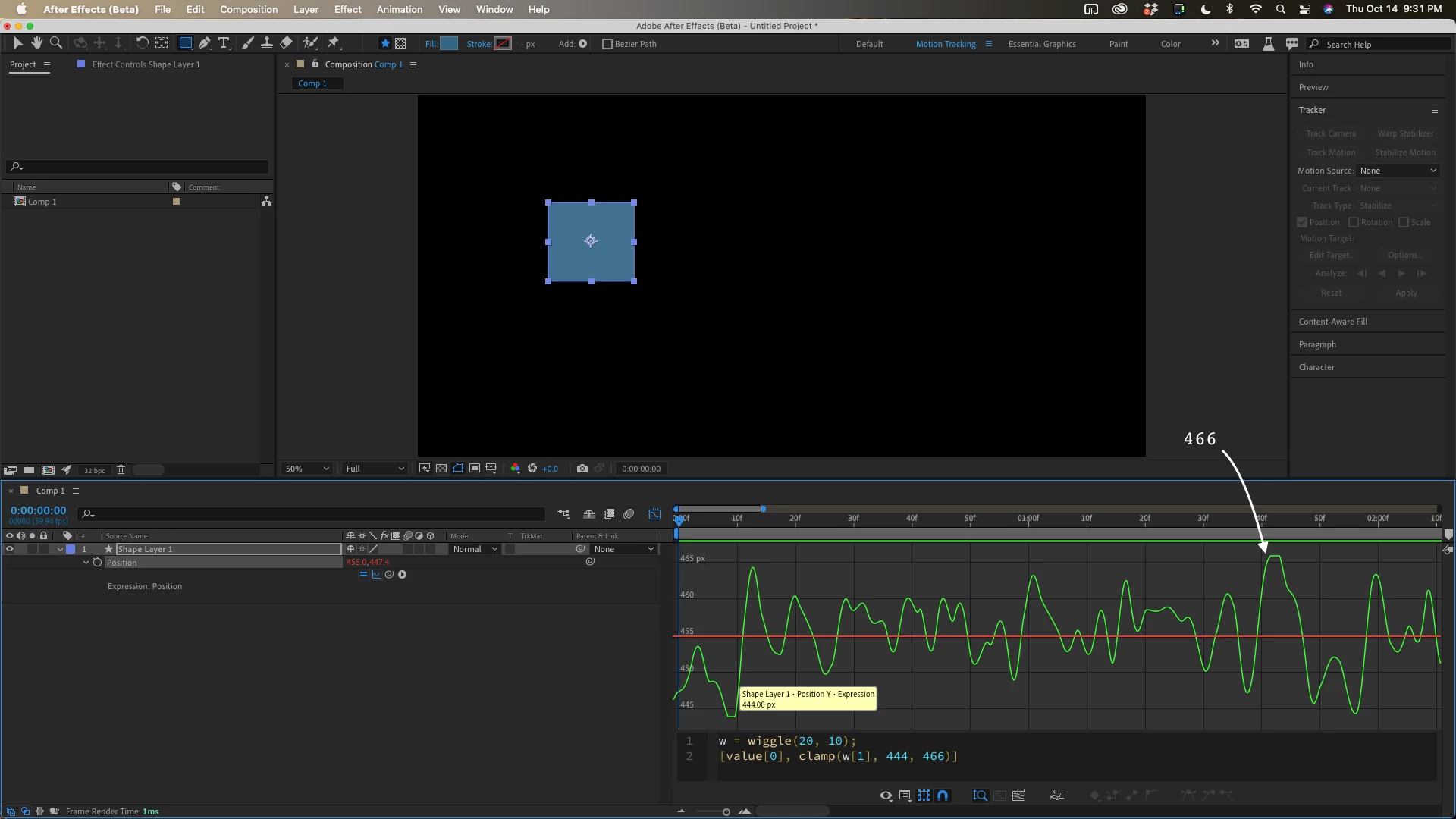
Wiggle will accelerate just past the stated value on occasion. The overshoot depends on the frequency and it can be 1 or 2 pixels. If you want to make sure that the movement hits the hard stops often at 444 and 466 you need to use 11. In this screenshot at 20 cycles per second and a distance of 10 pixels, I only get 2 clamped values with a maximum duration of 3 frames. The larger the amplitude value, the longer the movement will pause. There is almost always a little overshoot when you use wiggle.


1 reply

Rick GerardCommunity ExpertCorrect answer
Community Expert
October 15, 2021

Your wiggle result (line 3) has not been defined as a variable that can be added to the resulting array. The whole structure does not make much sense. 


Wiggle takes the current value and moves it between two values. The difference between 444 and 466 is 22 and half of that is 11. Halfway between is 455 so all you have to do is set the position to any value for x, 455 in the timeline then use this for your expression:


w = wiggle(9, 10);
mov = [value[0], w[1]];


If you want a hard clamp then you could write the expression like this:


w = wiggle(9, 11);
[value[0], clamp(w[1], 444, 466)]


Wiggle will accelerate just past the stated value on occasion. The overshoot depends on the frequency and it can be 1 or 2 pixels. If you want to make sure that the movement hits the hard stops often at 444 and 466 you need to use 11. In this screenshot at 20 cycles per second and a distance of 10 pixels, I only get 2 clamped values with a maximum duration of 3 frames. The larger the amplitude value, the longer the movement will pause. There is almost always a little overshoot when you use wiggle.


Participant
October 15, 2021

Ok, thanks for the explanation Rick!