Participating Frequently
April 13, 2017
Answered

Frame Rates...

  • April 13, 2017
  • 1 reply
  • 5682 views

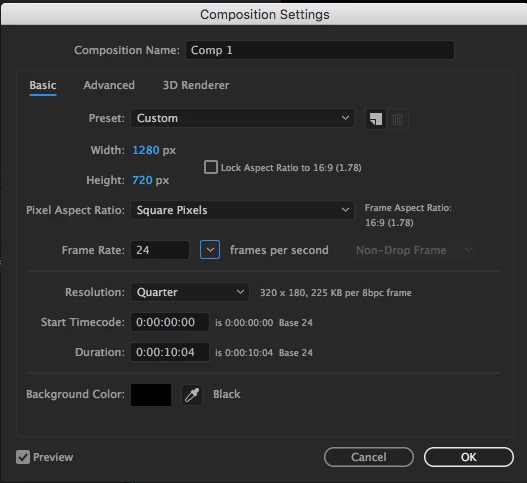
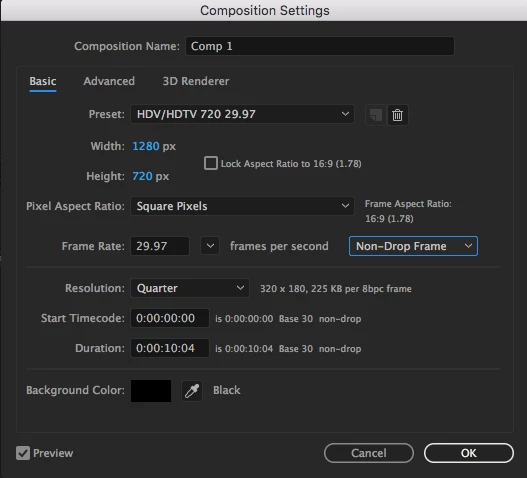
When I create a new composition is After Effects, next to the frame rate I have a blanked out option saying 'Non-Drop Frame' or 'Drop Frame' and I don't know what it is for, also I can edit the frame rate drop thingy when the frame rate is at 29.97fps or 59.94fps. The data also is transferred over to another frame rate that I chose e.g. I have just selected 59.94fps, so I change the frame drop thingy from Non-Drop Frame to Drop Frame, Then I make my fps 24, the box is now greyed out but the frame drop data thingy is carried over to the next frame rate that I choose. I hope this makes sense. Really what I would like to find out is what is the frame rate thingy with the drop and non drop thingy, and what does it do. And also why is it only available for two specific frame rates (not custom, the frames I tried were all from the drop down box) Like I said I hope this makes sense...

Thanks!
    This topic has been closed for replies.
    Correct answer Dave_LaRonde

    Ok... So I am a little confused... Is it best to work in Non-Drop Frame or Drop Frame, because you mentioned that it is a good idea to work in drop frame 'I's always good to work in Drop Frame.  You get a far more accurate idea of the length of an edited piece.   And it DOES NOT drop frames.'

    And why does it go up to 1.00.02 instead of 1.00.00 from 59.59? That confused me a little bit!


    Drop Frame time code compensates for the slightly-longer frame of video when it's shot at 29.97 as opposed to 30fps.

    If you have video shot at 200 fps, how long does each frame appear?  1/200 sec.  At 100 fps each frame appears for 1/100 sec.  At which rate do the frames appear longer?  100 fps. Makes sense.

    At  30 fps the duration of a frame is 1/30 sec, and at 29.97 the duration is 1/29.97 sec.  The difference in durations between these frame rates is miniscule.  But that tiny difference adds up over time.

    Tell you what -- Open Premiere Pro.  Make a custom sequence.  Make its frame rate 29.97.  Make its Display Format 29.97 fps Drop-Frame Time code.

    Then play with it.  Observe what happens when you move the timeline cursor frame-by-frame to 1 minute.  Or 2 minutes. Or ten minutes.  Or an hour.

    You'll get the idea.

    1 reply

    Mylenium
    Legend
    April 13, 2017

    Read up on NTSC timecode handling and the AE help.

    Mylenium

    Participating Frequently
    April 13, 2017

    I read up on it and it was quite interesting, I am also guessing that if the box is greyed out, It will have a set 'stop ' or 'non-drop' if that makes sense!

    Thank you for your help!

    Dave_LaRonde
    Inspiring
    April 13, 2017

    Almost ALWAYS, the following frame rates apply:

    30 fps is really 29.97 fps

    24 fps is really 23.976 fps

    60 fps is really 59.94 fps

    I's always good to work in Drop Frame.  You get a far more accurate idea of the length of an edited piece.   And it DOES NOT drop frames. That's an unfortunate and misleading name for what's happening.  Drop frame merely adjusts the time code associated with the fractional frame rates above to accurately reflect time.