Participant
November 10, 2019
Answered

Images with fuzzy edges after export

  • November 10, 2019
  • 1 reply
  • 1362 views

Hi! When I go to export an image or a movie from Animate, the image always comes through with fuzzy edges. How do I stop this from happening?

This topic has been closed for replies.
Correct answer n. tilcheff

Hi mate,


It seems that this setting is broken in Animate.

I ran some tests and the last version that responds to unchecking the 'smoothing' setting is CS6.
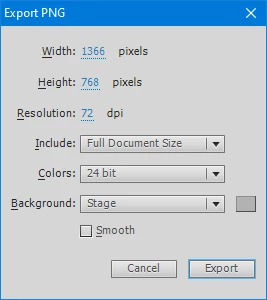
All Animate versions have the Smooth option at least in the 'legacy' image export, but unchecking it does nothing.


So if you want aliased (hard) edges, find a copy of Flash CS6. It can open Animate files.

Export from CS6.


Hope this helps!


ps. Alternatively, of course, you can do some batch processing in Photoshop, for example. If you export a sequence with Alpha channel you can batch process the Alpha through a Threshold and then apply it if you don't need the alpha.


1 reply

Preran
Legend
November 11, 2019

In which format are you exporting your images? Can you provide us with detailed info on how to reproduce your issue?

Participant
November 14, 2019

Yes! 


I went to File-> Export ->Export Image -> PNG-8  with no transperency. Then, I hit save and exported, resulting in this. 

When I export from Macromedia Flash 8, however, the file comes out looking like this, With clean, hard edges.

I want to get the images produced from Animate to look like this, as the project I'm using them for requires the images I make in these programs to look like these latter files. 


Thank you!

n. tilcheff
n. tilcheffCorrect answer
Legend
November 14, 2019

Hi mate,


It seems that this setting is broken in Animate.

I ran some tests and the last version that responds to unchecking the 'smoothing' setting is CS6.

All Animate versions have the Smooth option at least in the 'legacy' image export, but unchecking it does nothing.


So if you want aliased (hard) edges, find a copy of Flash CS6. It can open Animate files.

Export from CS6.


Hope this helps!


ps. Alternatively, of course, you can do some batch processing in Photoshop, for example. If you export a sequence with Alpha channel you can batch process the Alpha through a Threshold and then apply it if you don't need the alpha.


Nick - Character Designer and Animator, Flash user since 1998 | Member of the Flanimate Power Tools team - extensions for character animation