kellies50617532
Inspiring
April 25, 2016
Answered

Drag and Drop issues.

  • April 25, 2016
  • 1 reply
  • 533 views

Hi again,

I am working in

On a Mac

I have been working on this problem for a long time and cannot find a solution. And it is a multi part problem.

Initially I made my Drag and Drop interaction and it worked beautifully. Everything was doing exactly what I wanted it to. Then something happened and things aren't working correctly anymore. The problems I have are:

1) When the "Submit" button is clicked and the answers are right the correct answer comes on for half a second and then the whole thing moves to the next slide. I have tried several things to get it to hold longer, but nothing has had an effect. It just clicks and gone.

2) When the incorrect answers are selected and I hit the "Reset" button it will wait until the first item is dropped and then jump to the next slide.

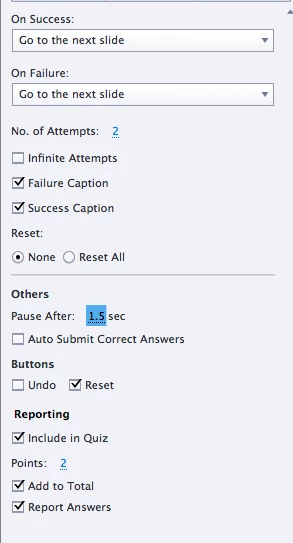
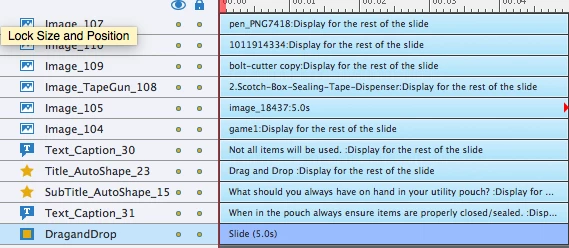
Here is a screenshot of the Actions panel and the timeline
My Drag and Drop interaction is included in the quiz scoring. The scoring always seems to be recorded correctly according to the answers provided.

This topic has been closed for replies.
Correct answer Lilybiri

Did you check the Pausing? Your actions are set to Go to Next slide, isn't that what you wanted? Change it to Continue instead if you want it not to go so quickly to the next slide.

Do you have Object actions?

As for the Reset, I mostly will create my own Reset button. You can have a look at this blog post:

Drag&Drop in 2016 with Captivate 9 - Captivate blog

1 reply

kellies50617532
Inspiring
April 25, 2016

Okay, so I have moved the Drag and Drop slide in the Filmstrip to inside of the quiz and this seems to have fixed issue 2 and part of 1. However, the slide still switches too fast when I click the "Submit" button with the correct answers.

Lilybiri
LilybiriCorrect answer
Legend
April 25, 2016

Did you check the Pausing? Your actions are set to Go to Next slide, isn't that what you wanted? Change it to Continue instead if you want it not to go so quickly to the next slide.

Do you have Object actions?

As for the Reset, I mostly will create my own Reset button. You can have a look at this blog post:

Drag&Drop in 2016 with Captivate 9 - Captivate blog

kellies50617532
Inspiring
April 25, 2016

That fixed it. Thanks again!