Participant
September 25, 2015
Question

How do I publish my project at a bit rate of 5000kbps, the settings I choose are ignored when publishing

  • September 25, 2015
  • 1 reply
  • 587 views

I am attempting to upload the video to Vimeo yet it tells me the bit rate is too low 128kbps instead of their recommended 5000kbps.  I have my frame rate set to 30 but it is publishing at 15.  I am running Captivate 7.
    This topic has been closed for replies.

    1 reply

    RodWard
    Community Expert
    Community Expert
    September 25, 2015

    Are you sure you're not confusing the Audio bitrate with the video bitrate?

    A bitrate of 5 megabits per second would be totally over the top for any Captivate content, and most users would not have access to that kind of bandwidth.

    HL5062Author
    Participant
    September 25, 2015

    Thanks for your reply.  I'm very new to this and have published my captivate videos to MP4 with the standard settings which play fine through Windows Media Player.  It's only when I've tried to upload them to Vimeo to stream from my website they are blurry at full screen and Vimeo says this:

    RodWard
    Community Expert
    Community Expert
    September 25, 2015

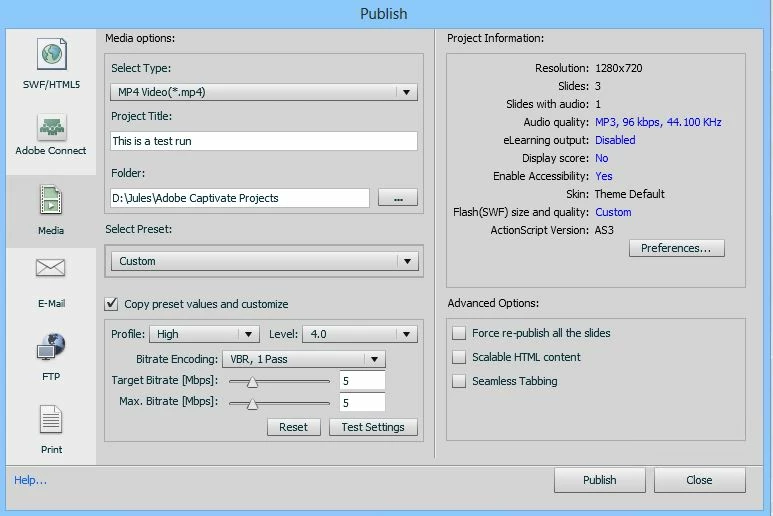
    OK. I can see your issue.  But I still think Vimeo is somehow detecting the audio bitrate which would usually be at about 128 kbps.  Your video encoding settings seem to indicate you WOULD be publishing out to 5 megabits.

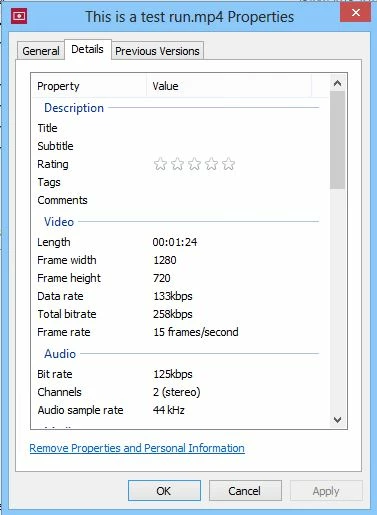
    When you right-click the output MP4 select Properties and look at the Details tab, what does it say there for the bitrate?