
Participant
September 28, 2013
Answered

color changes between docs with copy & paste in Illustrator CS6

  • September 28, 2013
  • 1 reply
  • 12286 views

designer copies & pastes a rectangle, that has a gradient fill, from one file to many new files. each time the gradient color changes. not a lot- but enough to make a red turn orange. i have not personally witnessed the c & p, but i have checked the colors on the gradient sliders & they are different. can this be possible? or am i being punked? any help will be greatly appreciated!
    This topic has been closed for replies.
    Correct answer D Fosse

    The documents have different color profiles.

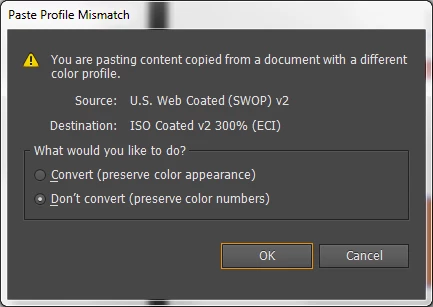
    If you go into Edit > Color Settings and check "ask when pasting" under Profile Mismatches, you will be presented with this dialog (self-explaining):

    Of course, the real question is what profile the document should be. That depends on the use and destination.

    1 reply

    D Fosse
    Community Expert
    D FosseCommunity ExpertCorrect answer
    Community Expert
    September 28, 2013

    The documents have different color profiles.

    If you go into Edit > Color Settings and check "ask when pasting" under Profile Mismatches, you will be presented with this dialog (self-explaining):

    Of course, the real question is what profile the document should be. That depends on the use and destination.

    perspyAuthor
    Participant
    September 29, 2013

    hi 21

    i don't have CS6 to experiment with at home. if every designer in our department selects the same color profile in Bridge that meets our needs, and in Illustrator, everyone does this: Edit > Color Settings and check "ask when pasting" , would this solve the problem across the board?

    thanks

    pat

    D Fosse
    Community Expert
    Community Expert
    October 2, 2013

    21,

    "Converting CMYK to CMYK should be avoided. Things like 100K blacks turning into four color blacks is one of the things that can happen."

    can u elaborate? as u c, i am a color management newbie. in my office, we all just use the default settings. we are designing for print primarily. and a lot of our packaging is produced in china. we use cmyk & pms colors. if spot colors are not printing, which is 99% of the time, we just click to convert.

    i don't know where to start! 

    thanks much

    p


    I've no experience with spot, so others will have to chime in there. What I've said above is about general principles of color management.

    But specifically, as far as CMYK is concerned, you can't just use default settings, there's no reason to assume that will be correct. As I said, you need to get a profile from the printer.

    (100K black is a black that prints only on the black plate, like text. As opposed to a black that prints on all four plates).