
Participating Frequently
August 10, 2018
Answered

Align selected art to pixel grid and Transform Panel

  • August 10, 2018
  • 6 replies
  • 3355 views

Hi,

I'm getting confused with creating a perfect pixel icons. I am creating my icons by following all the correct methods such as the preference changes in Illustrator, 72ppi, etc.

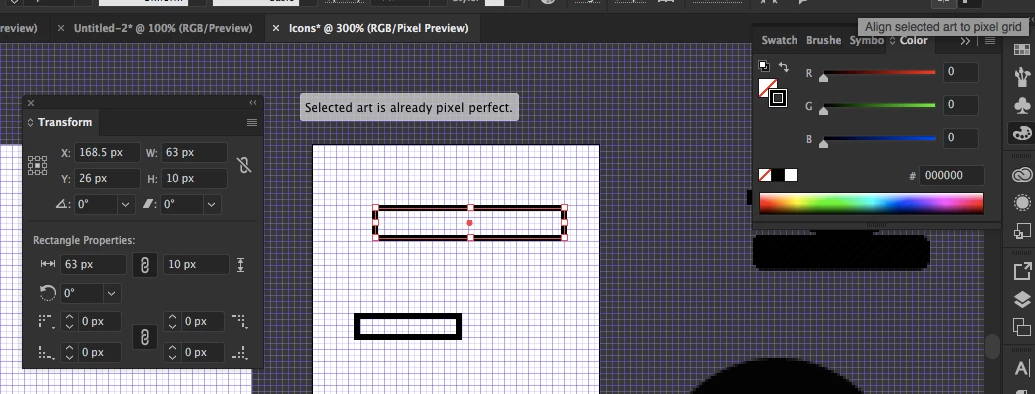
I am making sure all shapes I create are not left at a decimal like number for X and Y. What I noticed is after I make sure the shapes have accurate full numbers that when I click on the align selected art to pixel grid after, the values change to .5 and over. What is it am I doing wrong?

Screenshots:

Before - Corrected the X and Y

After - Clicked on Align selected art to pixel grid
I'm open to any suggestions!

Thanks.

This topic has been closed for replies.
Correct answer Monika Gause

Strange, it is:


It has a stroke of 3 px which is aligned to the center. The stroke needs to be sharp on the ouside, so the path needs to be on a half pixel. It will change when you set the stroke to 2 px.

6 replies

Participating Frequently
August 13, 2018

Just something I came across tonight but I grouped the shapes together after creating the icon (96x96) which are aligned to the grid. I copied and pasted it onto 112x112 template, I scaled it slightly bigger and I hit align to grid but, the shapes inside the group looks jumbled, few shapes have slightly moved. I understand why but what can I do to rectify that?

Monika Gause
Community Expert
Community Expert
August 13, 2018

They need to be ungrouped.

Participating Frequently
August 14, 2018

I have to separately scale them? I've ungrouped it but I select all of the objects and scaled it and still the same problem (I'm aware it's like being grouped if I select all)

Participating Frequently
August 10, 2018

Thanks for your replies guys. I wasn't aware about Proxy point!

Saying that, I've tried that and it still doesn't round of the numbers. I know it doesn't matter but I guess it's a learning curve for me to understand.

Screenshot:

This aligned to pixel.

Ton Frederiks
Community Expert
Community Expert
August 10, 2018

That is a free form shape. and anti aliasing will always occur with these rounded forms.

Align go pixel is is ment to avoid anti-aliasing (softening) of rectangular shapes and horizontal / vertical lines.

Participating Frequently
August 10, 2018

Ah, I see. So for free form shapes, the decimal numbers for Width and Height shouldn't matter when I align the pixel. I've saved it as PNG to see the quality and it looks perfect.

Going back to my first post, when I use the proxy point, my numbers still don't round up when I pick any of them (for rectangular shapes, etc).

Ton Frederiks
Community Expert
Community Expert
August 10, 2018

I agree with Monika and Anna, don't worry about it.

Anna Lander
Inspiring
August 10, 2018

Look: your icon size is perfect. X value is about the position and depends on the proxy point's placement. Choose for example  the left-center point on the pictogram and you'll have the perfect X value 

Monika Gause
Community Expert
Community Expert
August 10, 2018

"Align to pixel grid" is not about numbers, but about the look.

There might appear totally weird numbers, but as long as it looks OK, it is OK.

Ton Frederiks
Community Expert
Community Expert
August 10, 2018

Your Proxy point is set to the center and your width is not an even number, it is 63 px. 64 or 62 or setting the Proxy point to any other place would not give you these decimal coordinates.