
Known Participant
June 14, 2017
Answered

Ragging Long Paragraphs

  • June 14, 2017
  • 3 replies
  • 1569 views

Hi,

Would anyone give me some guidance regarding ragging this long column. Its an ingredient list on the side of packaging. I'd like to keep it this width. I've done alot of manual tracking and soft returns to get the rag like this (which I think is ok). However, I've become aware of justification settings, which seems like it might be an easier solution and provide a better looking result. Where do I begin that? First, nothing happens when I have preview on and I play with the percentages.

Would appreciate suggestions on what percentages to use in the different fields and any other thoughts people might have.

Thanks!
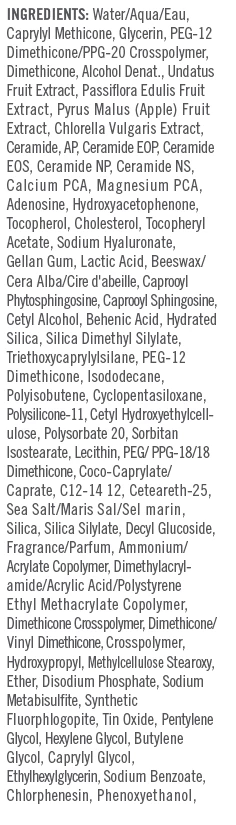
    This topic has been closed for replies.
    Correct answer JonathanArias

    I would suggest for you to do your copy layout in adobe indesign. adobe illustrator does not come close to all of the text/column formatting options you get in indesign. Place your dieline in indesign and layout in indesign versus illustrator. You will save yourself time and effort in the long run.

    when i do package design i place the dieline for the package on a layer on indesign and i layout on a different layer my art and copy.

    3 replies

    JonathanArias
    JonathanAriasCorrect answer
    Legend
    June 14, 2017

    I would suggest for you to do your copy layout in adobe indesign. adobe illustrator does not come close to all of the text/column formatting options you get in indesign. Place your dieline in indesign and layout in indesign versus illustrator. You will save yourself time and effort in the long run.

    when i do package design i place the dieline for the package on a layer on indesign and i layout on a different layer my art and copy.

    Mike_Gondek10189183
    Community Expert
    Community Expert
    June 14, 2017

    Justification has a bug  if you change to many numbers, so go slow and keep preview on. You may just be changing the minimum without changing desired is why it may appear nothing is happening.

    Default settings

    Glyph Scaling  90% - as I assume you are looking for a less ragged edge

    Glyph Scaling  80% - type is getting hard to read, but you have one less lien of type.

    Monika Gause
    Community Expert
    Community Expert
    June 14, 2017

    So this is the text that you have adjusted manually? You would first have to delete all the returns from it before justification will do anything.