
Save or export to DWG file option is missing in Illustrator v25.4.1 on Windows machine
In older versions (v22 - older), I was able to save as DWG and now I cannot. I'm on version 25.4.1 and I cannot save or export as DWG, and I can only save or export as 6 file types (pictures below).
Formats that Adobe "claims" illustrator can save in: https://helpx.adobe.com/illustrator/kb/supported-file-formats-illustrator.html
I've talked to 2 support people, and even with screenshots, they keep telling me that my BRAND NEW FILE is corrupt, or to Export As, to which the screenshots show that as well and they are dumbfounded that DWG is not there and insist that I, and my screenshots are incorrect. I have wasted so much time troubleshooting this, reinstalling, starting new files, deleting old pc files, clearing caches/cookies, looking for add-ons to save, just to be told that I'm blind somehow.
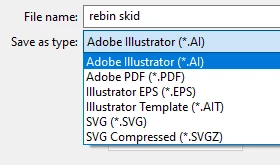
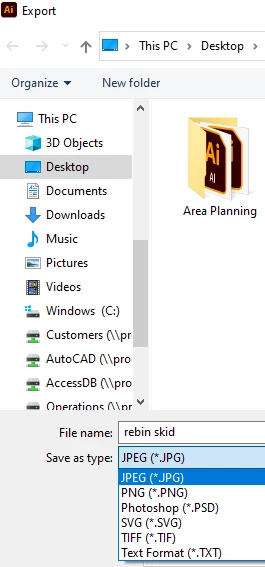
{Renamed by MOD}
 AdChoices