
Participant
October 23, 2017
Answered

Stroke Angle

  • October 23, 2017
  • 3 replies
  • 5750 views

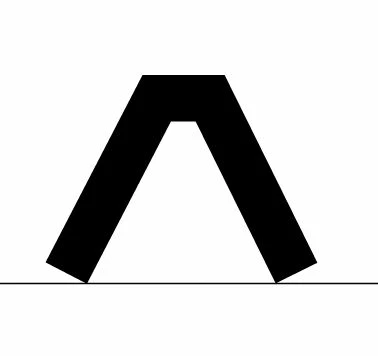
I am using Illustrator CC (2018) and using the pen tool to create the below image of a triangle with an open bottom. How do I make it so the angle of the stroke is even with the line below (I have only included the line for reference as to what degree of slant I am looking for)? I want to keep the path open at the bottom like it currently is, and want to use strokes, not a fill. I have tried everything I can think of... smart guides, clipping mask, pathfinder, and I am having no luck. Not sure what I'm missing or if there is not a way to do this?
This topic has been closed for replies.
Correct answer Ton Frederiks

No need to outline the stroke.

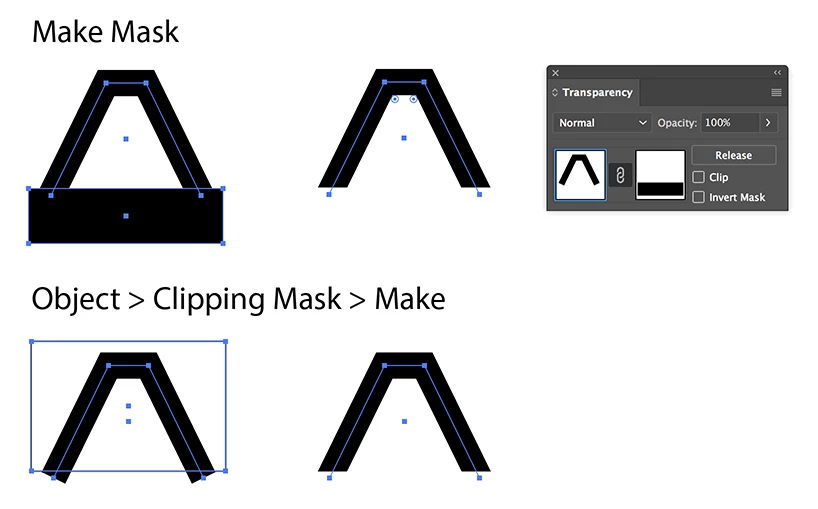
An Opacity Mask or a Clipping Mask should work, and keep the strokes editable.

3 replies

Ton Frederiks
Community Expert
Ton FrederiksCommunity ExpertCorrect answer
Community Expert
October 23, 2017

No need to outline the stroke.

An Opacity Mask or a Clipping Mask should work, and keep the strokes editable.

barbara_a7746676
Community Expert
Community Expert
October 23, 2017

As jdanek said, not possible if you want it to remain a stroke. What you need to do is:
Select the object.

Choose Object > Path Outline Stroke. that gives you a filled shape, no stroke.

Draw a rectangle where you want to cut the bottoms, and select both objects. The rectangle must be on top.

Click the second object in Pathfinder.

The shape gets cut where the top of the rectangle was and you end up with this:

Inspiring
October 23, 2017

I do not think it is possible.  You'd have to outline the stroke and then manually move the corner anchor point down.  But strokes do not have the ability to be manipulated to do what you want, unless I am mistaken.