
mickyhulse
Known Participant
May 13, 2016
Answered

Trouble understanding how gradientStops.add() works

  • May 13, 2016
  • 2 replies
  • 1064 views

Hello,

I'm just playing with gradientStops.add(), and I was having trouble getting my stops to be evenly spaced along the gradient from 0 to 100.

Here's a semi-functional code snippet:

grad = app.activeDocument.gradients.add();

for (i = 0; i < swatches.length; i++) {

  stop = grad.gradientStops.add();

  stop.color = swatches.color;

  grad.rampPoint = ((100 / l) * (i + 1));

  grad.midPoint = 50;

}

Where my "swatches" var contains a list of color objects.

When I run the above code, I get this:
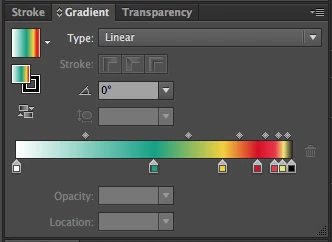
Why do my gradient stops start at 50% and go towards the right (exponentially?)? I feel like my math is right, but it doesn't seem to be working like how I would expect it to.

My goal is to evenly spread the gradient stops across the full width of the gradient itself, from 0 to 100.

Could anyone help kick me in the right direction?

Thanks so much in advance!


Cheers,

Micky

MgradientStopsgra

This topic has been closed for replies.
Correct answer moluapple

Your should set grad.gradientStops.rampPoint & grad.gradientStops.midPoint, not grad.

Also to notice that when gradients been added, it already has two gradientStops, so your should set the first and last one out the for loop.

var grad = app.activeDocument.gradients.add();

var sw = app.activeDocument.swatchGroups[1].getAllSwatches();

var l = sw.length;

grad.gradientStops[0].rampPoint = 0;

grad.gradientStops[0].midPoint = 50;

grad.gradientStops[0].color = sw[0].color;

for (i = 1; i < l - 1; i++) {

     stop = grad.gradientStops.add();

     stop.color = sw.color;

     grad.gradientStops.rampPoint = i / (l - 1) * 100;

     grad.gradientStops.midPoint = 50;

}

grad.gradientStops[l - 1].rampPoint = 100;

grad.gradientStops[l - 1].midPoint = 50

;

grad.gradientStops[l - 1].color = sw[l - 1].color;

Below is a image I created with a script written many years ago.

70_10365_34a13aa9adf55b7.png

2 replies

mickyhulse
Known Participant
May 14, 2016

Thank you!!!!

That totally worked!

I really appreciate the help.

moluappleCorrect answer
Inspiring
May 14, 2016

Your should set grad.gradientStops.rampPoint & grad.gradientStops.midPoint, not grad.

Also to notice that when gradients been added, it already has two gradientStops, so your should set the first and last one out the for loop.

var grad = app.activeDocument.gradients.add();

var sw = app.activeDocument.swatchGroups[1].getAllSwatches();

var l = sw.length;

grad.gradientStops[0].rampPoint = 0;

grad.gradientStops[0].midPoint = 50;

grad.gradientStops[0].color = sw[0].color;

for (i = 1; i < l - 1; i++) {

     stop = grad.gradientStops.add();

     stop.color = sw.color;

     grad.gradientStops.rampPoint = i / (l - 1) * 100;

     grad.gradientStops.midPoint = 50;

}

grad.gradientStops[l - 1].rampPoint = 100;

grad.gradientStops[l - 1].midPoint = 50

;

grad.gradientStops[l - 1].color = sw[l - 1].color;

Below is a image I created with a script written many years ago.

70_10365_34a13aa9adf55b7.png

mickyhulse
Known Participant
May 14, 2016

Thanks to your help, I was able to finish my script pretty quickly after make those changes:

GitHub - mhulse/illy-grad: Create gradient from selected swatches in Adobe Illustrator.

Thanks again for your help today @moluapple, I really appreciate it!

Inspiring
May 15, 2016

You are welcome! And nice code.