Participant
October 22, 2021
Answered

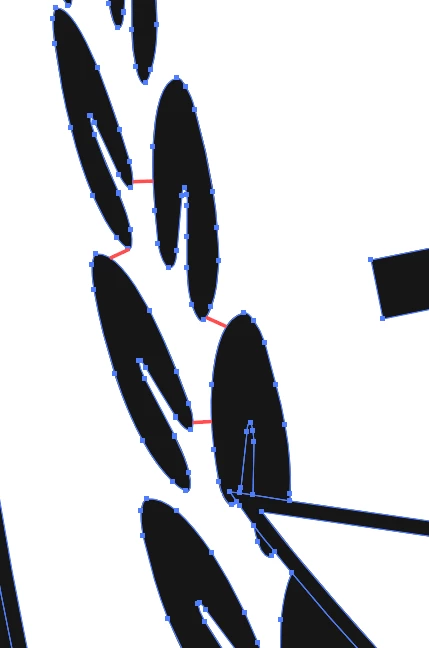
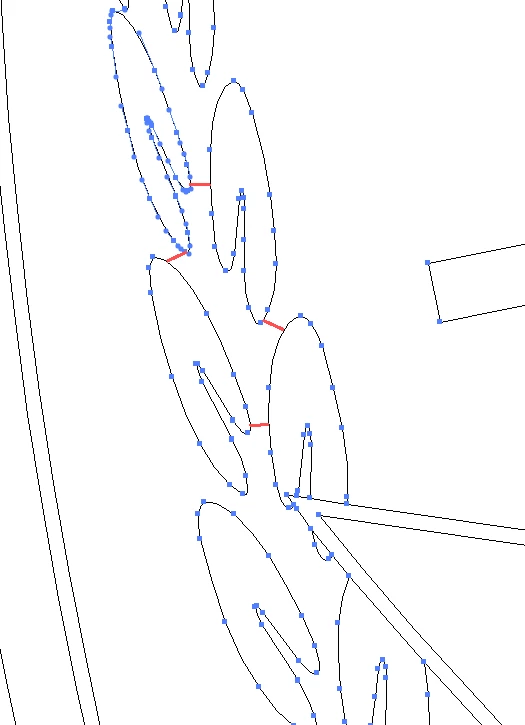
What are these strange Red lines connecting different shapes? (Can't interact with them)

  • October 22, 2021
  • 1 reply
  • 1060 views

Ive been using Adobe Illustrator for a couple of years now and it's the first time I'm seeing these red lines. They move with the artwork but I cant interact with them.


I used the shape builder tool to merge some shapes right before this but I've used it plenty before and this never happend. I can also select any other tool and they don't dissapear. They only dissapear when I deselect the group. 


Is it part of some new features that I'm not aware of or is my increadible ability to destroy anything and everything I touch acting up again?


Normal view mode.
 

Outline View mode(It's still there)
 

This topic has been closed for replies.
Correct answer defaultc0zann3k9cyf

I was in live paint mode, it also caused me to not be able to ungroup all of the obejects when i eneterd live paint mode.


To see if you in live paint mode check in the layer panel on the appropriate layers. Just undo the live paint mode by clicking Object > Live Paint > release or expand (whichever you want to happen.)

1 reply

defaultc0zann3k9cyfAuthorCorrect answer
Participant
October 22, 2021

I was in live paint mode, it also caused me to not be able to ungroup all of the obejects when i eneterd live paint mode.


To see if you in live paint mode check in the layer panel on the appropriate layers. Just undo the live paint mode by clicking Object > Live Paint > release or expand (whichever you want to happen.)