
Participant
August 16, 2018
Question

Cell styles "Ignore" function

  • August 16, 2018
  • 2 replies
  • 742 views

Indesign 13.1 x64 PC Version

I can't get the "Ignore" option to work when setting up cell styles, I've had it working on previous versions, but now it won't stay (it needs to show in the rule type and colour setting selector panel but when I select "Ignore" nothing shows in the panel - it needs to display the "Ignore" setting). An example of when you might use it is if you've set up a table with various cell styles, eg header row, thin underlines, thick underlines and a table end rule and then want to apply a tint panel to all, or some of one or more columns without changing any of the rules applied using other cell styles (Annual Reports are documents where you would like this to work).

Does any one know how to get the "Ignore" option to stick?
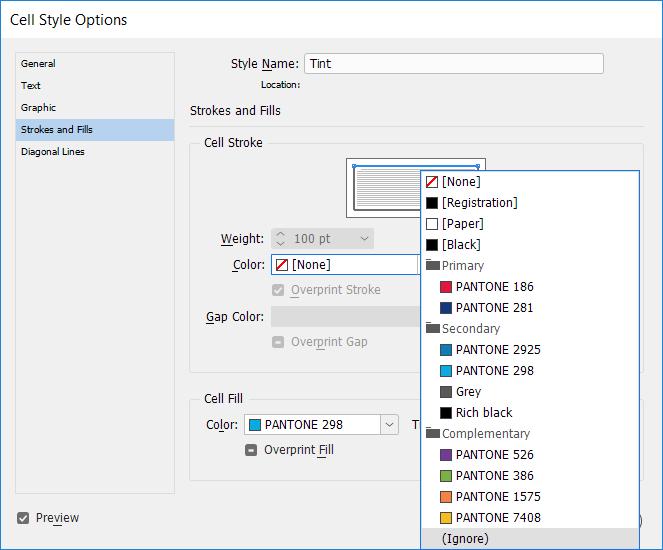
It's a very handy feature that doesn't seem to work any more.

Thanks,

Peter

    This topic has been closed for replies.

    2 replies

    Barb Binder
    Community Expert
    Community Expert
    August 16, 2018

    Hi Peter:

    I have not seen any change in how the strokes and strokes in cell styles work in InDesign in 2017, but I can tell you that the InDesign cell proxy confuses a lot of folks.

    Can you share some screen shots of your table along with what you want your cell style to do, and then what it is doing instead?I'm sure we can get you where you want to go.

    ~Barb

    ~Barb at Rocky Mountain Training
    Participant
    August 17, 2018

    Hello Barb,

    I have made some pictures to illustrate what's happening...

    1) Table set-up using table and cell styles.

    2) Setting up a style-sheet to tint a column which has been styled with several cell styles with the rules set to "Ignore"...

    3) "Ignore" does not show as a result, the fields for the stroke type and colour are empty (they should say "Ignore")...

    4) Tint style applied to column, produces unwanted underline changes...

    Do you know of any way of getting "Ignore" to show in the field once it's selected. That is the key to getting this function to work.

    thanks,

    Peter

    Barb Binder
    Community Expert
    Community Expert
    August 17, 2018

    Hi Peter:

    What happens if you simply leave the Cell Strokes blank when you are defining the new cell style? Do you get the desired result?

    ~Barb

    ~Barb

    ~Barb at Rocky Mountain Training
    manal shanableh
    Legend
    August 16, 2018

    (Ignore) means that the segment you checked will be ignored from this cell style color for the this stroke. when you apply the cell style to cells, will ignore this stroke.

    Participant
    August 16, 2018

    You are correct, however the problem I'm having is when I select "Ignore" Indesign does not insert "Ignore" into the cell colour or stroke options panel, the panel remains empty - with nothing showing in it. Unless "Ignore" shows in these two places the function does not work, so if I use the style it will over-write cells styled with other styling options.