Inspiring
April 30, 2020
Answered

How to deactivate box outside of my graphic/text frames in InDesign?

  • April 30, 2020
  • 1 reply
  • 606 views

Hi everyone,

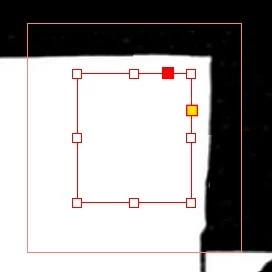
Today, out of nowhere, a box started to appear outside of my text frames and graphic frames, and it seems to impact the frames around it. How can I deactivate it? I don't even know how it appeared in the first place.
 

Thanks for your help!


{Renamed by MOD}
This topic has been closed for replies.
Correct answer rob day

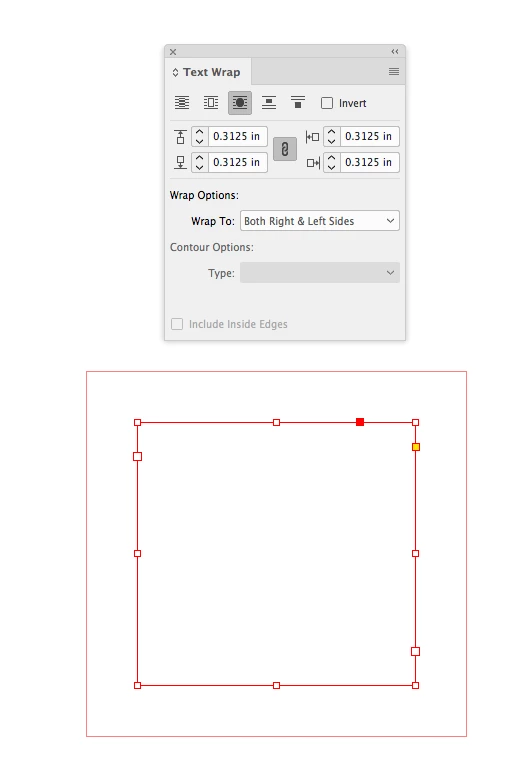
Looks like a Text Wrap has been applied:


1 reply

Bill Silbert
Community Expert
Community Expert
April 30, 2020

What operating system and what version of Illustrator are you using? Have you done the obvious and selected the frames and checked in the swatch panel to make sure that "None" is applied to the stroke of the frames. Also, with no document open look at the fill and stroke icons in the tool panel. If you see a color applied to the stroke icon change it to none. Then quit the program. When you relaunch "None" should be the default for all new frames that you draw.

Inspiring
April 30, 2020

Hi Bill! 
It's not Illustrator, but inDesign. I'm on Windows 10, using InDesign CC 2020 (15.0.2 if I remember well). 

Also, there's no fill or stroke applied to my frame here. What I'm worried about it that red square around my selected frame. It appears only when I select frames, it's not visible otherwise.

rob day
Community Expert
rob dayCommunity ExpertCorrect answer
Community Expert
April 30, 2020

Looks like a Text Wrap has been applied: