Inspiring
November 23, 2020
Answered

Indesign cannot change group name(s) in the Layer Panel

  • November 23, 2020
  • 4 replies
  • 1598 views

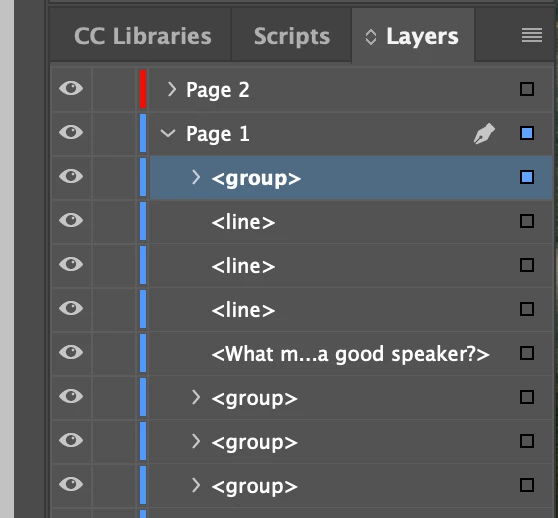
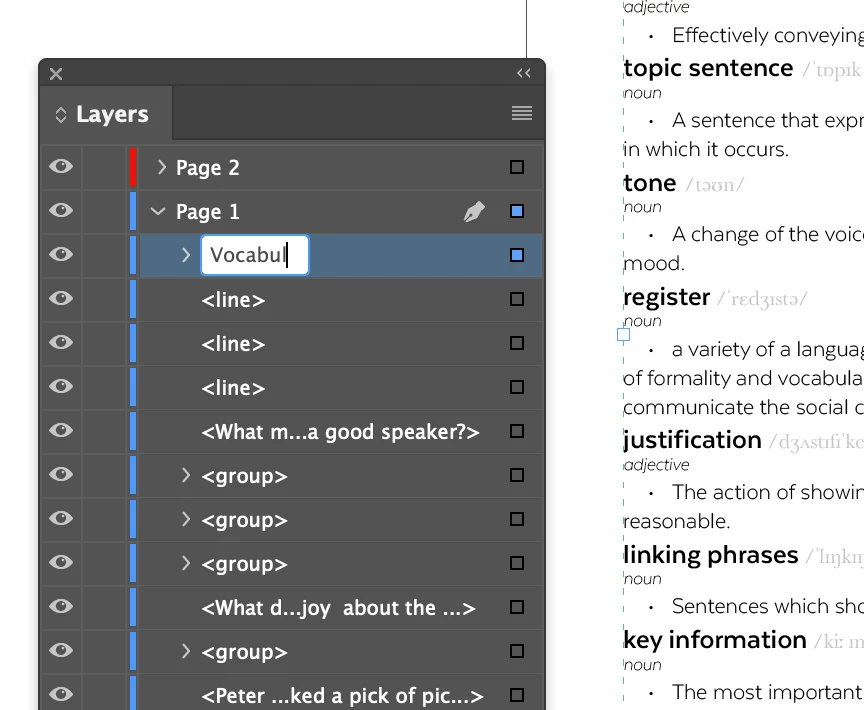
Normally I will single click on the group name in the layers panel and I can change the name. From this morning it now flashes (as if it is opening the box to type a name then closing) and doesn't allow me to change the name.

Is there any workaround for this?

I'm running Indesign V16.0 (no updates available on creative cloud) on a 2017 Macbook Pro running macOS Big Sur version 11.0.1. 
This topic has been closed for replies.
Correct answer chrisw31165698

Having the Layers panel as a floating panel allows me to change the name of a group or layer. When it is embedded in the side panel it does not.

4 replies

chrisw31165698AuthorCorrect answer
Inspiring
November 24, 2020

Having the Layers panel as a floating panel allows me to change the name of a group or layer. When it is embedded in the side panel it does not.

Community Expert
November 24, 2020

I'm not on OS X, I'm on Windows 10 so I cannot help or test directly.


What I wonder: If the input device ( perhaps in conjunction with the operating system ) could be the issue?

To rename an item in the Layers panel one has to click one time and then after a very short pause a second time. Do not confuse that with a double-click. A double-click will not work to get access to the edit field.


Maybe InDesign is interpreting the two clicks with the little pause between as a double-click?

I'd check how a double-click is defined speedwise in the operating system.


Regards,
Uwe Laubender

( ACP )

Inspiring
November 24, 2020

On my trackpad I have the option of gently tapping the trackpad once to make a selection. Pressing harder on the trackpad will produce a click, for the past two years this one press click has allowed me to change the name. Now it doesn't work. The dialogue box opens exactly where it should on top of the > <group> name but it dissapears within a half second. It looks like it is opening the box to change the name and then very quickly closing.

(clicking twice with a pause, without a pause, three clicks with and without various pauses have no effect).

I also changed each of the settings for my trackpad in settings and this hasn't helped. 

I also tried removing and reinstalling Indesign and this hasn't helped either.

Community Expert
November 23, 2020

Hi Chris,

the object that you want to rename must be (visibly) selected on the page.


Best,
Uwe Laubender

( ACP )

Steve Werner
Community Expert
Community Expert
November 23, 2020

I have a release version of Big Sur with InDesign 2021 on a MacBook Air. Had no problem renaming layers on my machine:


brian_p_dts
Community Expert
Community Expert
November 23, 2020

OP is stating that it's groups in particular giving them trouble. I have no trouble multiclicking to rename groups, but I am not on Big Sur yet. 

Community Expert
November 23, 2020

Didn't we have the same or a similar issue lately?

Check the forum. There is a workaround, a script by Rob Day.


Regards,
Uwe Laubender

( ACP )

Inspiring
November 23, 2020

I found the script, thanks, and it is: 

var d = app.dialogs.add({name:"Page Item Name"});
var tf = d.dialogColumns.add().textEditboxes.add({editContents:"", minWidth:250});
d.show();
var r = tf.editContents;
d.destroy();

var s = app.documents.item(0).selection[0];
s.name = r;


I couldn't get it to work and to be fair I don't fancy running this everytime I want to change the name of any object in my layer panel. I don't have that kind of time.