
stapled booklet printing issues with blank pages
Hello,
i'm having an issue printing to booklet -2 up, saddle stitch- ( i have to use MS PDF printer, no other way around that) with the empty pages.
right now the layout has 26 pages in 14 spreads, 1st page alone(on the right) then final page alone on the left side.
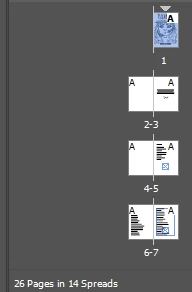
The layout content is built as this:
page 1 and 26 are the corresponding cover and back cover
page 2 is blank(that's the opposite of the cover), page 3 starts the content(right side)
If i select to print without "blank pages" the result is all broken:
spread 1 is pages 26,1 -->correct
spread 2 is pages 3,25 -->WRONG. it should be 2,25 as the 2nd spread should be the opposite side of the same paper sheet as 26,1 (so you get 1 ->2 then 25->26 on the same sheet)
If i tick the "print blank pages" in print settings, then it breaks differently but way way worse:
spread 1 is pages 1 (blank, 1) -->WRONG
spread 2 is pages 2 (2, blank) -->WRONG again
spread 3 has the back cover, i stopped checking after this as it's a total mess
¿how do i fix this?, ¿why is it not putting the correct sheets in the 1st case?
I also did a little test, i put some text on page 2 to see if the printout would be correct as it's no longer a blank page, well i was wrong, it broke everything like the 2nd case.
according to this: https://helpx.adobe.com/ca/indesign/using/printing-booklets.html
it should not be doing this, i have an even number of pages that can be nicely spread on 14 spreads.
In fact according to that link, the first sheet should be 1,8-2,7 for a 8pg file, in my case it should be 1,26-2,25!, yet i'm getting 1,26-3,25
 AdChoices