
Participating Frequently
August 30, 2012
Answered

Tables - Row Height and Cell Insets

  • August 30, 2012
  • 1 reply
  • 1369 views

I am working on ascript to do the following:

1. Set the first Row of all tables in my doc to these settings:

  • Row Height = .25in
  • Top and Bottom Inset = .04in

2. Set rest of the cells to these settings:

  • Row Height = .12in
  • Top and Bottom Inset = .12in

Here is where I am at:

app.activeDocument.stories.everyItem().tables.everyItem().rows[0].height = ".25 in";

app.activeDocument.stories.everyItem().tables.everyItem().rows[0].topInset = ".04 in";

app.activeDocument.stories.everyItem().tables.everyItem().rows[0].bottomInset = ".04 in";

for( x = 1; x < app.activeDocument.stories.everyItem().tables.everyItem().rows.length; x++ ) {

app.activeDocument.stories.everyItem().tables.everyItem().rows.height = ".12 in";

}

for( x = 1; x < app.activeDocument.stories.everyItem().tables.everyItem().rows.topInset; x++ ) {

app.activeDocument.stories.everyItem().tables.everyItem().rows.topInset = ".12 in";

}

for( x = 1; x < app.activeDocument.stories.everyItem().tables.everyItem().rows.bottomInset; x++ ) {

app.activeDocument.stories.everyItem().tables.everyItem().rows.bottomInset = ".12 in";

}

I keep getting this error and I am stuck.
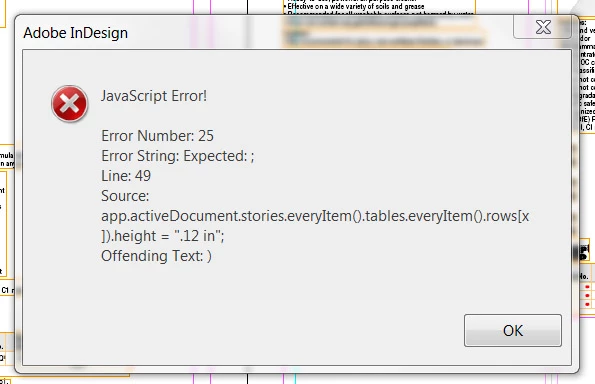
Anyone see anything that would help?

Thanks in advance.

This topic has been closed for replies.
Correct answer Jongware

There is indeed an extra closing parentheses on that line in the screenshot (but not in your sample lines).

I wonder if this construction

for( x = 1; x < app.activeDocument.stories.everyItem().tables.everyItem().rows.length ; x++ ) {

app.activeDocument.stories.everyItem().tables.everyItem().rows.heig ht = ".12 in";

}

every could work ... The for..loop expects a simple end number, but you feed it with an array of all of your individual tables' row lengths.

If this indeed does not work, turn your script around. Set all of the row heights and insets using

app.activeDocument.stories.everyItem().tables.everyItem().rows.everyItem().topInset = ".12 in";

and after that run the lines to do the top row adjustments.

(Use "Advanced editor" to be able to set Javascript syntax highlighting -- it makes your code ever so slightly more readable.)

1 reply

Jongware
Community Expert
JongwareCommunity ExpertCorrect answer
Community Expert
August 30, 2012

There is indeed an extra closing parentheses on that line in the screenshot (but not in your sample lines).

I wonder if this construction

for( x = 1; x < app.activeDocument.stories.everyItem().tables.everyItem().rows.length ; x++ ) {

app.activeDocument.stories.everyItem().tables.everyItem().rows.heig ht = ".12 in";

}

every could work ... The for..loop expects a simple end number, but you feed it with an array of all of your individual tables' row lengths.

If this indeed does not work, turn your script around. Set all of the row heights and insets using

app.activeDocument.stories.everyItem().tables.everyItem().rows.everyItem().topInset = ".12 in";

and after that run the lines to do the top row adjustments.

(Use "Advanced editor" to be able to set Javascript syntax highlighting -- it makes your code ever so slightly more readable.)

Participating Frequently
August 30, 2012

Good ideas. I will give these a shot.

Thanks so much!

Larry G. Schneider
Community Expert
Community Expert
August 30, 2012

Excuse me but I'm having a hard time understanding where things are going to go in these cells. With a top and bottom inset the same size as the height, it doesn't seem to leave much room for the text.