
April 8, 2011
Answered

Text frame creation- urgent

  • April 8, 2011
  • 2 replies
  • 2927 views

Hi

I use indesign CS4 javascript methology.

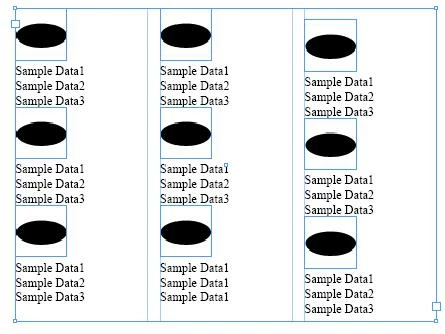
I want to create a text frame which will consist of

1. an image

2. Different text in each line

Please find the sample textframe below.

Some text in the textframe needs to be updated in the furure. So some way or other i need to find the text.
Please help me to create the textframe.

Thanks

Karthik


This topic has been closed for replies.
Correct answer Green4ever

Hi,

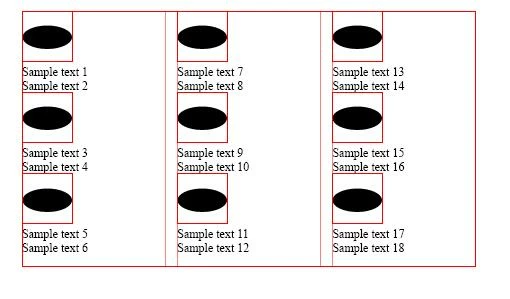
Please find the example below.

In this example, i have a single textframe with inline images and text.

After placing these contents through script, i need to modify one of the sample text.

For example, if i need to modify "Sample text 17" to "Hello" then how to modify it.

Please let me know if  i am unlear.

Thanks,

Karthik


Well, then you can do a find and replace using the following command,

E.g.

     app.findTextPreferences = NothingEnum.nothing;
     app.changeTextPreferences = NothingEnum.nothing;

     app.findTextPreferences.findWhat = "Sample text 17";

     app.changeTextPreferences.changeTo = "Hello";

     app.activeDocument.changeText();

By the same way you can do this for your exact requirement.

2 replies

Green4ever
Inspiring
April 9, 2011

It seems you are trying to place a inline image and also you want add some text after that.


First create a text frame and place the figure using place command.

TextFrame.place(<FiletoPlace>);

Then add the text you want.

Give a Try....

April 9, 2011

I can create a textframe . but how to create a textframe which consist  of inline image and inline text which needs to be modified for future  updation.

the text inside that should be tagged or labelled for future updation

Peter Kahrel
Community Expert
Community Expert
April 9, 2011

You can create a text frame, you said, and Green4ever showed you how to place an image in it.

var tframe = app.documents[0].pages[0].textFrames.add ();

tframe.geometricBounds = [0,0,"150mm","150mm"];

// place() returns an array, the image is therefore item [0]

// the inline is not the image, but it's container (i.e. its parent)

var inline = tf.insertionPoints[0].place (myFile)[0].parent;

inline.anchoredObjectSettings.anchoredPosition = AnchorPosition.aboveLine;

tframe.insertionPoints[-1].contents = "\rSample text\rMore sample text";

tframe.fit (FitOptions.frameToContent);

Peter

John Hawkinson
Inspiring
April 8, 2011

What's your actual question? "How do I create a textFrame"?

app.activeDocument.pages[0].textFrames.add().

Perhaps you should read "Creating a text frame" on p.71 of the scripting guide? (err, for cs5; you can find it for cs4)

April 9, 2011

Hi ,

Thanks for your reply.

I can create a textframe . but how to create a textframe which consist of inline image and inline text which needs to be modified for future updation

Thanks

Karthik