
Inspiring
April 1, 2017
Answered

Text wrap for some placed linked anchored objects work; others don't…

  • April 1, 2017
  • 3 replies
  • 1091 views

Hi. a text wrap problem I had previously had to do with my objects having been embedded,

but now they're all linked.

Some context: a 360-page document set up to be exported to a book printer using their PDF Job Options.

In the text there are 143 visuals—photos, drawings—that are linked and anchored.

When I choose wrap bounding box and its dimensions plus wrap right side, some objects wrap successfully

but others do not—they "spill" beneath the page.

     I've read-up on text wrap a lot and can't find a solution.

          Thank you,

            Morty

Here are two images: one that shows the wrap up to one click from where it fails;

          the other after one more click.
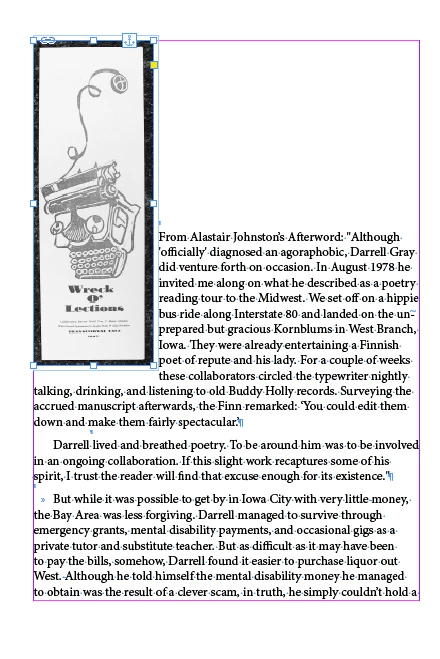
    This topic has been closed for replies.
    Correct answer rohit_ID

    Hi mortyfromqueens

    I think you need to know how the text wrap works in case of anchored objects. Only the lines following the line where the graphic is anchored will wrap text. The lines which contain the anchor don't wrap.So I suggest you move the anchor point to the start of the text after which the following content will wrap around perfectly.

    3 replies

    Inspiring
    April 2, 2017

    I don't know what happened to my first reply to you, but that doesn't matter now.

    I went back and instead of shift-dragging the anchor, I just dragged it, and the text wrapped to the right

    as I specified BUT not where I wanted the text to start. In this case it won't matter enough to change that

    —unless you can tell me how.

    Thanks again,

    Morty

    rohit_ID
    Adobe Employee
    rohit_IDCorrect answer
    Adobe Employee
    April 2, 2017

    Hi mortyfromqueens

    I think you need to know how the text wrap works in case of anchored objects. Only the lines following the line where the graphic is anchored will wrap text. The lines which contain the anchor don't wrap.So I suggest you move the anchor point to the start of the text after which the following content will wrap around perfectly.

    Barb Binder
    Community Expert
    Community Expert
    April 2, 2017

    Here are two images: one that shows the wrap up to one click from where it fails;

              the other after one more click.

    I only see one image. And I don't understand the use word click in the sentence above. What do you mean by "shows the wrap up to one click"?

    ~Barb at Rocky Mountain Training
    Inspiring
    April 2, 2017

    I added the second image twice, and both times it disappeared. I'll try again now.

    By click I mean that with the selection arrow on the image, I press the down arrow on my keyboard.

    The other way is just to drag the image down into the text. I used clicks so I could more accurately

    show just where the wrap failed.

    No go. When I click Add Reply, a message says to wait until the image uploads.

    I'll reduce the size now (it's only 72MB, but large).

    Willi Adelberger
    Community Expert
    Community Expert
    April 2, 2017

    As rohit_ID wrote, text wrap is only working in lines after the anchor in the text, so the first line will always fail. I recommend therefore either to insert the anchor in the paragraph before or have a dedicated paragraph in the text for the anchor only which will force the whole text of the next paragraph to wrap. Or release the anchored frame, so that it would not matter anyway.