
Known Participant
April 5, 2019
Answered

Presets in Lightroom Classic CC

  • April 5, 2019
  • 2 replies
  • 486 views

Recently, when I import photos into Lightroom Classic cc, I discovered all the photos were modified by a Preset. It was a Preset I used for previous import.  I uninstall Lightroom with cancellation of all the previous setting and reinstall the Lightroom again after a reboot of my computer. However, the situation remains unchanged. Please advised !   
This topic has been closed for replies.
Correct answer JohanElzenga

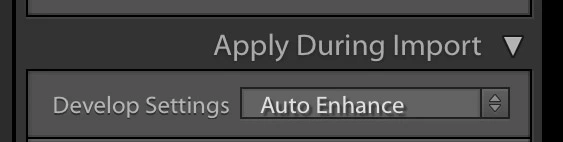
There is no reason to uninstall anything. The option to apply a preset on import is is in the Import dialog, under 'Apply During Import'. Just disable it there.

2 replies

cmgap
Community Expert
Community Expert
April 5, 2019

If you don't want to use that preset anymore you can turn it off as Johan suggests or you can delete it. You can find where it is stored here:

JohanElzenga
Community Expert
JohanElzengaCommunity ExpertCorrect answer
Community Expert
April 5, 2019

There is no reason to uninstall anything. The option to apply a preset on import is is in the Import dialog, under 'Apply During Import'. Just disable it there.

-- Johan W. Elzenga
Known Participant
April 11, 2019

I press Alt-reset in the calibration column and set Adobe default to my

camera default and saved. I reset to Adobe default and everything back to

normal.

Thanks, everyone for your suggestions.

JohanElzenga

[details removed ussnorway]