

RAW Photography66
Known Participant
November 9, 2023
Question

Topaz Photo AI Error in opening image from Lightroom classic

  • November 9, 2023
  • 3 replies
  • 953 views

Hi Guys

Heres a new problem I have discovered.

When opening an image through Lightroom to Topaz Photo AI when Photo AI opens I get an error message.
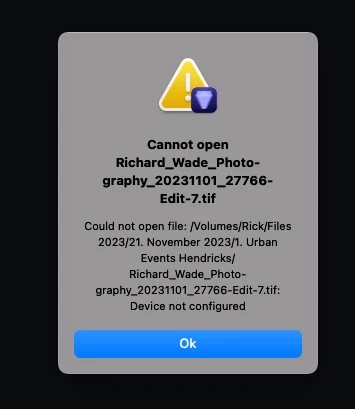
 I have spent 4 days with Topaz software support and they cant figure it out. They said ask you.....

I can open the image direct from Photo AI, I can open the image through PS into Photo AI but I always get this error when going from Lightroom classic.


They kept saying make sure the path to the file isnt broken, its not.

But cant work out what the message device not configured means.


Any idea?


I am running on a MacBook pro Max with and M1 chip

recently upgraged the OS to Sonoma, didnt have a single problem before this when on Ventura

LR Version 13.0.1 Apple /Silicon /Intel


Really looking forward to hearing back from you.

This topic has been closed for replies.

3 replies

Community Expert
November 10, 2023

If you can't make it work, it is almost as easy to "Show in Explorer" and drag the file to the Topaz AI icon.  On a Mac is it "Show in Finder"? 

Community Expert
November 9, 2023

Which version of Photo AI do you have installed?


My System: Intel i7-8700K - 64GB RAM - NVidia Geforce RTX 3060 - Windows 11 Pro 25H2 -- LR-Classic 15 - Photoshop 27 - Nik Collection 9 - PureRAW 6 - Topaz Photo AI
RAW Photography66
Known Participant
November 10, 2023

i am on Topaz AI Version 2.1.0

JohanElzenga
Community Expert
Community Expert
November 9, 2023

This error message comes from Topaz (look at the icon), so I wonder why they sent you here.


-- Johan W. Elzenga
RAW Photography66
Known Participant
November 10, 2023

Hi Johan


I know but they couldnt work out whats wrong, soi they thought someone here may have come accross this before.

JohanElzenga
Community Expert
Community Expert
November 10, 2023

I don't know who marked two answers as correct, but I undid that. A correct answer means that the issue has been solved by that answer. So other people do not need to read it or answer it. Clearly it has not been resolved.


-- Johan W. Elzenga