
xkevinmora
Participant
June 2, 2022
Answered

Filter Gallery has Color without adding color

  • June 2, 2022
  • 1 reply
  • 199 views

Everytime I add a layer over my original photo that I used a "sketch" filter gallery effect, it will have the color tinted on it. I have to reset my photoshop in order to get rid of the color it puts on it when I add the "sketch" filter gallery effects  
This topic has been closed for replies.
Correct answer jane-e


@xkevinmora 


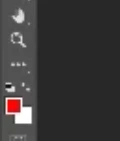
Before you apply the filter, type "D" to reset your foreground and background swatches to the default colors of B&W.


Your foreground color is currently red.


Jane


1 reply

jane-e
Community Expert
jane-eCommunity ExpertCorrect answer
Community Expert
June 2, 2022


@xkevinmora 


Before you apply the filter, type "D" to reset your foreground and background swatches to the default colors of B&W.


Your foreground color is currently red.


Jane