Participant
November 20, 2017
Question

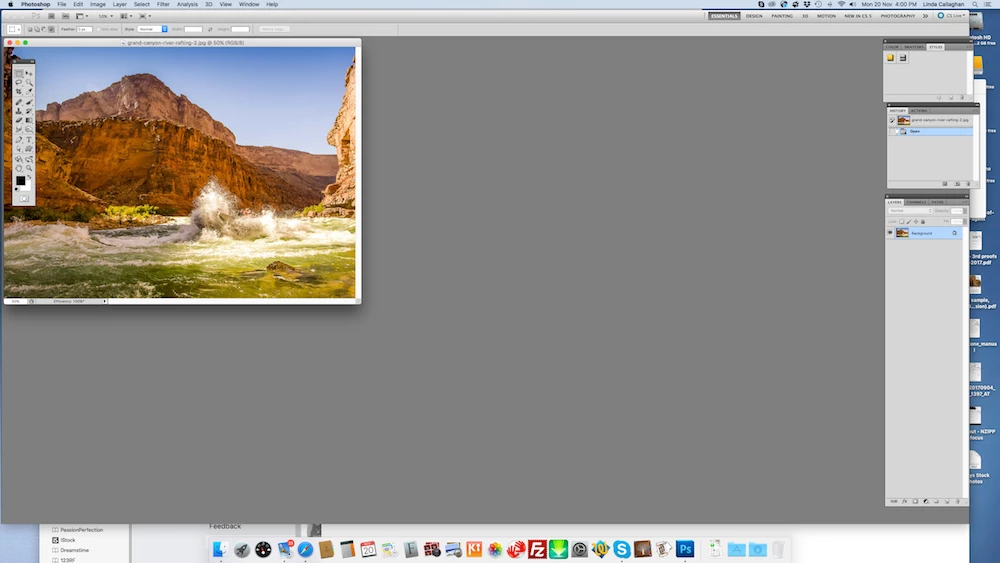
Image snaps to left of screen.

  • November 20, 2017
  • 1 reply
  • 1090 views

Hi,

I have Photoshop CS5 Extended - Version 12.0.4 x 64.

I’ve been using this on my 27” iMac desktop for the past 6/7 years without a problem, but just in the last week, any image I open in PS is locked on the lefthand side of my home screen. I try to move it with my mouse on the top grey bar of the image but it keeps snapping back to the top left and I can't centralise the image as I use to.  It's very frustrating and hope someone can help me.

I'm using OS X El Capitan, version 10.11.6 and have been for over a year.

Help Please   I've enclosed a capture of my home screen
[Here is the list of all Adobe forums... https://forums.adobe.com/welcome]
[Moved from Connect to Photoshop forum... Mod]

    This topic has been closed for replies.

    1 reply

    Trevor.Dennis
    Community Expert
    Community Expert
    November 20, 2017

    Your screen shot appears to show a floated window.  You can fix this by going Window > Arrange > Consolidate all to tabs or you might be able to do this by simply dragging the window onto the options bar until you see a blue line.  I can't remember if this is true with CS5 though.

    Also open your Preferences, and in the Workspace tab, check Open Documents as Tabs.  Here again I am not totally sure this is the same with CS5, but I think it is.

    Good luck

    Participant
    November 20, 2017

    Hi Trevor,

    Many thanks for the quick reply.

    I know about Windows > Arrange >  Consolidate all the tabs, but could't drag the window as suggested.

    I checked under Preferences and under 'Interface' I removed the tick from 'Enable Floating Document Window Docking' and that did the trick.

    Thank you so much. I truely appreciate you help