
Participant
October 25, 2023
Answered

is it possible to request the location of a layer on the timeline

  • October 25, 2023
  • 1 reply
  • 178 views

I need a simple script to make frame animation viable, a single keypress to swap between drawings on the timeline, select next layer-> find out where the layer is on the timeline-> move the timehead onto the layer's frame.   the first and third part are relatively trivial with a scriptlistener. 

but finding a layer's timecode on the timeline is hidden somewhere I cant find.


I have tried using this this guide to go through the top level objects [application, document, layer] to try and find it, and came up empty. the layer seemingly stores no data on its place in the timeline.


I have found this thread which gets closer to timeline variables with this script:

var r = new ActionReference();
r.putProperty(charIDToTypeID('Prpr'), stringIDToTypeID('frameCount'));
r.putClass(stringIDToTypeID('timeline'));
var ret = executeActionGet(r);
alert( ret.getInteger(stringIDToTypeID('frameCount')) ); //currentFrame, documentTimelineSettings, duration, enabled, frameCount, frameRate, hasMotion, workInTime, workOutTime

but I am unable to adjust this to see if the timeline stores more variables/objects than just these.


and finaly using script listeners I hit a dead end

var idmoveAllTime = stringIDToTypeID( "moveAllTime" );
    var desc650 = new ActionDescriptor();
    var idtimeOffset = stringIDToTypeID( "timeOffset" );
        var desc651 = new ActionDescriptor();
        var idseconds = stringIDToTypeID( "seconds" );
        desc651.putInteger( idseconds, 0 );
        var idframe = stringIDToTypeID( "frame" );
        desc651.putInteger( idframe, -1 );
        var idframeRate = stringIDToTypeID( "frameRate" );
        desc651.putDouble( idframeRate, 30.000000 );
    var idtimecode = stringIDToTypeID( "timecode" );
    desc650.putObject( idtimeOffset, idtimecode, desc651 );
executeAction( idmoveAllTime, desc650, DialogModes.NO );

 this is a script of moving a layer one frame to the left on the timeline. and it somehow lacks all reference to other objects. it is a blank command as far as I can tell, with the code to make it work hidden in the back.


can anyone help find the "timeline" object proper? or wherever the layer's location on the timeline is stored.

//--------

and in case someone wants to follow along

	s2t = stringIDToTypeID;
	var r = new ActionReference();
	r.putEnumerated(s2t('layer'), s2t('ordinal'), s2t('targetEnum'));
	var d = new ActionDescriptor();
	d.putReference(charIDToTypeID( "null" ),r)
	
	d.putObject(s2t('object'), s2t('layerInfo'), executeActionGet(r));//
	alert(executeAction(s2t('convertJSONdescriptor'), d).getString(s2t('json')));

	var e = executeActionGet(r);
			var str = ''
	for (var i = 0; i < e.count; i++) 
	{ str += typeIDToStringID(e.getKey(i)) + ':' + e.getType(e.getKey(i)) + '\n' }
	alert(str);

this is the script im using to read through the objects ("layer") in this ocasion to get this readout of its contents which are suspiciously lacking timeline information :
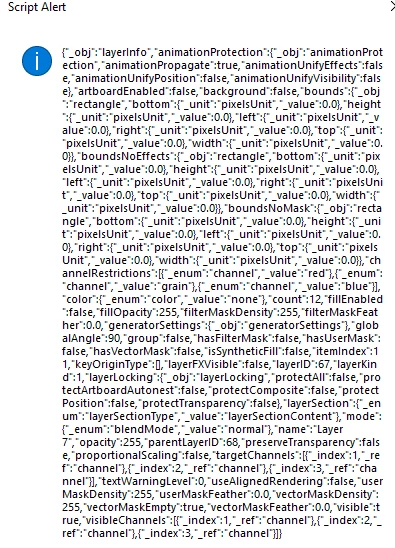
This topic has been closed for replies.
Correct answer plantermander

presuming I never get an answer to this, I figured out a terrible workaround.

there are no variables that change on layers when moving the timehead, there's nothing in the whole scene that indicates anything changed except for the histogram.

the histogram displays whats currently in the scene, so by scrolling the timehead you can detect when it hits a different looking layer.


this is a terrible workaround, but incase some future person needs this: here is the code

try{

	//this is the code to go one layer back, if you want forwards you will have to run the for loops in reverse and change the Bckw to Frwr
	var doc = app.activeDocument;
	var currentLayer = doc.activeLayer;
	var group = currentLayer.parent;
	var a = group.artLayers.length;

	// find which is the selected layer in the video group
	for(var i=0; i < group.artLayers.length;i++ ) 
	{         
	  if(group.artLayers[i]==currentLayer)
	  {
		  a=i;
		  break;
	  }
	}


	// function to change the selected layer to the next one
	function moveLayer (){ 

		var idslct = charIDToTypeID( "slct" );
			var desc231 = new ActionDescriptor();
			var idnull = charIDToTypeID( "null" );
				var ref1 = new ActionReference();
				var idLyr = charIDToTypeID( "Lyr " );
				var idOrdn = charIDToTypeID( "Ordn" );
				var idFrwr = charIDToTypeID( "Bckw" ); //Frwr   for forwards
				ref1.putEnumerated( idLyr, idOrdn, idFrwr ); 
			desc231.putReference( idnull, ref1 );
			var idMkVs = charIDToTypeID( "MkVs" );
			desc231.putBoolean( idMkVs, false );
			var idLyrI = charIDToTypeID( "LyrI" );
				var list4 = new ActionList();
				list4.putInteger( 9 );
			desc231.putList( idLyrI, list4 );
		executeAction( idslct, desc231, DialogModes.NO );
	}


	//look if the next layer is the same as the current layer through the bounds of the layer
	// so that we skip it the same way the timehead does when it doesnt detect a histogram change
	for(var i = a+1; i<group.artLayers.length; i++) { 
		if (currentLayer.bounds[1]!=group.artLayers[i].bounds[1]){break}else{
		if (currentLayer.bounds[2]!=group.artLayers[i].bounds[2]){break}else{
		if (currentLayer.bounds[3]!=group.artLayers[i].bounds[3]){break}else{
		if (currentLayer.bounds[4]!=group.artLayers[i].bounds[4]){break}else{	
			moveLayer ();}}}} // skip said layer

	};

	// move the layer one over if its not the last in the group
	if (a<group.artLayers.length-1){moveLayer ();}; 


	//get the current frame the timehead is on
	var r = new ActionReference();
	r.putProperty(charIDToTypeID('Prpr'), stringIDToTypeID('currentFrame'));
	r.putClass(stringIDToTypeID('timeline'));
	var ret = executeActionGet(r);
	var frame = ret.getInteger(stringIDToTypeID('currentFrame')) ;
	
	//get the total amount of frames on the timeline
	var r = new ActionReference();
	r.putProperty(charIDToTypeID('Prpr'), stringIDToTypeID('frameCount'));
	r.putClass(stringIDToTypeID('timeline'));
	var ret = executeActionGet(r);
	var frametotal = ret.getInteger(stringIDToTypeID('frameCount')) ;
	
	//get the current histogram
	s2t = stringIDToTypeID;
	var r = new ActionReference();
	r.putProperty(stringIDToTypeID("property"), stringIDToTypeID('histogram'));
	r.putEnumerated(s2t('channel'), s2t('ordinal'), s2t('targetEnum'));
	var histo = executeActionGet(r).getList(stringIDToTypeID('histogram'));
	
	// a function to move the timehead
	function movetimehead (pos){
	
			var idsetd = charIDToTypeID( "setd" );
			var desc239 = new ActionDescriptor();
			var idnull = charIDToTypeID( "null" );
				var ref2 = new ActionReference();
				var idPrpr = charIDToTypeID( "Prpr" );
				var idtime = stringIDToTypeID( "time" );
				ref2.putProperty( idPrpr, idtime );
				var idtimeline = stringIDToTypeID( "timeline" );
				ref2.putClass( idtimeline );
			desc239.putReference( idnull, ref2 );
			var idT = charIDToTypeID( "T   " );
				var desc240 = new ActionDescriptor();
				var idseconds = stringIDToTypeID( "seconds" );
				desc240.putInteger( idseconds, 0 );
				var idframe = stringIDToTypeID( "frame" );
				desc240.putInteger( idframe, pos );
				var idframeRate = stringIDToTypeID( "frameRate" );
				desc240.putDouble( idframeRate, 30.000000 );
			var idtimecode = stringIDToTypeID( "timecode" );
			desc239.putObject( idT, idtimecode, desc240 );
		executeAction( idsetd, desc239, DialogModes.NO );

	}


	// move the timehead over each frame and check the histogram of that frame against the old histogram
	// if the histogram changed, that means this is a new layer
	for (var i = frame; i > 0 ; i--)
	{

		movetimehead(i);

		//get the new histogram
		var r = new ActionReference();
		r.putProperty(stringIDToTypeID("property"), stringIDToTypeID('histogram'));
		r.putEnumerated(s2t('channel'), s2t('ordinal'), s2t('targetEnum'));
		var newhisto = executeActionGet(r).getList(stringIDToTypeID('histogram'));
		
		//go through all 256 entries to see if one of them changed
		for (var j = 0; j < histo.count; j++){
			if (histo.getInteger(j)!= newhisto.getInteger(j)){
			 break;
			}
		}
		
		//if it changed, stop moving the timehead
		if (j!=histo.count){break};
	
	}
	
	
}catch(e){};

1 reply

plantermanderAuthorCorrect answer
Participant
October 26, 2023

presuming I never get an answer to this, I figured out a terrible workaround.

there are no variables that change on layers when moving the timehead, there's nothing in the whole scene that indicates anything changed except for the histogram.

the histogram displays whats currently in the scene, so by scrolling the timehead you can detect when it hits a different looking layer.


this is a terrible workaround, but incase some future person needs this: here is the code

try{

	//this is the code to go one layer back, if you want forwards you will have to run the for loops in reverse and change the Bckw to Frwr
	var doc = app.activeDocument;
	var currentLayer = doc.activeLayer;
	var group = currentLayer.parent;
	var a = group.artLayers.length;

	// find which is the selected layer in the video group
	for(var i=0; i < group.artLayers.length;i++ ) 
	{         
	  if(group.artLayers[i]==currentLayer)
	  {
		  a=i;
		  break;
	  }
	}


	// function to change the selected layer to the next one
	function moveLayer (){ 

		var idslct = charIDToTypeID( "slct" );
			var desc231 = new ActionDescriptor();
			var idnull = charIDToTypeID( "null" );
				var ref1 = new ActionReference();
				var idLyr = charIDToTypeID( "Lyr " );
				var idOrdn = charIDToTypeID( "Ordn" );
				var idFrwr = charIDToTypeID( "Bckw" ); //Frwr   for forwards
				ref1.putEnumerated( idLyr, idOrdn, idFrwr ); 
			desc231.putReference( idnull, ref1 );
			var idMkVs = charIDToTypeID( "MkVs" );
			desc231.putBoolean( idMkVs, false );
			var idLyrI = charIDToTypeID( "LyrI" );
				var list4 = new ActionList();
				list4.putInteger( 9 );
			desc231.putList( idLyrI, list4 );
		executeAction( idslct, desc231, DialogModes.NO );
	}


	//look if the next layer is the same as the current layer through the bounds of the layer
	// so that we skip it the same way the timehead does when it doesnt detect a histogram change
	for(var i = a+1; i<group.artLayers.length; i++) { 
		if (currentLayer.bounds[1]!=group.artLayers[i].bounds[1]){break}else{
		if (currentLayer.bounds[2]!=group.artLayers[i].bounds[2]){break}else{
		if (currentLayer.bounds[3]!=group.artLayers[i].bounds[3]){break}else{
		if (currentLayer.bounds[4]!=group.artLayers[i].bounds[4]){break}else{	
			moveLayer ();}}}} // skip said layer

	};

	// move the layer one over if its not the last in the group
	if (a<group.artLayers.length-1){moveLayer ();}; 


	//get the current frame the timehead is on
	var r = new ActionReference();
	r.putProperty(charIDToTypeID('Prpr'), stringIDToTypeID('currentFrame'));
	r.putClass(stringIDToTypeID('timeline'));
	var ret = executeActionGet(r);
	var frame = ret.getInteger(stringIDToTypeID('currentFrame')) ;
	
	//get the total amount of frames on the timeline
	var r = new ActionReference();
	r.putProperty(charIDToTypeID('Prpr'), stringIDToTypeID('frameCount'));
	r.putClass(stringIDToTypeID('timeline'));
	var ret = executeActionGet(r);
	var frametotal = ret.getInteger(stringIDToTypeID('frameCount')) ;
	
	//get the current histogram
	s2t = stringIDToTypeID;
	var r = new ActionReference();
	r.putProperty(stringIDToTypeID("property"), stringIDToTypeID('histogram'));
	r.putEnumerated(s2t('channel'), s2t('ordinal'), s2t('targetEnum'));
	var histo = executeActionGet(r).getList(stringIDToTypeID('histogram'));
	
	// a function to move the timehead
	function movetimehead (pos){
	
			var idsetd = charIDToTypeID( "setd" );
			var desc239 = new ActionDescriptor();
			var idnull = charIDToTypeID( "null" );
				var ref2 = new ActionReference();
				var idPrpr = charIDToTypeID( "Prpr" );
				var idtime = stringIDToTypeID( "time" );
				ref2.putProperty( idPrpr, idtime );
				var idtimeline = stringIDToTypeID( "timeline" );
				ref2.putClass( idtimeline );
			desc239.putReference( idnull, ref2 );
			var idT = charIDToTypeID( "T   " );
				var desc240 = new ActionDescriptor();
				var idseconds = stringIDToTypeID( "seconds" );
				desc240.putInteger( idseconds, 0 );
				var idframe = stringIDToTypeID( "frame" );
				desc240.putInteger( idframe, pos );
				var idframeRate = stringIDToTypeID( "frameRate" );
				desc240.putDouble( idframeRate, 30.000000 );
			var idtimecode = stringIDToTypeID( "timecode" );
			desc239.putObject( idT, idtimecode, desc240 );
		executeAction( idsetd, desc239, DialogModes.NO );

	}


	// move the timehead over each frame and check the histogram of that frame against the old histogram
	// if the histogram changed, that means this is a new layer
	for (var i = frame; i > 0 ; i--)
	{

		movetimehead(i);

		//get the new histogram
		var r = new ActionReference();
		r.putProperty(stringIDToTypeID("property"), stringIDToTypeID('histogram'));
		r.putEnumerated(s2t('channel'), s2t('ordinal'), s2t('targetEnum'));
		var newhisto = executeActionGet(r).getList(stringIDToTypeID('histogram'));
		
		//go through all 256 entries to see if one of them changed
		for (var j = 0; j < histo.count; j++){
			if (histo.getInteger(j)!= newhisto.getInteger(j)){
			 break;
			}
		}
		
		//if it changed, stop moving the timehead
		if (j!=histo.count){break};
	
	}
	
	
}catch(e){};