Jeff Arola
Community Expert
Community Expert
April 29, 2026
Answered

Photoshop 2026 (ps ver 27.6) Filter Gallery Color Picker

  • April 29, 2026
  • 6 replies
  • 146 views

I must be missing something, but i don’t see the Filter Gallery Color Picker for any filter as described here under Editing tools:

https://helpx.adobe.com/photoshop/desktop/whats-new/photoshop-on-desktop-release-notes.html

“The Filter Gallery now includes a foreground and background color picker for dual-color filters, giving you more control over stylized effects.”


The only filter that i can find with a color picker is Artistic>Neon Glow and that’s always had a color picker for the Glow Color.


Is this referring to Filter>Filter Gallery or some other filter gallery?
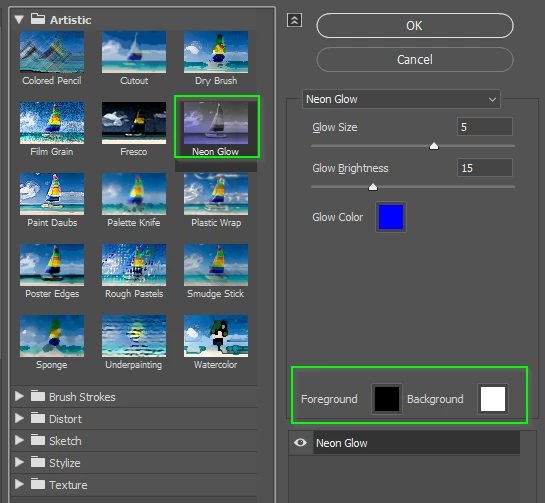
    Correct answer Trevor.Dennis

    Colin Smith demo’d it today, but I can’t remember what filter he had selected.  It is definitely filter specific with some only showing background.  As you say, Neon Glow has both.  Nice, but not especially helpful if only works with the one filter.   Ahhh I remember!  He was using Color halftone.


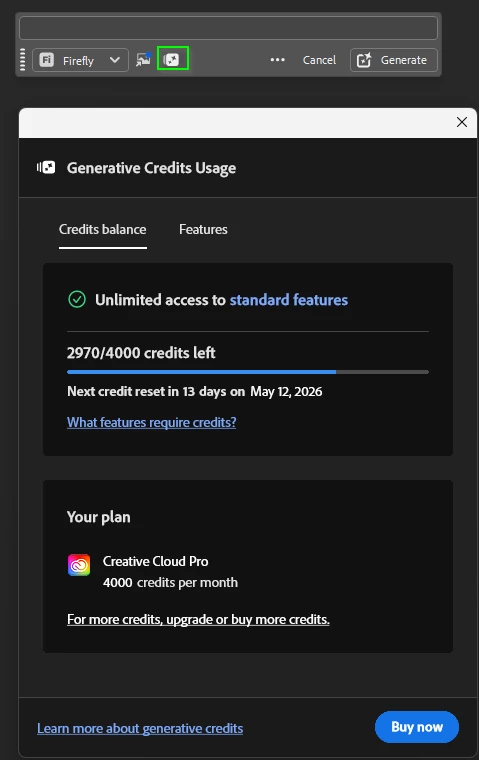
    It’s one heck of an update.  I was nigh on wetting myself with excitement hearing wheel out one super useful feature after another.  There’s a new icon in the CTB that gives your Gen Cred balance without having to use the previous convoluted route.


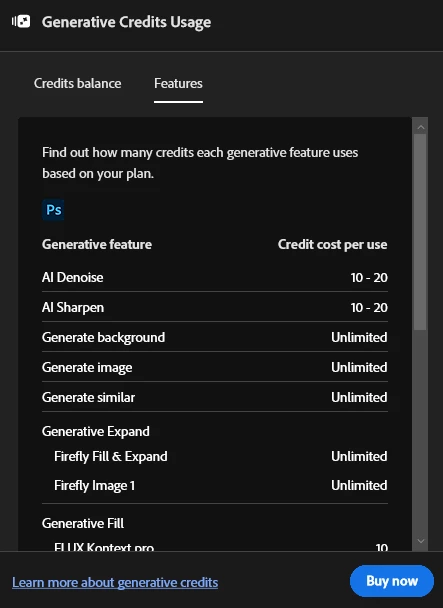
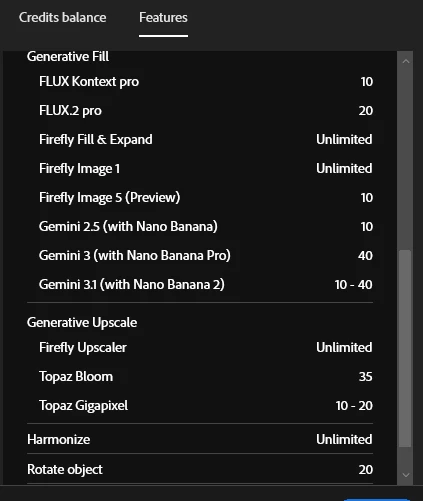
    Colin didn’t mention it, but the other tab tells us what the various models use., although some have a range depending on how you use them.  I thought that particularly useful as we get asked on the forum now and again (not so much recently)

    BTW I did not realise that FT Rotate uses 20 credits!

    I loved the Layer Clean up function.  Right now Generative layers are named with the full prompt which is super annoying as it is also placed on the image Tab so you can’t see the names of other open images.  The layer cleanup does an Ai type summarize of the changes.  Now that’s cool!


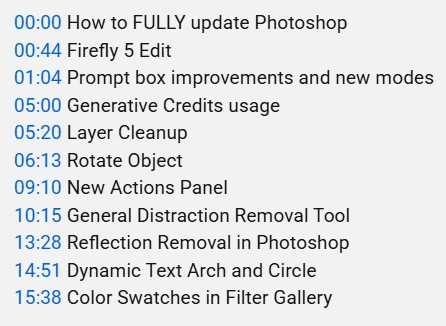
    Easier to show you what else he covered 

    12 BIG NEW Photoshop Features just released


    6 replies

    Srishti Bali
    Community Manager
    Community Manager
    April 29, 2026

    Hi ​@Jeff Arola ​@Trevor.Dennis 


    Thank you both for flagging this early. This is indeed a beta feature (available in 27.7) that was mistakenly included in the current release notes. We have raised a request to have it removed as soon as possible.

    Thanks, Srishti Bali | Community & Engagement Strategist, Digital Imaging | Adobe
    Inspiring
    April 29, 2026

    Yes, missing here too...

    Jeff Arola
    Community Expert
    Community Expert
    April 29, 2026

    Thanks for checking Trevor.

    Yes i found that as well.


    Photoshop Beta 27.7


    Photoshop 2026 (ps ver 26.7)


    Trevor.Dennis
    Community Expert
    Community Expert
    April 29, 2026

    I just realised I was using beta 27.7  The filter gallery swatches do not seem to be there in the release version.  I’d had a problem with the CTB when using Generative Fill in that the text field was not accepting input, so I was swapping versions.  Resetting Preferences fixed it.

    Trevor.Dennis
    Community Expert
    Trevor.DennisCommunity ExpertCorrect answer
    Community Expert
    April 29, 2026

    Colin Smith demo’d it today, but I can’t remember what filter he had selected.  It is definitely filter specific with some only showing background.  As you say, Neon Glow has both.  Nice, but not especially helpful if only works with the one filter.   Ahhh I remember!  He was using Color halftone.


    It’s one heck of an update.  I was nigh on wetting myself with excitement hearing wheel out one super useful feature after another.  There’s a new icon in the CTB that gives your Gen Cred balance without having to use the previous convoluted route.


    Colin didn’t mention it, but the other tab tells us what the various models use., although some have a range depending on how you use them.  I thought that particularly useful as we get asked on the forum now and again (not so much recently)

    BTW I did not realise that FT Rotate uses 20 credits!

    I loved the Layer Clean up function.  Right now Generative layers are named with the full prompt which is super annoying as it is also placed on the image Tab so you can’t see the names of other open images.  The layer cleanup does an Ai type summarize of the changes.  Now that’s cool!


    Easier to show you what else he covered 

    12 BIG NEW Photoshop Features just released


    Manu_74
    April 28, 2026