
Question
Script that adds a random gradient from a .grd file
Hello everyone, I am trying to get some help to fix an error that is making me crazy.
I have this script that I saw here searching for a script to add a random gradient from a gradient file (.grd) that contains about 15 gradients.
// change path to your  preset file here
var file = new File("C:\\Users\\aguir\\Documents\\Gradients.grd");
file.open("r");
file.encoding = "BINARY";
file.seek(6, 0);
var s = file.read();
file.close();
var d = new ActionDescriptor();
d.fromStream(s);
d = d.getList(charIDToTypeID("GrdL"));
var n0 = d.count-1;
var n = Math.round(n0*Math.random());
d = d.getList(n).getObjectValue(0).getObjectValue(stringIDToTypeID("gradient"));
var nam = (n+1)  + " from " + (n0+1) + " " + localize(d.getString(stringIDToTypeID("name")));
set_gmap(d, nam);
if (activeDocument.activeLayer.name != nam) activeDocument.activeLayer.name = nam;

///////////////////////////////////////////////////////////////////////////////
function set_gmap(gradient_data, name)
    {
    try {
        var d = new ActionDescriptor();
        var r = new ActionReference();
        r.putEnumerated(stringIDToTypeID("adjustmentLayer"), stringIDToTypeID("ordinal"), stringIDToTypeID("targetEnum"));
        d.putReference(stringIDToTypeID("null"), r);
        var d1 = new ActionDescriptor();
        d1.putObject(stringIDToTypeID("gradient"), stringIDToTypeID("gradientClassEvent"), gradient_data);
        d.putObject(stringIDToTypeID("to"), stringIDToTypeID("gradientMapClass"), d1);
        executeAction(stringIDToTypeID("set"), d, DialogModes.NO);
        }
    catch (e) { alert(e); }
    }
However, when I run it, on a new file using Edit > Scripts > Browse and double-click on the .jsx file I get this error:
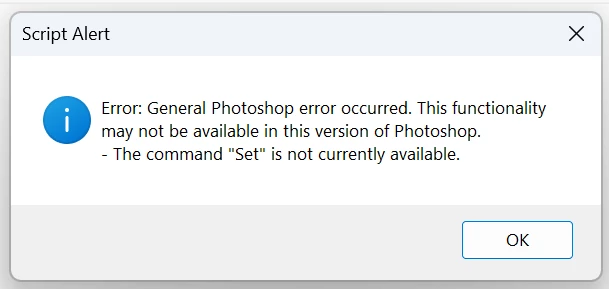
I know this error often refers that the current workspace may not allow me to set the layer with the gradient, however, I already made sure that I am using a new unedited file, I tried flattening the image making sure it starts with the default Background layer.
I would really appreciate it if someone can take a look at the script and help me figure out what may be happening.
Thank you!
 AdChoices