
Participant
November 24, 2019
Question

wacom works with pressure after turn off the servicess. Please help me with this annoying issue!!!

  • November 24, 2019
  • 1 reply
  • 367 views

Hi Folks
I would like to share a very annoying problem that I use to have for months while using a Wacom tablet with adobe photoshop and illustrator. I am using  intous pro M

wacom pressure issue is an classical issue for all users as we know :P.
As you can see on the left screenshot wacom is working on services. but on photoshop pressure fails.
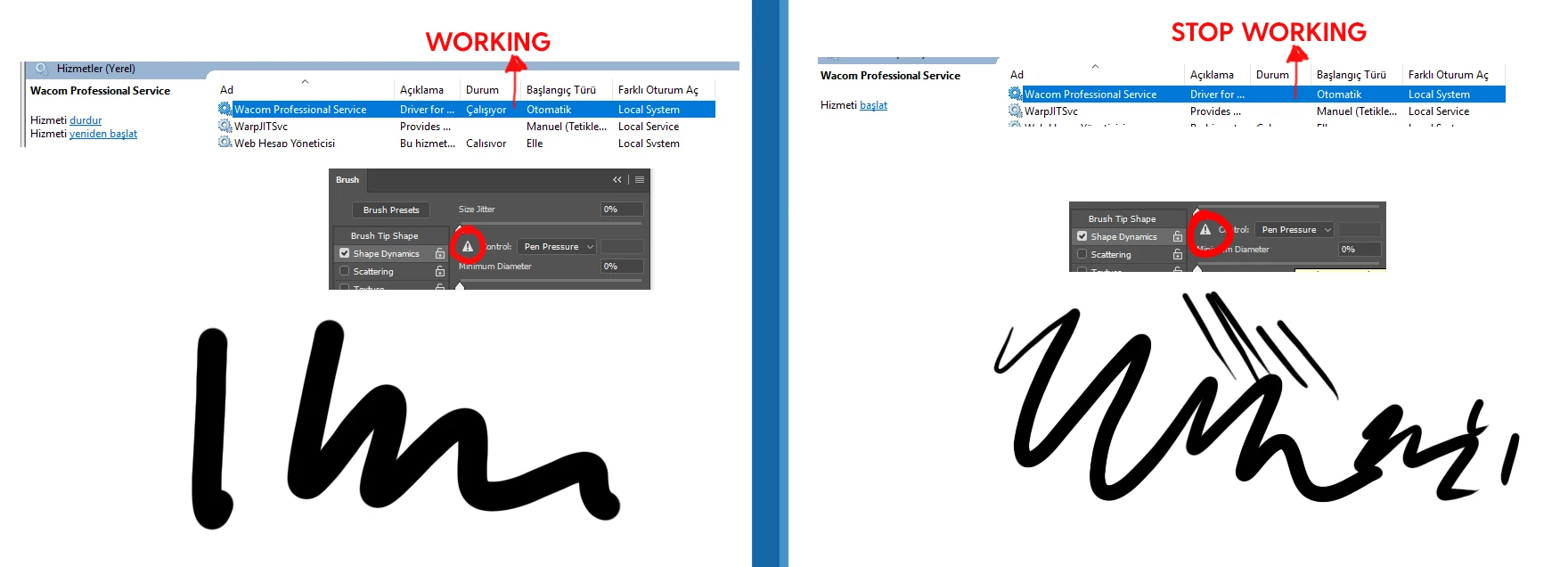


when i turn off the wacom manually on services, as you can see  pressure icon fails but it draws with pressure.... but i is impossible to use while designing or illustrating.


most annoying problem i ever had, how can i fix this issue?
please lead me to  happy ending!

thank you all

This topic has been closed for replies.

1 reply

Akash Sharma
Legend
November 25, 2019

Hi there,


Sorry thay Pen pressure in Photoshop and Illustrator is not workig as expected. 


Could you please chckout the steps below?


• Update the tablet driver from manufacturer's website.
• Reset the driver preferences to ensure that a specific setting isn’t causing your pen issues.
• Next, try to test the pen in a different software.
• Windows Refer https://helpx.adobe.com/in/photoshop/kb/tablet-support-faq-photoshop.html 
• Mac: Refer https://helpx.adobe.com/in/illustrator/kb/illustrator-cc--wacom-drivers.html   


Also, which version of Photoshop are you using and on which OS?


Thanks,

Akash

Participant
December 1, 2019

Update the tablet driver from manufacturer's webste.
Already did and did not work sorry.
Reset the driver preferences to ensure that a specific setting isn’t causing your pen issues.
I update and re install the drivers  while reseting the preferences. And result is same


Next, try to test the pen in a different software.
• Windows Refer https://helpx.adobe.com/in/photoshop/kb/tablet-support-faq-photoshop.html 
• Mac: Refer https://helpx.adobe.com/in/illustrator/kb/illustrator-cc--wacom-drivers.html   

Your links are not working  404....

Also, which version of Photoshop are you using and on which OS?
i am using CC2017  windows  10

Akash Sharma
Legend
December 4, 2019

Sorry about the trouble caused. Would you mind updating to the latest version of Photoshop 2020(21.0.1) and let us know if that issue still persists? See https://chl-author-preview.corp.adobe.com/content/help/en/photoshop/kb/uptodate.html


~Akash