
Weird colour glitch
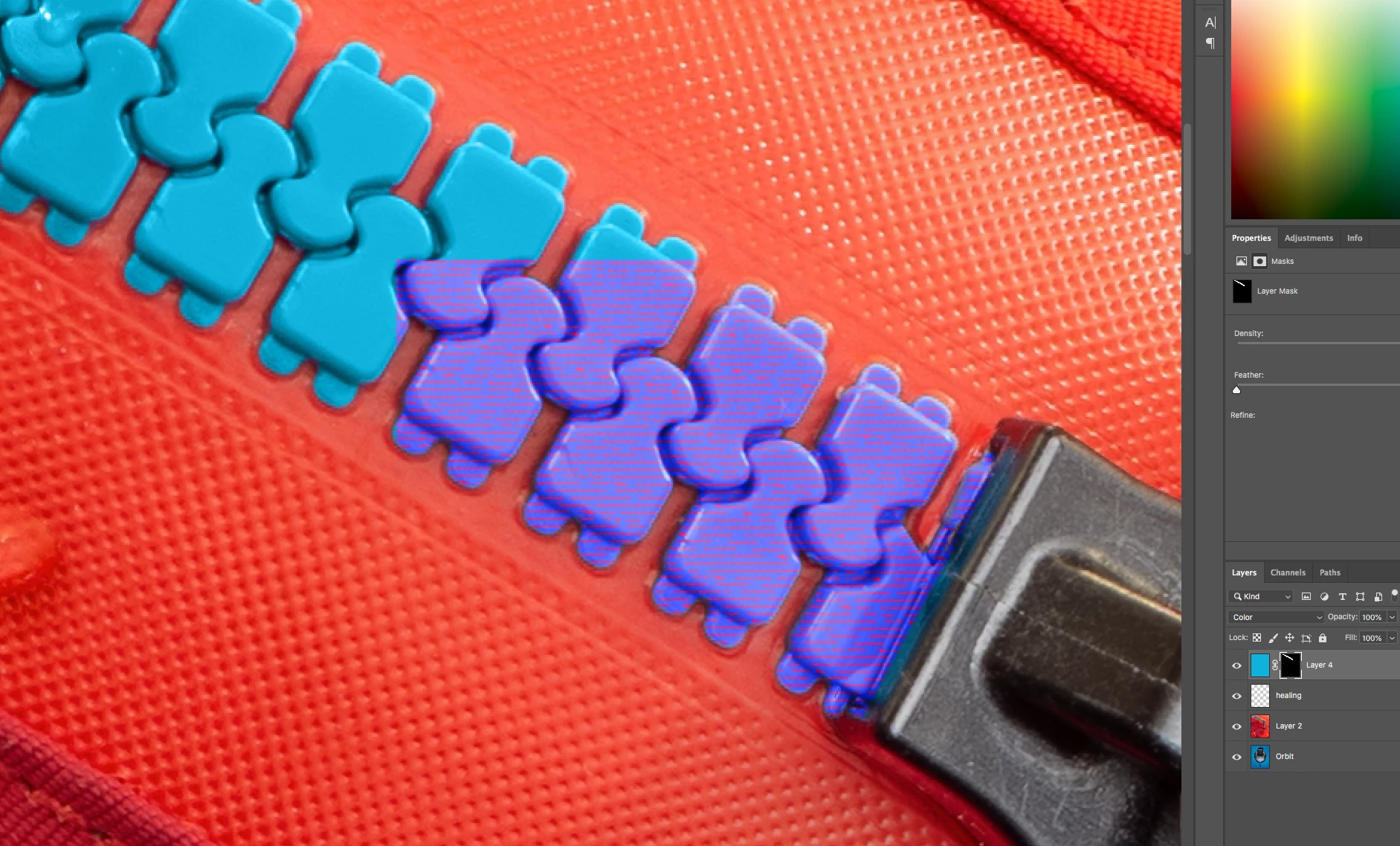
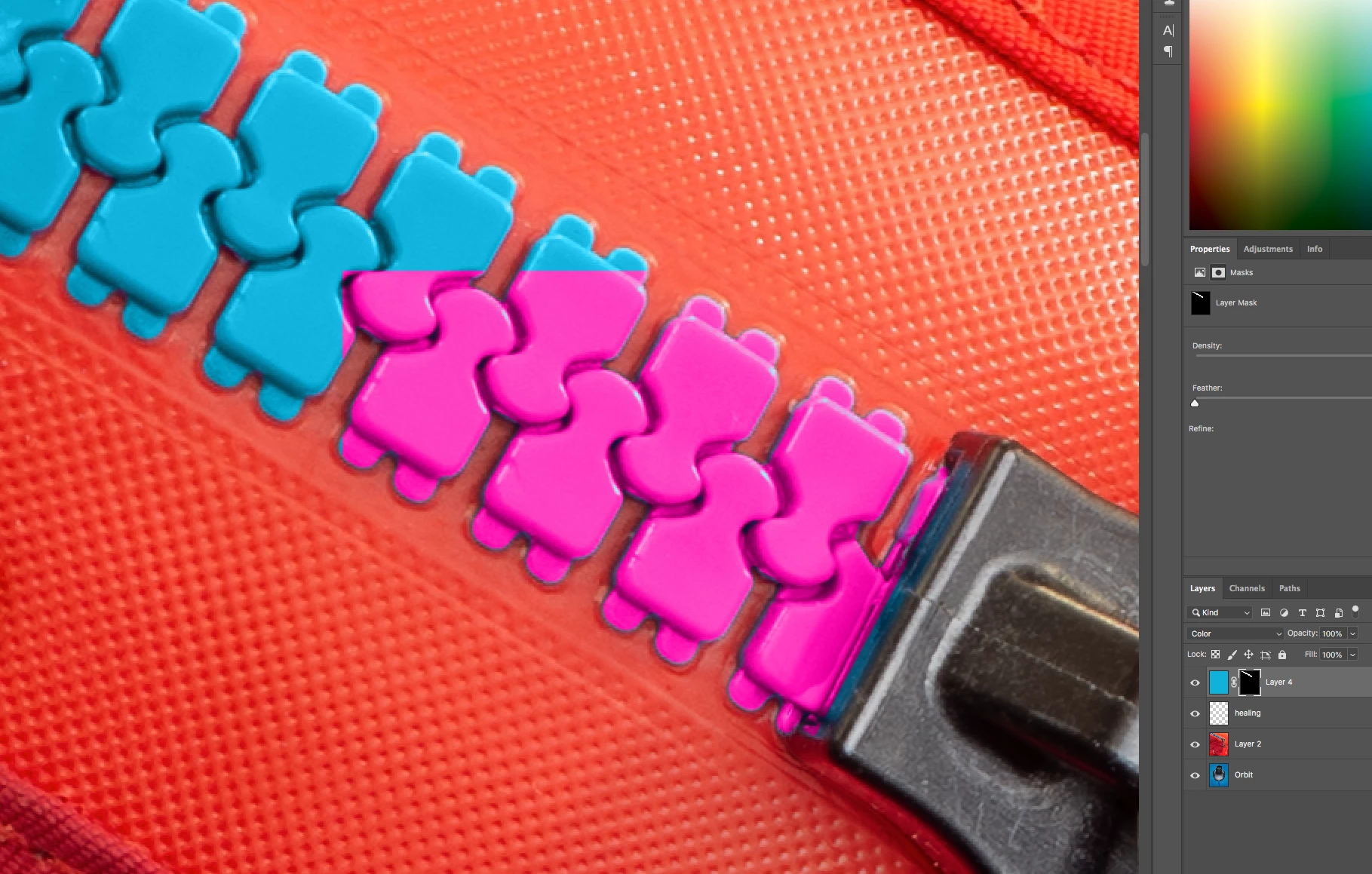
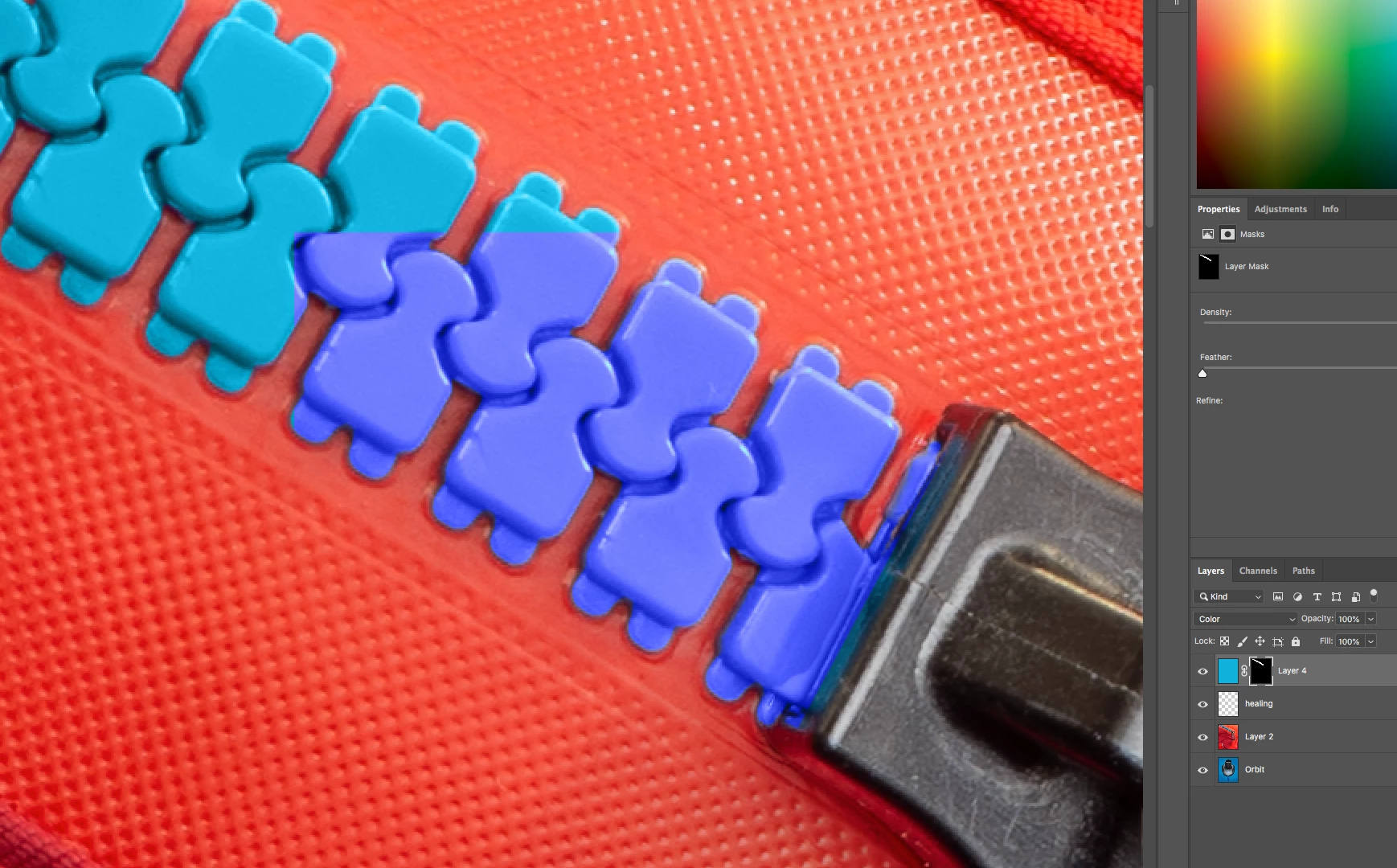
I'm running on an old iMac (specs below) and got this weird glitch when applying one layer as a 'color' overlay on top of another. I worked around this and applied the colour in a different way ... but what was odd was that toggling the color layer on and off produced different pixel glitch effects ... in a boxed area that was not defined in the mask or anywhere else.
Is this because Photoshop 2019 no longer supports my GPU properly?
The 'performance' preferences pane is auto-detecting and applying ATI Radeon 5720 OpenGL Engine setting.
Should I enable 'legacy compositing' or something else to make Photoshop render stuff better on my old system?
Regards,
Peter
Adobe Photoshop Version: 20.0.0 20180920.r.24 2018/09/20: 1193433 x64
Number of Launches: 153
Operating System: Mac OS 10.13.6
System architecture: Intel CPU Family:6, Model:14, Stepping:5 with MMX, SSE Integer, SSE FP, SSE2, SSE3, SSE4.1, SSE4.2, AVX, AVX2, HyperThreading
Physical processor count: 4
Processor speed: 2800 MHz
Built-in memory: 16384 MB
Free memory: 5970 MB
Memory available to Photoshop: 14510 MB
Memory used by Photoshop: 70 %
Alias Layers: Disabled.
Modifier Palette: Disabled.
Highbeam: Enabled.
Touch Bar Property Feedback: Disabled.
Image tile size: 1024K
Image cache levels: 4
Font Preview: Medium
TextComposer: Latin
Display: 1
Main Display
Display Bounds: top=0, left=0, bottom=1440, right=2560
Display: 2
Display Bounds: top=0, left=2560, bottom=768, right=3584
OpenGL Drawing: Enabled.
OpenGL Allow Old GPUs: Not Detected.
OpenGL Drawing Mode: Advanced
OpenGL Allow Normal Mode: True.
OpenGL Allow Advanced Mode: True.
AIFCoreInitialized=1
AIFOGLInitialized=1
OGLContextCreated=1
NumGLGPUs=1
NumCLGPUs=1
NumNativeGPUs=0
glgpu[0].GLVersion="2.1"
glgpu[0].IsIntegratedGLGPU=0
glgpu[0].GLMemoryMB=1024
glgpu[0].GLName="ATI Radeon HD 5750 OpenGL Engine"
glgpu[0].GLVendor="ATI Technologies Inc."
glgpu[0].GLVendorID=4098
glgpu[0].GLRectTextureSize=16384
glgpu[0].GLRenderer="ATI Radeon HD 5750 OpenGL Engine"
glgpu[0].GLRendererID=16915202
glgpu[0].HasGLNPOTSupport=1
glgpu[0].CanCompileProgramGLSL=1
glgpu[0].GLFrameBufferOK=1
glgpu[0].glGetString[GL_SHADING_LANGUAGE_VERSION]="1.20"
glgpu[0].glGetProgramivARB[GL_FRAGMENT_PROGRAM_ARB][GL_MAX_PROGRAM_INSTRUCTIONS_ARB]=[4096]
glgpu[0].glGetIntegerv[GL_MAX_TEXTURE_UNITS]=[8]
glgpu[0].glGetIntegerv[GL_MAX_COMBINED_TEXTURE_IMAGE_UNITS]=[16]
glgpu[0].glGetIntegerv[GL_MAX_VERTEX_TEXTURE_IMAGE_UNITS]=[16]
glgpu[0].glGetIntegerv[GL_MAX_TEXTURE_IMAGE_UNITS]=[16]
glgpu[0].glGetIntegerv[GL_MAX_DRAW_BUFFERS]=[8]
glgpu[0].glGetIntegerv[GL_MAX_VERTEX_UNIFORM_COMPONENTS]=[3072]
glgpu[0].glGetIntegerv[GL_MAX_FRAGMENT_UNIFORM_COMPONENTS]=[3072]
glgpu[0].glGetIntegerv[GL_MAX_VARYING_FLOATS]=[128]
glgpu[0].glGetIntegerv[GL_MAX_VERTEX_ATTRIBS]=[16]
glgpu[0].extension[AIF::OGL::GL_ARB_VERTEX_PROGRAM]=1
glgpu[0].extension[AIF::OGL::GL_ARB_FRAGMENT_PROGRAM]=1
glgpu[0].extension[AIF::OGL::GL_ARB_VERTEX_SHADER]=1
glgpu[0].extension[AIF::OGL::GL_ARB_FRAGMENT_SHADER]=1
glgpu[0].extension[AIF::OGL::GL_EXT_FRAMEBUFFER_OBJECT]=1
glgpu[0].extension[AIF::OGL::GL_ARB_TEXTURE_RECTANGLE]=1
glgpu[0].extension[AIF::OGL::GL_ARB_TEXTURE_FLOAT]=1
glgpu[0].extension[AIF::OGL::GL_ARB_OCCLUSION_QUERY]=1
glgpu[0].extension[AIF::OGL::GL_ARB_VERTEX_BUFFER_OBJECT]=1
glgpu[0].extension[AIF::OGL::GL_ARB_SHADER_TEXTURE_LOD]=1
clgpu[0].CLPlatformVersion="1.2 (May 24 2018 20:07:03)"
clgpu[0].CLDeviceVersion="1.2 "
clgpu[0].IsIntegratedCLGPU=0
clgpu[0].CLMemoryMB=1024
clgpu[0].CLName="ATI Radeon HD 5750"
clgpu[0].CLVendor="AMD"
clgpu[0].CLVendorID=16915200
clgpu[0].CLDriverVersion="1.2 (Jun 29 2018 18:33:46)"
clgpu[0].CLBandwidth=3.97074e+10
clgpu[0].CLCompute=93.2039
License Type: Subscription
Serial number: 94070758929313704698
GUIDBucket:Composite Core (enable_composite_core): onComposite Core UI (comp_core_ui): offDocument Graph (enable_doc_graph): off
Application folder: /Applications/Adobe Photoshop CC 2019/
Photoshop scratch has async I/O enabled
Scratch volume(s):
Startup, 931.3G, 391.3G free
Required Plug-ins folder: /Applications/Adobe Photoshop CC 2019/Adobe Photoshop CC 2019.app/Contents/Required/Plug-Ins/
Primary Plug-ins folder: /Applications/Adobe Photoshop CC 2019/Plug-Ins/
 AdChoices