
Inspiring
July 18, 2024
Question

What tool would you use?

  • July 18, 2024
  • 2 replies
  • 419 views

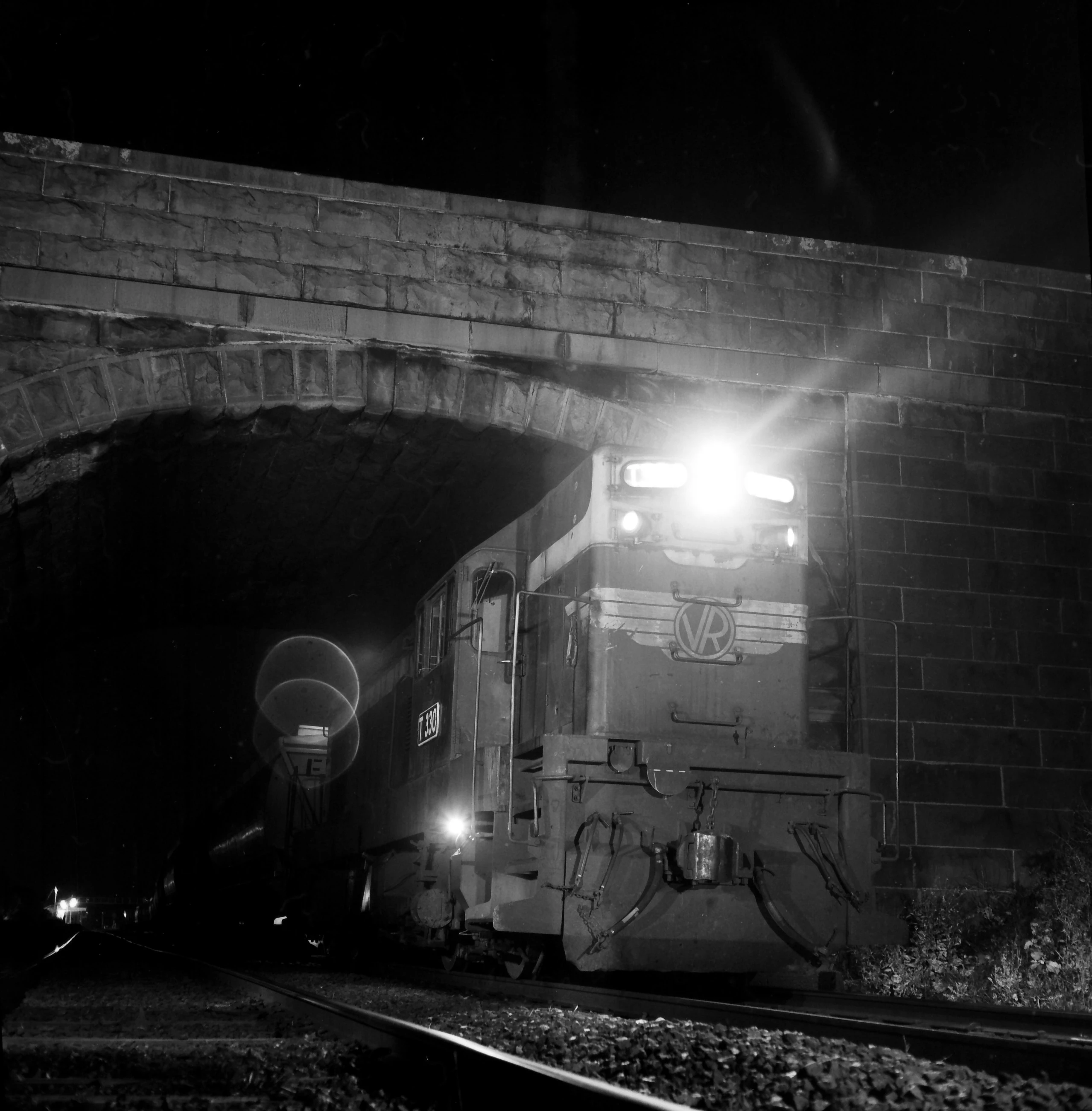
I've attempted to remove the transparent circles on this image but nothing works well. The problem is that the detail inside the circles needs to be preserved. What is the best tool/method to get rid of them?

Thanks for any help.
This topic has been closed for replies.

2 replies

Bojan Živković11378569
Community Expert
Community Expert
July 18, 2024

I believe that completing a task using just one tool or technique may not be feasible. One option to consider is Generative Fill, which is a good starting point. To achieve excellent results, investing time is crucial. The image used for generation remains unaltered, but you can experiment with adjusting image before running the Generative Fill or modifying the mask. Combining both approaches, along with additional fine-tuning, is likely to yield the best outcome.

gunzelguyAuthor
Inspiring
July 18, 2024

Your changes are similar to what I got. All of the detail inside the circles is gone. See the big letter F in the lower circle. I want to get rid of the circles without destroying what's inside them.

Bojan Živković11378569
Community Expert
Community Expert
July 18, 2024
You want original details without circles, thats not very difficult but you
need to adjust area inside circles to match surrounding. Doable but
chalenge and for more experienced users. Start using Clone Stamp or Spot
Healing brush to remove white part of circle on separate layer. Mask
affected area and try using Curves, for example, to adjust tonality. Trial
and error...
Participant
July 18, 2024

Hi,gunzelguy
I'd recommend using Photoshop's Content-Aware Fill or the Clone Stamp Tool to carefully preserve the details inside the circles. Let me know if you need a detailed guide!

gunzelguyAuthor
Inspiring
July 18, 2024

I've tried the clone tool, it gets rid os everything, I need to preserve the detail inside the circles. But I'll take up your offer of a detailed guide, thanks.