Known Participant
June 27, 2017
Answered

Blu-ray 5.1 Sound Not Playing in Surround

  • June 27, 2017
  • 2 replies
  • 7066 views

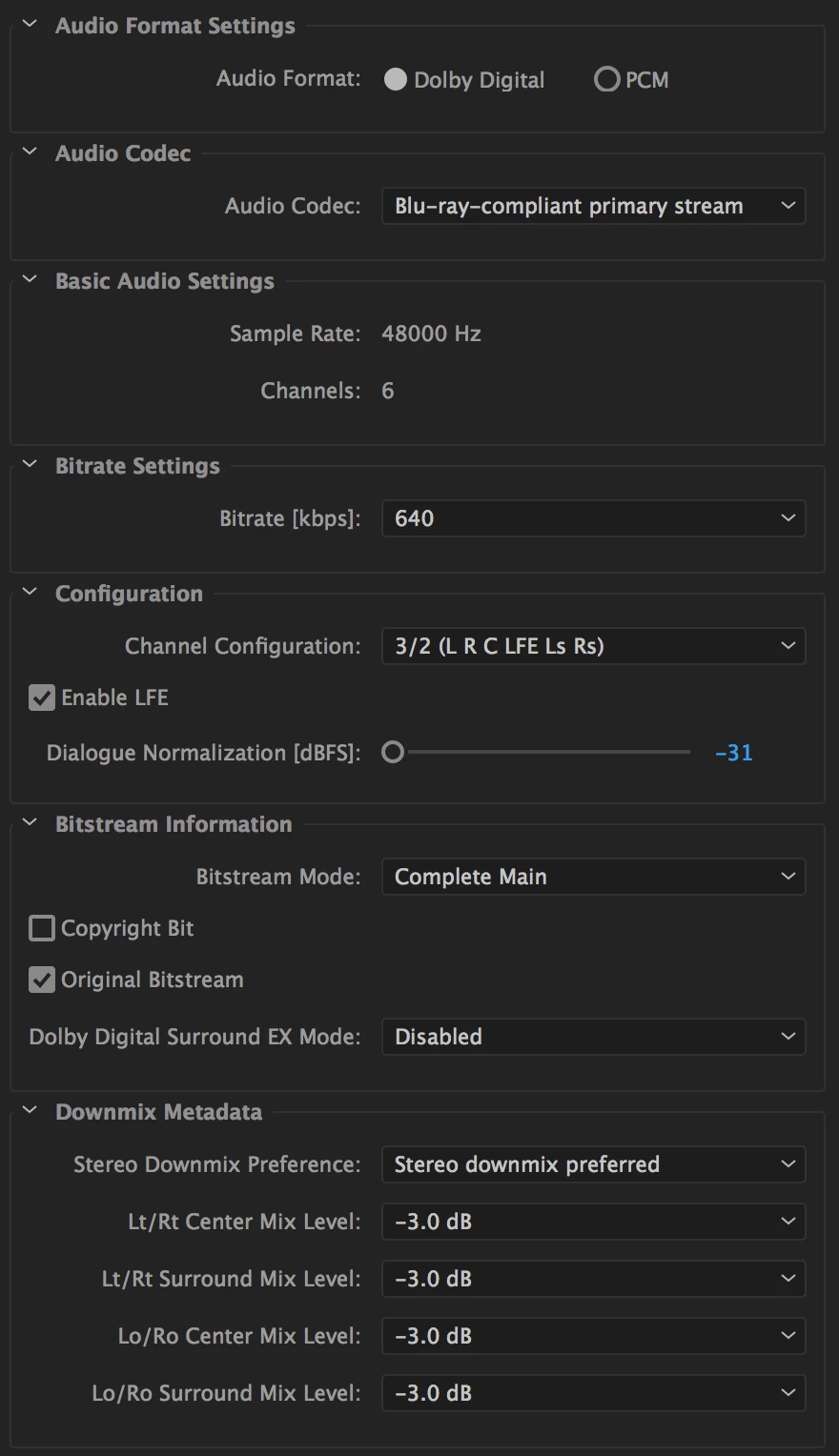
I am working on an Encore project with Dolby Digital 5.1 surround sound. I have a DVD and Blu-ray made. Both have 5.1 surround sound. My issue is that the Blu-ray is being down-mixed to stereo, but the DVD plays fine on the same sound system. Why is that? The sound system confirms that there are 5.1 channels present at 640 kbps when I hit the "info button on the remote." The only difference between the DVD audio and the Blu-ray audio is the extra option that I have to select for the Blu-ray export settings in Premiere Pro (which I selected "Blu-ray-compliant primary stream"), and the bitrate. Through long trials and error with Encore, I learned Encore will transcode (and of course, down-mix) anything above 448 kbps for DVD. BUT, for Blu-ray, having the audio all the way maxed to 640 seems to be fine with Encore. At least I get the desired "Don't Transcode" status. Could the higher bitrate that I am using for the Blu-ray audio be the problem? Or why else would the Blu-ray disk's surround mix be down-mixed to stereo? Any help is greatly appreciated!

This topic has been closed for replies.
Correct answer neil wilkes

It is almost certainly the firmware/player setup in the initial player at fault here,

What happens when these things are sent out from the factory is the default settings in every player are minimal options that will get sound & picture up on as wide a range of systems as possible - the idea is that you then tweak the player options to match your needs.

As this is a Blu-ray player it will almost certainly be set to basic mode - stereo output. Why? Because there are so many ways to connect the audio system:

1 - Analogue Stereo

2 - Analogue Surround

3 - HDMI Digital

4 - CoAxial Digital

5 - Lightpipe/TOSlink/ADAT digital (all the same).

Because of the complex situation with audio on Blu-ray, the older options (4 & 5) are restricted and usually option 3 is set to stereo downmix mode - or the amplifier is set to stereo downmix mode (unlikely). This is simply because there are weird mandatory audio setups (almost everything about Blu-ray is over complicated - it is the epitome of why you should never design media formats by committee) so we have the following mandatory forms (by Mandatory, every player must be capable of this output)

A - PCM at up to 24/192 in 5.1 and up to 7.1 in 24/96.

B - Dolby True HD (Stereo component only - Mandatory Multichannel configuration with Dolby True HD is the AC3 (Dolby Digital) core audio stream and the full 5.1/7.1 lossless output is optionally supported only ("optionally supported" means it is up to the hardware manufacturer to decide of they want this ON or OFF)

C - DTS-HD Master Audio (Stereo component only - mandatory part is the DTS Core Audio, lossless multichannel is optionally supported)

D - Dolby Digital (24/48 resolution) at up to 640kbps

E - DTS Core Audio.

All the rest is optional. So it is quite possible to play a disc, have the Dolby True HD light (or the DTS-HD Master Audio) and actually be getting lossy audio.

Additionally, lossless multichannel cannot be output down the so-called "legacy" digital connections (options 4 & 5 above) because the upper resolutions cannot go down these connections as there is insufficient bandwidth - down these connections you can get 24/48 5.1 at best, possibly 24/48 7.1 but I am not sure there. So all are restricted rather than just allowing only 16/24 bit at 48kHz and restricting the rest as that would be almost impossible to pull off. That said, some consoles will automatically resample and/or truncate the bitrate & shoe-horn it into a degraded output.

Check the audio setup in the old player, and make sure it is not set to downmix to stereo.

2 replies

neil wilkes
Legend
October 5, 2017

I do not use Encore but I have to ask - what other options do you have for your downmix settings please?

I see the metadata is set to prefer stereo downmix.....

640kbps is out of spec for DVD (although fine for Blu-ray) and although some players will handle it most will not - for DVD you should not go above 448kbps but as this did not sort the problem I do wonder about the metadata.

Is it the same player for both DVD & BD? Can you check on a different playback system to eliminate the player as the problem?

Known Participant
October 11, 2017

Thanks for your reply Neil. Perhaps I should mark this as solved, but I still never figured out entirely everything. Here is what I found, though: The only Blu-ray player connected to a 5.1 system that I had access to at the time played the DVD at 448kbps perfectly the way it was  supposed to in 5.1. That same player played the BD also at 448kbps only as stereo. But when I hit "Info," on the blu-ray player remote, it would show the correct metadata (5.1 and 448kbps). I never did solve this problem on this player.

Finally, I bought an USB blu-ray drive to connect to my MacBook Pro. I then played the Blu-ray disk (which is a real pain to do on an apple computer), and outputted the audio via HDMI. This allowed me to connect to several different 5.1 systems with just my laptop and portable Blu-ray drive. Going this route consistently worked.

So in conclusion, I believe that I did everything correct after all. My best guess is that there is just something wrong between the first Blu-ray player receiver combo that I tried. At least that's what I tell myself to help me sleep at night and put the project to rest.

neil wilkes
neil wilkesCorrect answer
Legend
October 17, 2017

It is almost certainly the firmware/player setup in the initial player at fault here,

What happens when these things are sent out from the factory is the default settings in every player are minimal options that will get sound & picture up on as wide a range of systems as possible - the idea is that you then tweak the player options to match your needs.

As this is a Blu-ray player it will almost certainly be set to basic mode - stereo output. Why? Because there are so many ways to connect the audio system:

1 - Analogue Stereo

2 - Analogue Surround

3 - HDMI Digital

4 - CoAxial Digital

5 - Lightpipe/TOSlink/ADAT digital (all the same).

Because of the complex situation with audio on Blu-ray, the older options (4 & 5) are restricted and usually option 3 is set to stereo downmix mode - or the amplifier is set to stereo downmix mode (unlikely). This is simply because there are weird mandatory audio setups (almost everything about Blu-ray is over complicated - it is the epitome of why you should never design media formats by committee) so we have the following mandatory forms (by Mandatory, every player must be capable of this output)

A - PCM at up to 24/192 in 5.1 and up to 7.1 in 24/96.

B - Dolby True HD (Stereo component only - Mandatory Multichannel configuration with Dolby True HD is the AC3 (Dolby Digital) core audio stream and the full 5.1/7.1 lossless output is optionally supported only ("optionally supported" means it is up to the hardware manufacturer to decide of they want this ON or OFF)

C - DTS-HD Master Audio (Stereo component only - mandatory part is the DTS Core Audio, lossless multichannel is optionally supported)

D - Dolby Digital (24/48 resolution) at up to 640kbps

E - DTS Core Audio.

All the rest is optional. So it is quite possible to play a disc, have the Dolby True HD light (or the DTS-HD Master Audio) and actually be getting lossy audio.

Additionally, lossless multichannel cannot be output down the so-called "legacy" digital connections (options 4 & 5 above) because the upper resolutions cannot go down these connections as there is insufficient bandwidth - down these connections you can get 24/48 5.1 at best, possibly 24/48 7.1 but I am not sure there. So all are restricted rather than just allowing only 16/24 bit at 48kHz and restricting the rest as that would be almost impossible to pull off. That said, some consoles will automatically resample and/or truncate the bitrate & shoe-horn it into a degraded output.

Check the audio setup in the old player, and make sure it is not set to downmix to stereo.
Community Expert
June 27, 2017

I would try at a lower bit rate. I have never used 640 as all my discs are sold as a Bluray/DVD package so I use the highest dvd rate for both masters. I have never had your 'stereo' problem

Known Participant
June 27, 2017

Ok, thanks for your response. I'll give that a try and report back whether or not it worked.