

Getting warning in PR about sample rate in audio mismatch
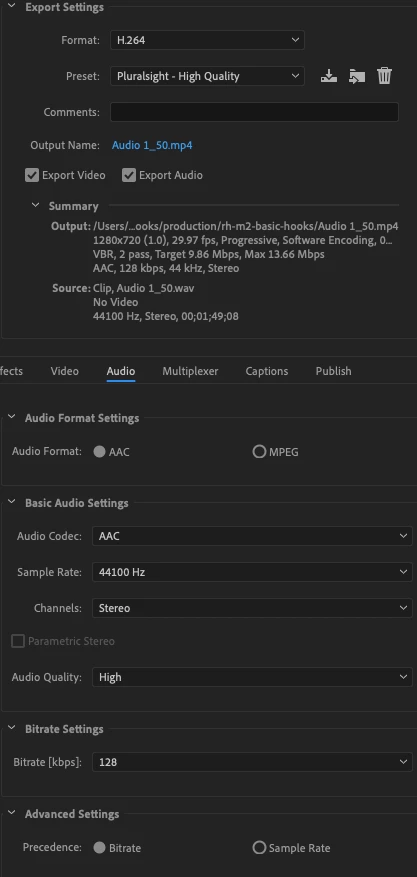
I record with Premiere directly, then I use a preset provided by my publisher for encoding. I'm getting this warning below. I'm pasting in the properties of my audio and what I have in my preset. Should I worry?
03/31/2019 05:18:37 PM : Queue Started
File Path: /Users/peterkellner/Dropbox/MyDocs/__Share/pluralsight-react-hooks/modules/rh-m2-basic-hooks/Adobe Premiere Pro Captured Audio/mod2a/Audio 1_50.wav
Type: Waveform Audio
File Size: 36.79 MB
Source Audio Format: 44100 Hz - 32 bit floating point - Stereo
Project Audio Format: 44100 Hz - 32 bit floating point - Stereo
Total Duration: 00:01:49:14888
- Source File: /var/folders/2w/3f0wzlsx5q51msm2s6gspwzr0000gp/T/mod2a.prproj
- Output File: /Users/peterkellner/Dropbox/MyDocs/__Share/pluralsight-react-hooks/production/rh-m2-basic-hooks/m2-clip070.mp4
- Preset Used: Pluralsight - High Quality
- Video: 1280x720 (1.0), 30 fps, Progressive, Software Encoding, 00:01:18:00
- Audio: AAC, 128 kbps, 44 kHz, Stereo
- Bitrate: VBR, 2 pass, Target 9.86 Mbps, Max 13.66 Mbps
- Encoding Time: 00:00:18
03/31/2019 05:18:56 PM : File Encoded with warning
------------------------------------------------------------
Adobe Media Encoder
The destination sample rate is different from the source sample rate. Resampling changes the signal's loudness and true peak level.
 AdChoices