
Participant
November 7, 2016
Question

Multi-channel audio: can't convert stereo track to dual mono

  • November 7, 2016
  • 2 replies
  • 3830 views

Hi,

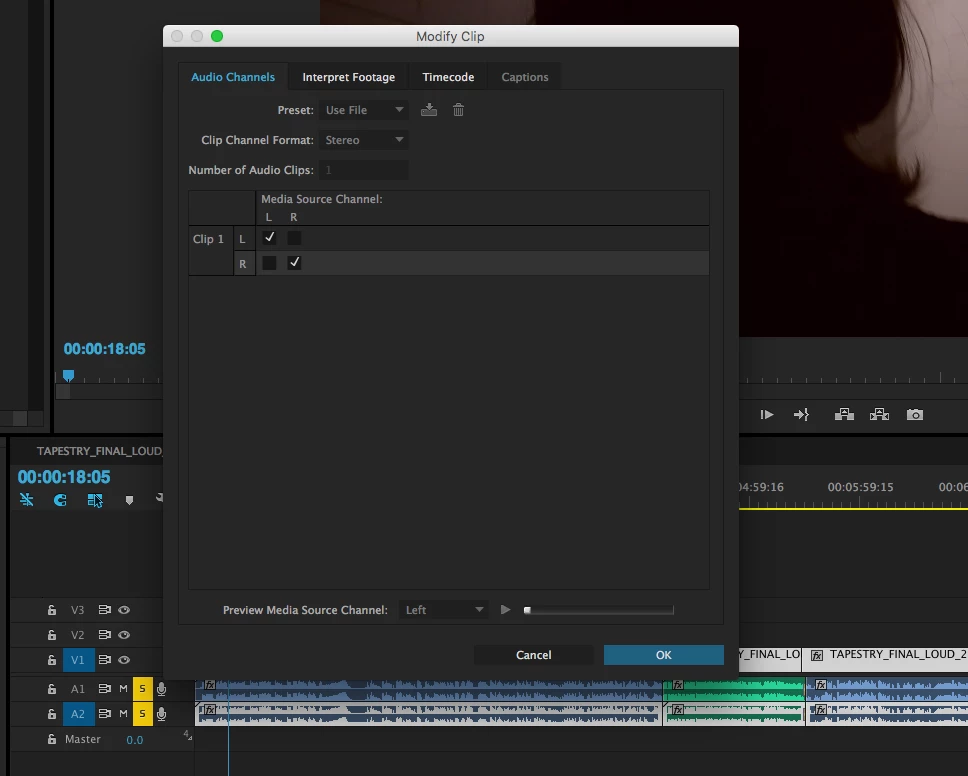
I'm trying to render my audio for broadcast, and they want multichannel audio: stereo 1,2 and dual mono 3,4. I've already created a new sequence with four channels, added a new audio track, copied the audio files to it (.wav), and designated track 1 to stereo 1,2 and track 2 to stereo 3,4. The problem is that when I go to modify track 2's format to mono, I cannot click on the option. Is there something I need to enable in order to click on it?
This topic has been closed for replies.

2 replies

Inspiring
November 7, 2016

Change Clip Channel Format to "Mono";

Number of Audio Clips to "2".

Does that  work?

Mo Alani
Community Expert
Community Expert
November 8, 2016

i think i  know what you want..

Create a new Sequence and do these setting

2. after you do the import , right click in the file and choose Modify>Audio channels

3. in the Audio track mixer, assign the channels 1-2 to track 1 and 2 and 2-3 to track 3 and 4

Muhannad,

Legend
November 7, 2016

You can't change a track type.  You'll have to create two more mono tracks and add the proper clips to those.

Note, however, that PP's multichannel output will be stereo pairs.  That's not user configurable.  So whether you keep what you have or redo it as above, you'll end up with the same result.