
Premiere Pro Horizontally Squishes videos when they are below a certain size.
Hi, So I'm not sure why it does this but I've had this issue ever since I started using PP back in 2015.
If a video is below a certain sizing (I think if it's below 1080 width) than it is displayed as squished horizontally. This wouldn't be a problem if this was just for the preview, but it exports squished as well.
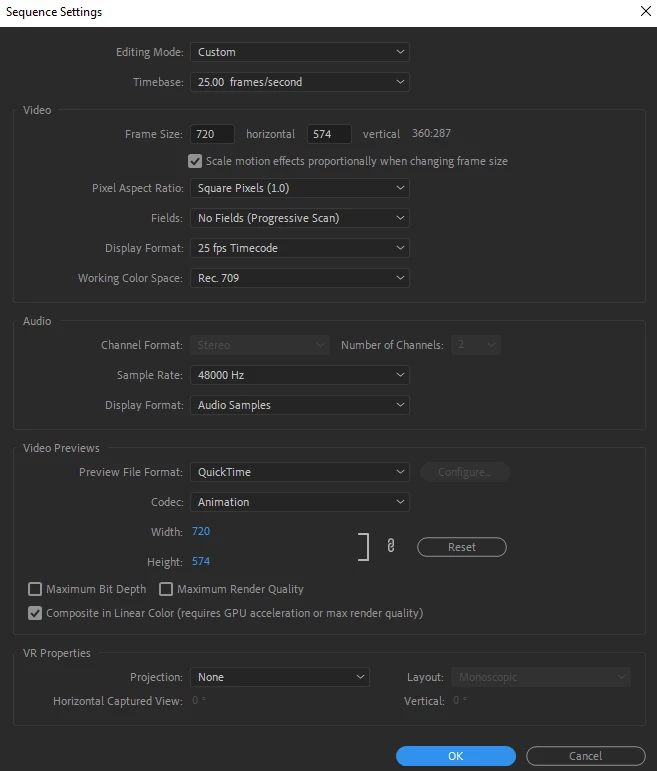
The video itself is not squished (obviously), but moreso if I check the properties of the video by itself to see the height and width and then compare that to the sequence settings height and width, they both match.
Idk if it's worth note or not, but I'll add that with this particular project I had to change the Preview File Format to Quicktime because not only was I experiencing frame jumping, but I'd cut the clip and go back and my selection would have shifted a couple of seconds over - not in the timeline but the clip itself (if that makes sense).
Anyway I've attached my sequence settings (which were all automatically configured by PP btw)
I've found ways around this issue in the past. Screen recording my videos or putting them into PP and adjusting the project's sizing and then using the transform effect to manually widen the width scale of the clip to match a screenshot of the actual clip -- but it's a bit tedius and there surely is a proper solution.
And before you say "clear your cache" yes I have done that, many many times.
 AdChoices