
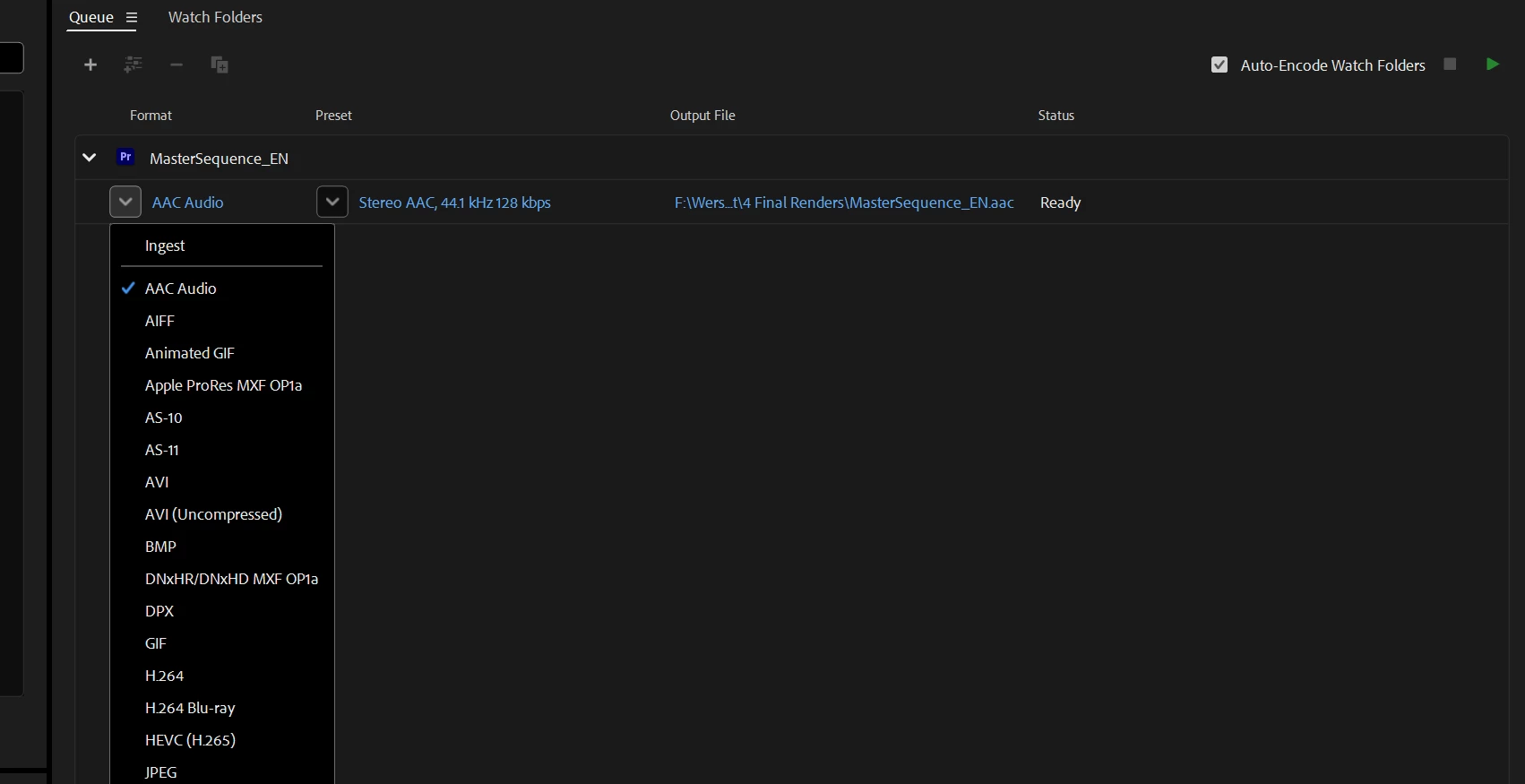
Problem: render via script always takes first preset from the list (.aac)
Hey folks,
I have this issue with RENDER PRESET when rendering from script:
app.encoder.encodeSequence(sequence, outputPath, presetPath, workArea, removeUponCompletion);
The presetPath for .epr file is correct,
and even when I want to use ProRes, h264 mp4, AVCHD or whichever,
it somehow always take the first preset from Encoder list which is an .aac preset.
- How do I know the .epr file path is correct?
When I brake it - the Encoder doesn't even open - there is no error thou.
- I use Visual Studio Code 1.73.1, Premiere Pro 24.1.0 (build 85), AME 24.1.1 (build 2)
- The same thing happens when I use app.encoder.encodeFile() and app.encoder.encodeProjectItem().
- The same thing happens when I run Encoder first via app.encoder.launchEncoder() and then try to render.
- Also I found that the last extension part of my outputPath is useless too, it doesn't matter if I write ".mp4" or ".mov" or whatever, it doesn't use anything after the dot, just uses .aac.
I attached a screenshot of my queue
Did I make some rookie mistake or is this a bug? Any workarounds?
Sadly without it, the whole automation process is pretty useless 😮
Thanks for any help guys!
 AdChoices