
Participating Frequently
June 14, 2019
Question

[System Compatibility Report] - Issues with Premiere Pro (version 13.1.2)

  • June 14, 2019
  • 4 replies
  • 3942 views

Hello all,

I would like to point out a problem I am having since a week or so.
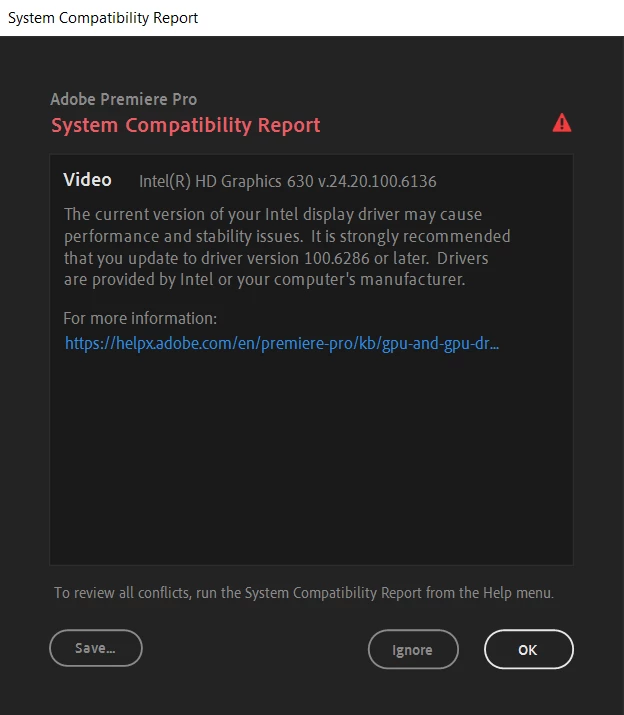
As I tried to use Premiere Pro 2019 instead of 2018 I received this message. I have never seen such warning before and I decided to click on the link below "For more information".

Because this was all rather new to me, I chose the generic version to update my driver. (I used the .exe rather than the zip file as well). And so after restarting my computer it is still giving me this warning.

At this point I am clueless as to what I could do without accidentally messing up. Do you guys have any idea how to solve this?

This topic has been closed for replies.

4 replies

Adobe Employee
July 8, 2019

Hi there,

Please let us know if you were able to solve the issue you were facing. If you are still getting that System Compatibility Report, please try to update the drivers for Intel HD 630. The latest driver version available for download is version 26.20.100.6912. Please try to install that and let us know if that solves the issue.

Download Intel® Graphics - Windows® 10 DCH Drivers

Thanks,

Sumeet

Participant
March 1, 2020

Hi, 


I have updated to these graphics on my laptop and desktop, but it still says it is incompatible. 


Kind regards, 

CCIN 

MyerPj
Community Expert
Community Expert
March 1, 2020

That message was last July, did you upgrade to the latest one?

Version: 26.20.100.7870 (Latest) Date: 2/19/2020

https://downloadcenter.intel.com/download/29426/Intel-Graphics-Windows-10-DCH-Drivers?v=t


Legend
June 15, 2019
Peru Bob
Community Expert
Community Expert
June 15, 2019

Jim,

B.  Creativity is no longer enough. -- In this day and age, you do yourself a disservice if you are not an advanced computer user.  Any editor using software at this level should be able to build and troubleshoot their own computer. (Or at the very least, have quick and easy access to such a person.)

The OP has access to such a person here.  That's why he posted on the forum.

SpecimanAuthor
Participating Frequently
June 15, 2019

1. MSI

2. Yes

3. It says For more information, click on the link that is colored blue in the image shown above. Once you open that there is a link to download a generic version for Intel drivers to update to regarding this case.

Stan Jones
Community Expert
Community Expert
June 15, 2019

Re "still giving me this warning," what version of the graphics driver does it say you now have installed?

SpecimanAuthor
Participating Frequently
June 15, 2019

Current version is 24.20.100.6136. I am talking about my Intel driver which is causing this warning/issue, not my GPU driver.

Peru Bob
Community Expert
Community Expert
June 14, 2019

What brand computer?

Is this a laptop?

Where did you download the driver from?