

Ezad
Inspiring
September 2, 2022
Question

Timeline: image and frame rate mismatch

  • September 2, 2022
  • 1 reply
  • 200 views

Hello

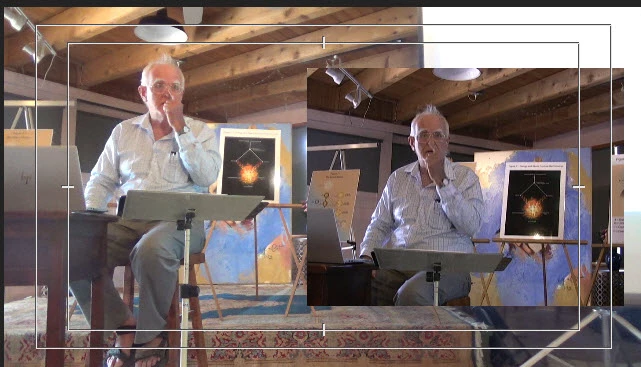
Need help to re-frame-resize two films on the timeline.

This was an interview shot with two camcorders. I didn’t expect there would be a discrepancy between the two Sony cameras.

How can I alter/adjust the films so that they are both matching? I do notice Image size and Frame rate are different. Thanks for any advise!


Here is V1

Type: MPEG Movie
File Size: 1.24 GB
Image Size: 720 x 540
Frame Rate: 29.97
Source Audio Format: 32000 Hz - Compressed – Stereo
Project Audio Format: 32000 Hz - 32 bit floating point – Stereo
Total Duration: 00:54:43:04
Pixel Aspect Ratio: 1.0
Alpha: None
Video Codec Type: MP4/MOV H.264 4:2:0

Here is V2

Type: MPEG Movie
File Size: 1.98 GB
Image Size: 1920 x 1080
Frame Rate: 23.976
Source Audio Format: 48000 Hz - Compressed – Stereo
Project Audio Format: 48000 Hz - 32 bit floating point – Stereo
Total Duration: 00:52:37:00
Pixel Aspect Ratio: 1.0
Alpha: None
Video Codec Type: AVCHD H.264 4:2:0
 

This topic has been closed for replies.

1 reply

Richard van den Boogaard
Community Expert
Community Expert
September 3, 2022

You're probably best off by choosing to edit the sequence in 23.976 fps mode. It's generally easier for an NLE to disregard frames (29.97 > 23.976) than it is to re-invent frames that were never there in the first place (23.976 > 29.97).


In terms of resolution, you have a large gap to overcome. Going from 720x540 to 1920x1080 requires a 266% enlargement, which probably means you will be counting pixels by then. An edit at 1280x720 seems to be the best you can do given these source materials.


However, the framing of both cameras does not differ that much if were to make a crop of the 1080p clip on a 720p timeline, so you might as well disgard the smaller video angle altogether and just edit off of the 1080p clip and use b-roll to cover up any cuts involved.


Hope this helps.