
Inspiring
February 6, 2017
Answered

Unmuting mute premiere pro cc 2017
  • February 6, 2017
  • 1 reply
  • 8053 views

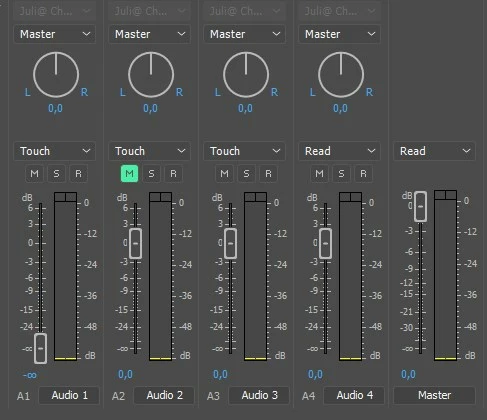
Hi I accendentally pressed the mute button during mixing audio tracks in premiere pro while the write option was on. I can of course re-record but still I have this split second of muted audio track since I only know to react when the green button pops up. How do I delete this action and have a normal/constant audible audio track again? Thanks for reading and answering! Regards René
    This topic has been closed for replies.
    Correct answer renéw33656593

    As you can see this mute keyframe is in the track itself not in the audio file. How is it possible to make it visible? Can't find it in the online manual. Thanks reading and answering Regards, René


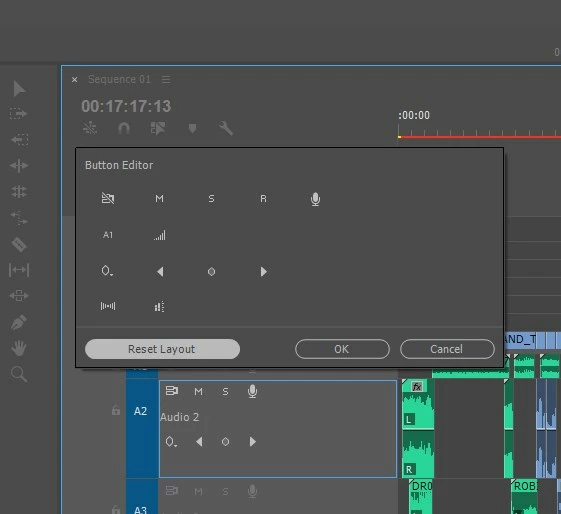
    OK solved it!   With the help of this answered question. Premiere Pro mute track problem  My problem was that 'show keyframes' in the timeline tracks kept grey and not accessable. However after pressing 'reset layout' I could access it and went into these mute keyframes in the track itself. I didn't dare to press that before thinking to lose all the other keyframe setting in that perticular track. I hope that I helped anybody too by writing this down

    1 reply

    Ann Bens
    Community Expert
    Community Expert
    February 7, 2017

    Go into the timeline with the Pentool.

    Lasso all (Track) keyframes and delete.

    Inspiring
    February 7, 2017

    Thanks Ann for reading and answering. I solved it temporary within this project by changing it to an another track but I can't seem to delete the mute moment in track 2. Though show audio keyframes is on and try to lasso with pentool. Only riple delete shows up but stays grey. Must look into the tutorials to solve I guess. Regards René

    Inspiring
    February 8, 2017

    As you can see this mute keyframe is in the track itself not in the audio file. How is it possible to make it visible? Can't find it in the online manual. Thanks reading and answering Regards, René