
creating pdf from postscript file.
Help: creating adobe pdf from postscript file
It was not answered, as it should be answered, and i did not place the mark that it was answered correct!
My problem just occured since yesterday. Before yesterday everything worked fine. It is a low resolution pdf that i have to send to the customer, and it is the only way to send it in one file if i have more artboards, and don't want them to be displayed under each other. If the artboards are next to each other, the customer can easily see the difference between them, and make there choice.
Here under another file. Left is the export to Pdf file and on the right the illustrator file with 5 artboards. When exporting only 3 artboards are shown. It doesn't auto rotate any more.
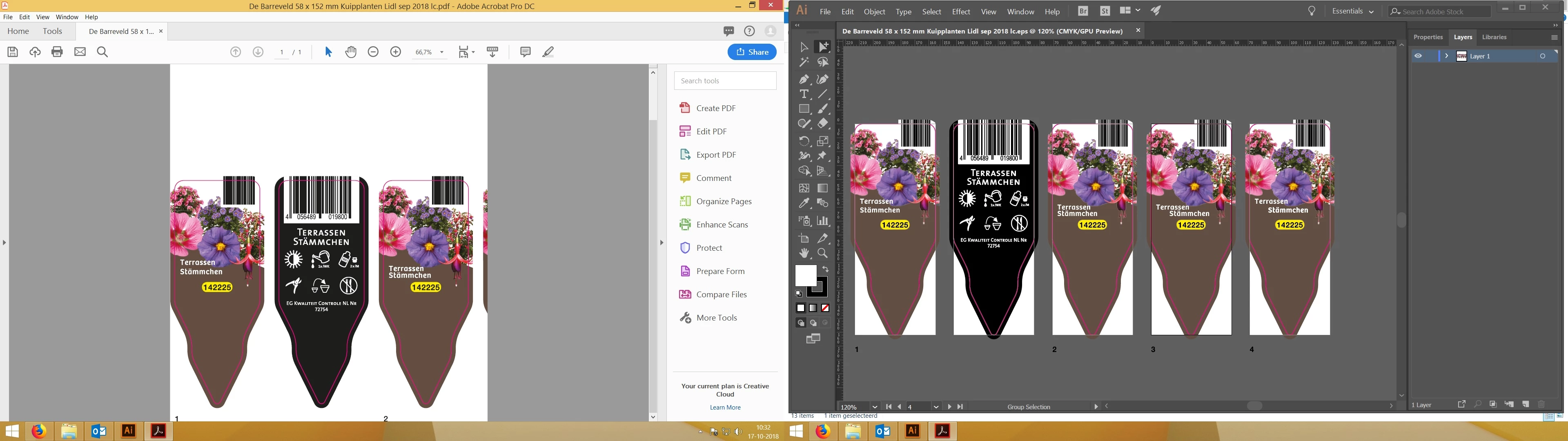
It is just too easy to say, use the other way. It worked untill yesterday, and now it doesn't anymore for me. On all other machines it works, just on mine not anymore. I de-installed Illustrator and Acrobat, and installed them again, nothing workes. I think it has to do with Office 365, because that is the only thing i installed before this problem occurred. Please help me!
Example form yesterday.
I created an EPS in Illustrator in 2 artboards. I allways click on the EPS file with right click, and then select create adobe PDF. Adobe Acrobat DC then opens and the PDF is created in 1 single pdf with no white space around it.
Now suddenly it doesnot auto rotated anymore, and the file is placed in the left under corner, filled with a lot of white space around it, or even not showing the complete artboards anymore. I have not changed anything in the settings. The only thing i installed is office365.
What can i do. It is no option for me to save the pdf in Illustrator, because the customer cannot see the difference then between one or 2 designs, because each artboard is then under each other in steath of next to each other
Illustrator file:

How it should be created:

Now it Adobe Acrobat does this:

it doesn't rotate the file, it is worthless right now.
Please help and let me know what i can do.
Thank you.
Kind regards,
Will
 AdChoices