
Participant
July 30, 2024
Answered

How can I populate the amount fields based on whether or not a checkbox is checked?

  • July 30, 2024
  • 3 replies
  • 983 views

I am trying to auto calculate a total amount from a list of different options with different amounts. 

I want it to work where if a checkbox is checked for a Charge (Cleaning, Minor Damage, Major Damage, etc.) that the cost for that charge is included in the autopopulated amount (Total Charges Owed). How can I go about this?

This topic has been closed for replies.
Correct answer JR Boulay

You don't need to use JavaScript.

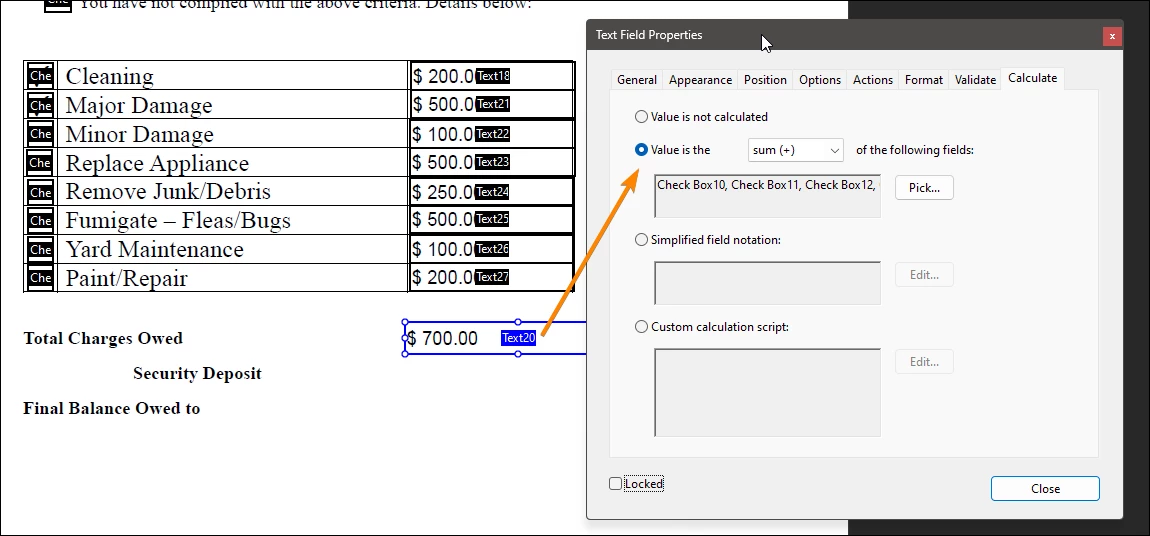
Enter the prices as the export values of the check boxes. When a number is repeated, add one or two zero as decimal to avoid duplicate export values, because check boxes with exactly the same export value will be checked at the same time.

Make the "Text20" calculate the sum of the concerned checkboxes.

See Attachment.
 

3 replies

JR Boulay
Community Expert
JR BoulayCommunity ExpertCorrect answer
Community Expert
July 30, 2024

You don't need to use JavaScript.

Enter the prices as the export values of the check boxes. When a number is repeated, add one or two zero as decimal to avoid duplicate export values, because check boxes with exactly the same export value will be checked at the same time.

Make the "Text20" calculate the sum of the concerned checkboxes.

See Attachment.


Acrobate du PDF, InDesigner et Photoshopographe
PDF Automation Station
Community Expert
Community Expert
July 30, 2024

If the prices aren't going to change, make those text fields static text (not fields).  Remove your check boxes.  Create one check box at the top ("Check Box"), then right-click > Create multiple copies and add 8 fields down and 1 across.  Enter the prices as the export values of the check boxes (numbers only, eg. 200).  When a number is repeated, add a zero in front of it (eg. 200, 0200, 00200) so there are no duplicate export values.  In your Total field ("Text20"), in the calculation tab, select Value is the sum of, and select the "Check Box" field only.  This article might help you.

Participant
July 30, 2024

I have no knowledge of JS, but I have added this script which is just taking care of the first two lines of check boxes and amounts:


{Check_Box8: 1, check: "Yes", Text18: 200.00}
{Check_Box8: 1, check: "No", Text18: 00.00}
{Check_Box9: 1, check: "Yes", Text21: 500.00}
{Check_Box9: 1, check: "No", Text21: 00.00}


However, I keep getting the erro "SyntaxError: missing ; before statement 1: at line 2"