
How to set dropdown border line style solid via javascript
Hi there,
I have a large pdf file with lots of filled forms in it. I need all the dropdown fields to have the border line style as solid via javascript, so that i can print only the value of the field and not the outline around it.
I now how to do it manually, by going to Properties- Appearance - Border Line Style Solid - no color, but i need to do it automatically because the pdf file has more than 600 dropdowns in it.
I am sharing this image in order to understand what i want to achieve by code. The arrows shows the fields that I want to hide the outline by code.

I need to print the pdf, so that the printed documents do not show the outline of the two dropdowns.
Is this possible to do it?
The needed settings i need to achieve by code are the ones shown below:
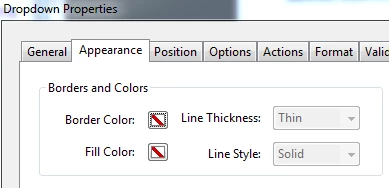
Any help will be greatly appreciated.
 AdChoices