
Participant
September 16, 2021
Answered

Unable to Extract Multiple Pages

  • September 16, 2021
  • 2 replies
  • 1954 views

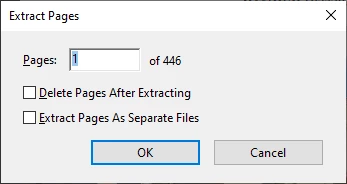
Adobe Acrobat Pro DC (version 2021.007.20091) went through an update earlier and now I am unable to extract more than one page at a time. I've tried the Repair Installation and restarting my computer with no luck. Does anyone have any guidance or a solution? 
 

Thank you, 
This topic has been closed for replies.
Correct answer gauravs43202023

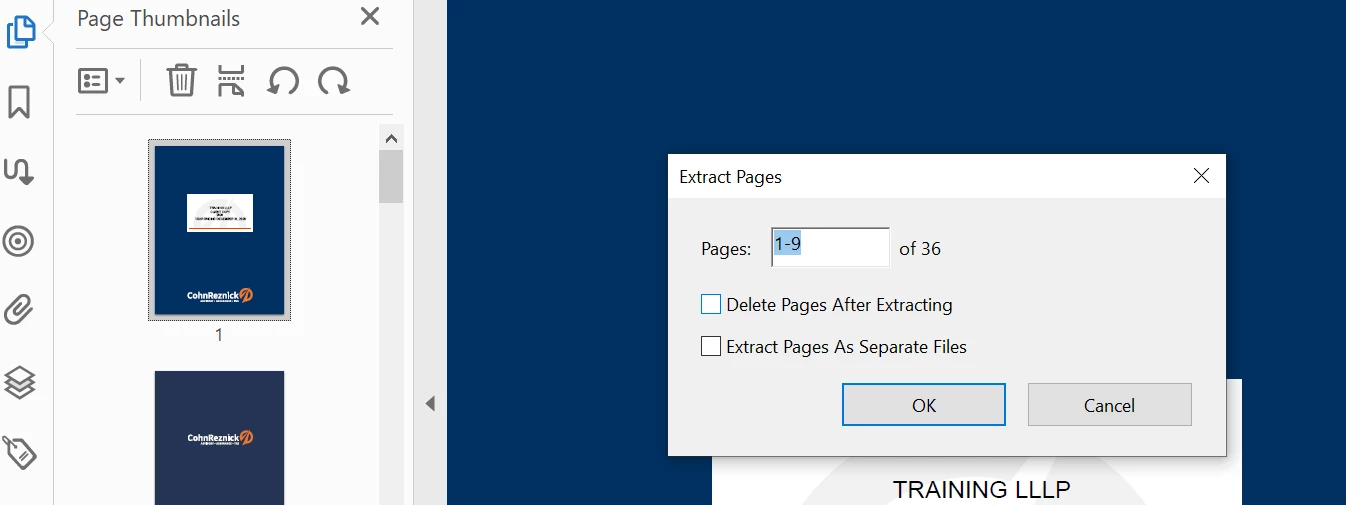
You can edit that first box only and mention your range. Like 1-5 or 1-10 (whatever range of pages you want to select). 

2 replies

Nesa Nurani
Community Expert
Community Expert
September 17, 2021

Did you try enter pages for extracting like this: 1-5


Participant
September 17, 2021

This is no longer an option which is the issue. See screenshot above which only allows the ability to enter a specific page number and not a range after selecting "Extract Pages" from the left hand pane. 


Thank you, 

gauravs43202023
Adobe Employee
Adobe Employee
September 17, 2021

Hello,


Thanks for contacting us.


Can you please share further details ?


- Are you using Organize Pages App or Left hand thumnail pane ? If possible can you please share a video of your steps or explain a bit more about the exact steps you are trying ?


- Please share OS details.


- Is it happening with you for all files ?


Thanks,

Gaurav Sharma

Participant
September 17, 2021

- I'm using the Left hand thumbnail pane and right clicking on a page then selecting "Extract Pages." Prior to yesterday both page fields would show as editable where I could for example select pages 1 to 15, now the only editable option is the first box so I'm only able to select one specific page in the file. I've been doing the exact same steps with Adobe Pro for several years and now the functionality is not working properly. 


- Device: Latitude 7310

Processor: Intel(R) Core(TM) i7-10610U CPU @ 1.80GHz 2.30 GHz

System type: 64-bit operating system, x64-based processor

Windows specs

Edition: Windows 10 Enterprise

Version: 21H1

OS Build: 19043.1165


- Yes, this happens now with all PDF files. 


Thank you,

gauravs43202023
Adobe Employee
gauravs43202023Correct answer
Adobe Employee
September 18, 2021

You can edit that first box only and mention your range. Like 1-5 or 1-10 (whatever range of pages you want to select).