Exit
  • Global community
    • Language:
      • Deutsch
      • English
      • Español
      • Français
      • Português
  • 日本語コミュニティ
  • 한국 커뮤니티
0

Commas in Number in Text Boxes

New Here ,
Dec 09, 2016 Dec 09, 2016

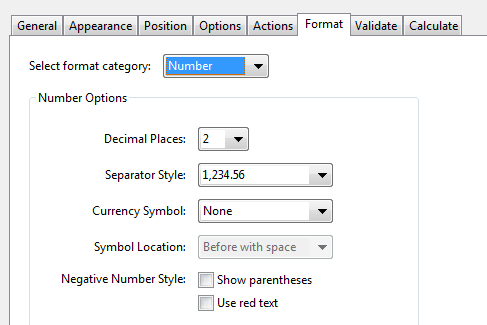
Hi, I am using PDF Mail Merge software to populate Adobe PDF forms from an excel sheet. I have an issue with a display in the text box: when I choose format "number separated by commas", no commas are displayed. However, when I type the number in the cell, it shows commas. Can anyone explain what I need to do that the text box would display commas when I import the numbers from an excel sheet? FYI, I tested different types of cell formatting in excel but it seems not to have any impact on the pdf text box.

TOPICS
PDF forms
4.9K
Translate
Report
Community guidelines
Be kind and respectful, give credit to the original source of content, and search for duplicates before posting. Learn more
community guidelines
LEGEND ,
Dec 09, 2016 Dec 09, 2016
LATEST

The field formatting that you set up in Acrobat will only work if Acrobat/Reader is used to populate the fields with data. If some other software is used, it probably won't work. What would work is to change the data from numbers to strings so that the commas are included.

Translate
Report
Community guidelines
Be kind and respectful, give credit to the original source of content, and search for duplicates before posting. Learn more
community guidelines
