Copy link to clipboard
Copied
We just updated to the latest version of Adobe Acrobat Reader.
Now it automatically chooses to print double sided.
Does someone know how to turn this off?
Copy link to clipboard
Copied
Hi Rubenv,
Sorry for the delay in response.
Considering your response it seems your machine might be IT managed. If that is the case, you need to check with your IT, this could be due to script or group policy on your machine.
Feel free to update the discussion if you have further questions.
-Tariq Dar
Copy link to clipboard
Copied
You didn't state your system! So please give information on OS and version and the printer and driver version.
What is the default setting with your printer? If it is double sided it is normal that it prints double sided.
Acrobat standard if printing to a printer able doing duplex printing is this:
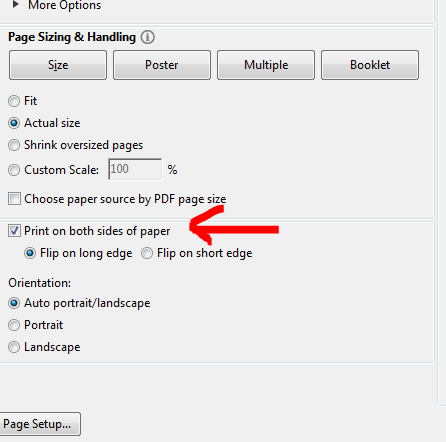
Some printers however do not pass their information on to the OS, so that Acrobat does not get that information and cannot act accordingly. In that case the only possibility to swith double sided printing off is to pass to the printer's setup dialogue box and change there the settings.
Copy link to clipboard
Copied
Thanks for your answer!
My printer is set to print on one side.
However, since the update the box you're pointing at is automatically ticked when booting the print window.
Copy link to clipboard
Copied
Hi Rubenv,
Sorry for the delay in response.
Considering your response it seems your machine might be IT managed. If that is the case, you need to check with your IT, this could be due to script or group policy on your machine.
Feel free to update the discussion if you have further questions.
-Tariq Dar
Get ready! An upgraded Adobe Community experience is coming in January.
Learn more



