lisah49386807
Participating Frequently
November 9, 2017
Question

Opera browser updated and now I can't get flash player to install

  • November 9, 2017
  • 3 replies
  • 35198 views

My opera browser had an update and now that I have rebooted the computer the flash player does not work and I get a message that I need to install flash player when I go to facebook to play one of the games I get a message stating that I need to update/install Adobe Flash to enable my Flash Player Experience.

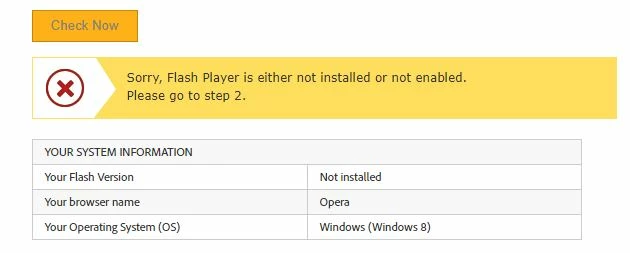
I have gone to the Adobe Flash Player Install for all versions and tried installing that version, but I still get the same message and if I go to  Flash Player Help to check to see if it is installed it says that it is not installed on my computer.  (it also states that I am running windows 8 but my system is windows 10 now).

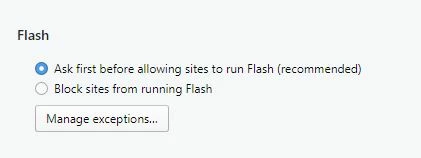
I have followed the steps to make sure that it is enabled in Opera and that is not the problem.

I have gone to Adobe Flash Player Install for all versions to download the player from there and do that install and it too has been unsuccessful. 

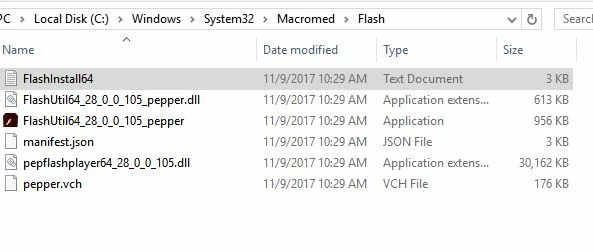
I have tried uninstalling and then installing the player multiple times.  I have used the uninstaller that I found at Uninstall Flash Player for Windows and then followed the steps there - but I was unable to delete all the files found in C:\Windows\system32\Macromed\Flash so I renamed the folder to flash.old

I am not sure exactly what is meant for the next step  (am I supposed to delete those files / folders as well?)

Follow steps a, b, and c for the following:
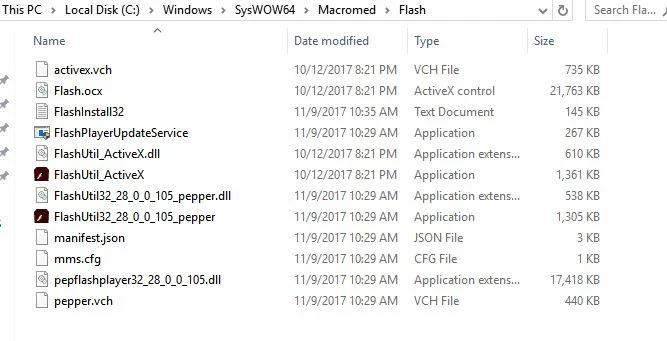
C:\Windows\SysWOW64\Macromed\Flash
%appdata%\Adobe\Flash Player
%appdata%\Macromedia\Flash Player

I have also followed the steps I found at https://forums.adobe.com/thread/2283833

I have also tried the download found at http://labs.adobe.com/downloads/flashplayer.html

Download Adobe Flash Player 28 Beta for Desktops - Adobe Labs

After uninstalling the program - both with the uninstaller or from control panel, I am rebooting the computer, then installing the download and the browser is not open while doing this.   I have then opened the browser and checked to see if it is installed by going back to Flash Player Help  and it still shows as not being installed.  I have then tried again but rebooting the computer after the install and then checking with the same results.  I have even disabled my anti-virus program during the install and that has not helped.

I have been trying for the past 3 hours to get the darn flash player to install and work with no luck at all.  It is showing as being installed in Control Panel     Programs and Features.    

I have tried the 3 different downloads

flashplayer27pp_fa_install

flashplayer27pp_hc_install

install_flash_player_ppapi

but nothing is working.  Below are the screen shots that may or may not help

This topic has been closed for replies.

3 replies

Chaturbate_
New Participant
January 30, 2018

Thank you !

[moderator: links to self-promoted and offensive content removed]

November 20, 2017

Wow, original poster did a great job documenting. I did all those similar things and am having same issue, but I am running Windows 7 Professional. I couldn't see that anyone in this thread found a solution that actually worked to figure out why Opera isn't seeing Flash. As a side note, I tried Firefox, exact same issue as Opera. Only browser I can run my Flash based FB game on right now appears to be Chrome that has built in Flash. I want my Opera back

shahram-b
Participating Frequently
November 21, 2017

A commenter in Opera forum found and suggested a solution(as following) that fixed the above flash player problem for me and some other Opera user, I hope it help you:

"I've been playing with chrome://site-engagement more. Setting a site to 0, pressing enter and refreshing that page does indeed remove the site from the list.

Also, setting a site to 100 (and pressing ENTER to apply it) and refreshing the site's page often allows flash to work without even adding an exception to the list. I say "often" as it doesn't work all the time. Sometimes I have to close out of the tab for the site and open it up again. Other times I have to repeat that stuff a lot of times or refresh the site page a bunch of times. Then it works, again without adding an exception.

So, maybe try going to chrome://site-engagement and setting all the sites to 100 (making sure to press ENTER each time). Then, for sites where that still doesn't help, keep reloading the site for a while just to see if you can get it to work.

If a site isn't in the list, go to the site first and then it'll show up. If it still doesn't though, you'll have to try the exceptions list. Then it should show up in the site-engagement list where you can then set it to 100.

Not a solution. Just something to mess around with. Also, once it works for a page, I'm not sure if it keeps working (after a restart for example) yet. But, it looks like it persists."

In my case, I set each website to 100, pressing Enter, I repeated the above process for a few time because in the first time was not successful,and refreshing website was not enough but also the website should be closed and then be opened(in my case).

shahram-b
Participating Frequently
November 21, 2017

I discovered that the problem come back again after using Ccleaner in order to clean the PC and the browsers and again the above process over  "chrome: // site-engagement"must be repeated.

_maria_
Community Manager
Community Manager
November 9, 2017

Thank you for providing the detailed information.  It's very helpful.  Please provide the following information:

  • Opera browser version
  • direct (exact) link to the content that is not playing.

Thank you.

lisah49386807
Participating Frequently
November 9, 2017

Information on the Opera Browser is : Version:49.0.2725.34 (PGO) - Opera is up to dateUpdate stream:StableSystem:Windows 10 64-bit (WoW64)

Exact link showing that flash player is not playing is  https://apps.facebook.com/forbiddengarden/?fb_source=bookmark&ref=bookmarks&count=9&fb_bmpos=_9  as well as   https://apps.facebook.com/klondikegame/?fb_source=bookmark&ref=bookmarks&count=4&fb_bmpos=_4

If I go to Flash Player Help it states that it is not installed or not enabled but I have checked the settings as directed.

_maria_
Community Manager
Community Manager
November 9, 2017

I forgot to ask which Windows 10 OS version you have.  Took a guess and tested with Windows 10 Home Version 1703 OS Build 15063.674.

I installed Flash Player PPAPI plug-in version 27.0.0.183

I first tested both sites you provided on Opera 48.0.2685.50 and they both played fine.

I then updated to Opera 49.0.2725.34(PGO).  I navigated to helpx.adobe.com/flash-player.html and at first, the browser did not detect the Flash plugin.  I manually added the domain to the list of exceptions for Flash to play:

  1. Launch Opera
  2. Navigate to settings
  3. In the menu on the left, select Websites
  4. Locate the Flash section and click Manage Exception button link
    • Alternatively, skip steps 2-4 and go directly to opera://settings/contentExceptions#plugins
  5. In the Hostname pattern field enter helpx.adobe.com and in the corresponding drop-down menu, select Allow
  6. click Done to close the Manage Exceptions window
  7. Refresh/reload Opera and navigate to helpx.adobe.com/flash-player.html
  8. Click the Check Now button
  9. Opera will now allow Flash content and display the version installed:

You will  need to Allow flash on both sites you provided by clicking the 'Get Adobe Flash Player' button, which will display the option to allow/deny Flash.

Forbidden Garden game:

Click the Get Adobe Flash Player button

The info bar displays, asking to allow/deny flash.  Click Allow

Opera enables Flash and the game plays with Flash content:

Klondike game:

Click the Get Adobe Flash Player button

The info bar displays, asking to allow/deny flash.  Click Allow

Opera enables Flash and the game plays with Flash content:

If you navigate back to opera://settings/contentExceptions#plugins you'll see that https://apps.facebook.com:443 has been added to the list of Flash Exceptions.

As long as this is listed here, you shouldn't have to 'Allow' Flash again on https://apps.facebook.com:443.

If you continue to have issues with enabling Flash on Opera, I recommend contacting Opera as it's the click-to-play Flash implementation that determines when Flash will load, not the plugin itself.