yvonnen33145778
Participant
December 14, 2017
Answered

Quality raw files

  • December 14, 2017
  • 4 replies
  • 1062 views

Hello,

I have a question. I have the canon 6d mark II. This camera includes software to edit raw files. This program's name is Digital Photo Proffesional (DPP). But this program is very slow I(version 4).

So I edit the pictures in Photoshop CC. But the quality here is not so good as in DPP. In DPP the pictures are sharper en the colors are more beautiful. Can someone tell me how this is Possible? Or maby i'm doing something wrong?

I hope someone can help me.

    This topic has been closed for replies.
    Correct answer Bob_Hallam

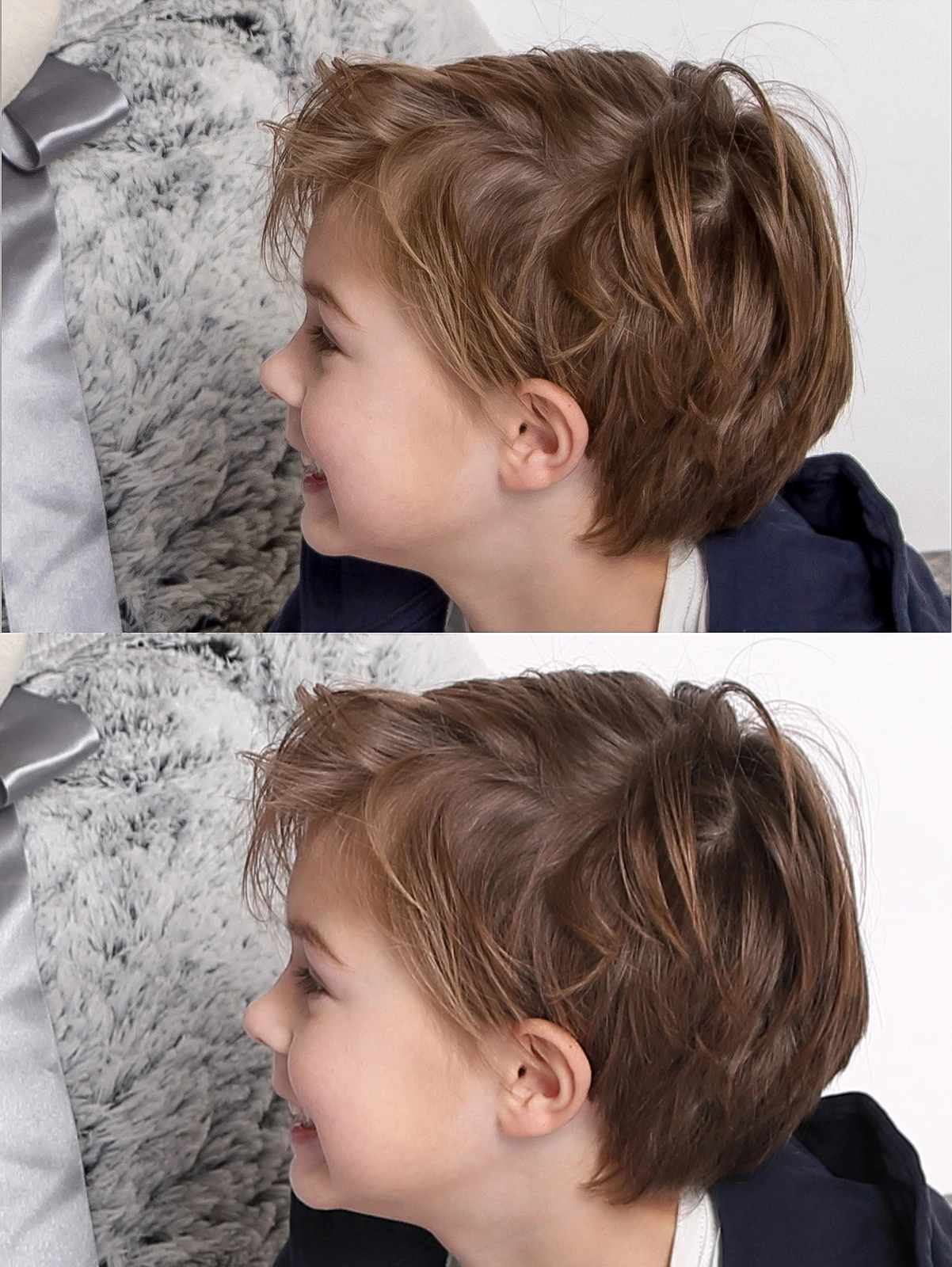
    There are a few things going on here.  It appears your ACR settings are basically flat, with no "style" set.  Since you are shooting RAW choosing a style in your camera won't matter at all.  Those styles are for rendering jpgs only and have no effect on RAW files themselves.   

    1.) Notice the highlight weight in the Canon image as the background tone on the right.   That tells us the Canon image has cleaner, brighter highlights, so you will need to increase exposure in ACR.  (Try Auto) Also the highlight balance is slightly warmer, so an adkustment in white balance increasing yellow a bit will help. 

    2.) You can see along the bridge of the nose that the Canon image has some outlining due to unsharp masking being added.  Adding this will help, but remember to keep Radius low (.6-.8) to limit this outline effect. 

    3.)Adjust shadows and black values at this time.  Opening shadows and darkening blacks can have the effect of adding contrast and increasing color saturation in the shadow tones. 

    4.) Then minus vibrance and add saturation (as needed to get the look you like)

    Here's what I did in a few quick adjustments.  Arguably a bit better than the Canon version, but only just to show that really there are a lot of style possibilities. 
    4 replies

    Bob_Hallam
    Legend
    December 21, 2017

    Just thinking that the full answer to this is to sav the ACR settings after the preference adjustments.   So tweak until your happy and save.

    Uncheck saving white balance.  Since this will be image dependent.  Then load those settings on the next image.  You can further automate with an action that calls ACR and uses those saved settings.  So really there is far more flexibility.

    ICC programmer and developer, Photographer, artist and color management expert, Print standards and process expert.
    yvonnen33145778
    Participant
    December 21, 2017

    Thank you very much. I did it and I am satisfied and happy I save the settings and now it's 1 push on the button and the picture is perfect. Thank you very much.

    Bob_Hallam
    Bob_HallamCorrect answer
    Legend
    December 18, 2017

    There are a few things going on here.  It appears your ACR settings are basically flat, with no "style" set.  Since you are shooting RAW choosing a style in your camera won't matter at all.  Those styles are for rendering jpgs only and have no effect on RAW files themselves.   

    1.) Notice the highlight weight in the Canon image as the background tone on the right.   That tells us the Canon image has cleaner, brighter highlights, so you will need to increase exposure in ACR.  (Try Auto) Also the highlight balance is slightly warmer, so an adkustment in white balance increasing yellow a bit will help. 

    2.) You can see along the bridge of the nose that the Canon image has some outlining due to unsharp masking being added.  Adding this will help, but remember to keep Radius low (.6-.8) to limit this outline effect. 

    3.)Adjust shadows and black values at this time.  Opening shadows and darkening blacks can have the effect of adding contrast and increasing color saturation in the shadow tones. 

    4.) Then minus vibrance and add saturation (as needed to get the look you like)

    Here's what I did in a few quick adjustments.  Arguably a bit better than the Canon version, but only just to show that really there are a lot of style possibilities. 

    ICC programmer and developer, Photographer, artist and color management expert, Print standards and process expert.
    Omar.Fathy
    Community Expert
    Community Expert
    December 14, 2017

    you can just increase the [clarity] + increasing [Contrast] in camera raw and it'll be good then you can go to Details tab and you can increase [Sharpness].
    Let me know if you need any help in camera RAW so I can help you.

    yvonnen33145778
    Participant
    December 15, 2017

    Thank you very much. Today I will try it and let you know.

    Bob_Hallam
    Legend
    December 14, 2017

    Canon has the inside scoop / secret sauce on their cameras and lenses, so they do have an edge in some ways.  The solution is not obvious or simple, and any changes will be complex to get the improvements your looking for.   If you can post 1 examples from each software, and your settings in ACR, there will be many opinions on what you can do to go from one to the other.   Without them it will be impossible to really help you.   

    ICC programmer and developer, Photographer, artist and color management expert, Print standards and process expert.
    yvonnen33145778
    Participant
    December 14, 2017

    Per Berntsen
    Community Expert
    Community Expert
    December 14, 2017

    You are probably using a Picture style (or whatever Canon calls it) on your camera that increases saturation, and possibly sharpness.

    Camera Raw cannot read these proprietary settings, and ignores them.

    In addition, DPP probably has other default settings than Camera Raw, and most likely also a higher default sharpening.

    A raw file is open to interpretation - there are no right or wrong settings, and it is up to you to edit the image to your liking.

    DPP does not produce higher quality than Camera Raw, and you can achieve the same results in Camera Raw as you are getting in DPP.

    To begin with, you can try the different camera profiles in the Camera Calibration tab in Camera Raw (it has a camera icon), and there may be one that gives you a rendering similar to DPP.

    See also these two threads, that are basically about the same problem:

    Photo change after import

    Camera RAW makes image darker after importing.