

Possible fix for BSOD with Adobe apps
I am on an Alienware Aurora based desktop very good specs incl 32gigs ram, i7 8700k, GTX 1080 Ti, it's a brand new build. The only apps installed are adobe apps and mozilla firefox. Windows 10 Pro.
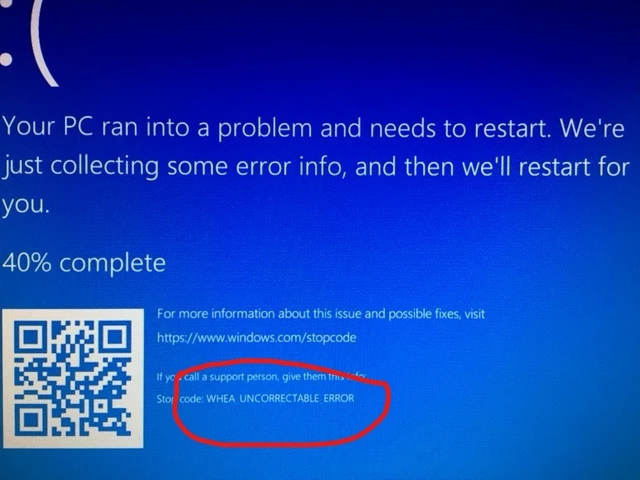
I have been experiencing massive system failures (whea uncorrectable error) when using most adobe apps (I mainly use premiere), and I notice a lot of others in this forum and elsewhere with the same problem so I just wanted to share my "fix". Seems to work with all adobe apps incl premiere, media encoder, lightroom etc that I was getting these crashes from.
I saw various mentions of something along the lines of "adobe app asking for more power than motherboard was willing to give and to go into system bios and up the voltage a little." (very rough translation) So I tried to do this but could not find the actual voltage settings, but I found something in the bios called Intel Speedstep
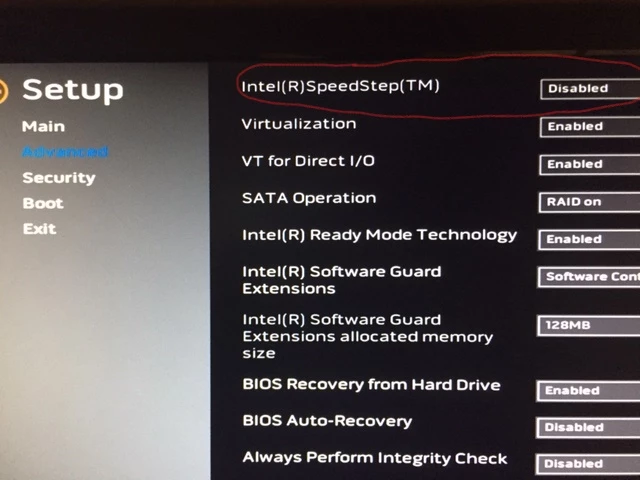
Look at what the description say about it
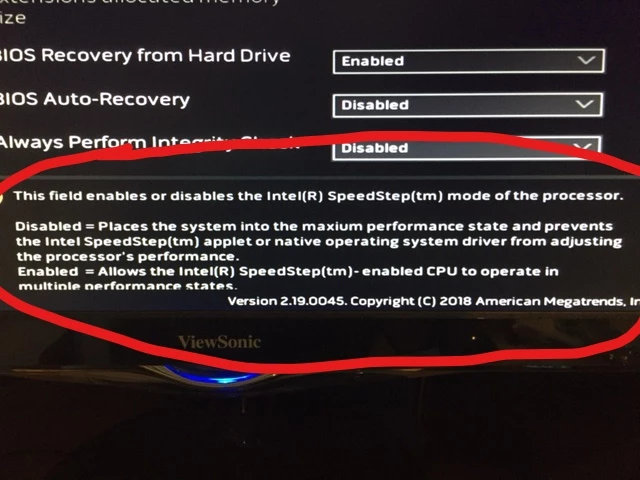
So I disabled this and my system and all adobe apps has been running smoothly ever since. I did uninstall all adobe products and reinstall them one by one with a complete system reboot after each install. I mainly use premiere (in this case 12.0) and I have been throwing everything I can at it for the past few hours and it has not glitched once.
I realize this may not work for everyone but it worked for me so I'm sharing. I went from every app causing blue death to all apps running smoothly (so far). I will post an update if the problem returns. If anyone needs a detailed walk through of the steps just let me know.
Good luck everyone.


 AdChoices