


- Home
- Acrobat
- Discussions
- Re: Acrobat DC using huge amounts of memory while ...
- Re: Acrobat DC using huge amounts of memory while ...
Acrobat DC using huge amounts of memory while doing nothing

Copy link to clipboard
Copied
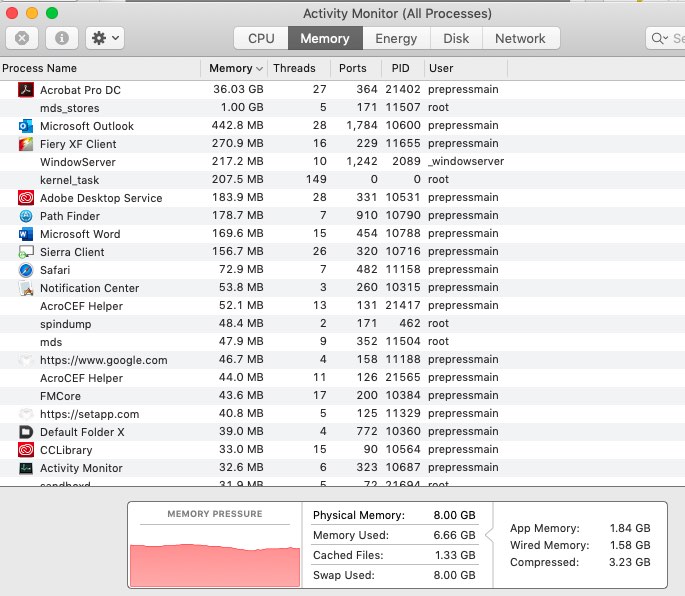
What is wrong with Acrobat?!? It is using a huge chunk of memory while doing nothing. I work on one or two files and all of a sudden Acrobat exhibits behavior of memory leak. Brings everything to a grinding standstill on my Mac workstation. I end up having to force quite to do anything. This has become a real issue.


 6
Replies
6
6
Replies
6


Copy link to clipboard
Copied
How much memory, exactly? What version of Acrobat DC (not "latest" please).
Copy link to clipboard
Copied
Acrobat Pro DC the most current Creative Cloud has.
Version 2019.012.20036
Notice it says 36.03 Gigs
This occurs not when I have some monstrously large file open, but when the program is idle. After a certain time the program will become non-responsive and have to be force quit.
Copy link to clipboard
Copied
That's certainly excessive. It's very rare Acrobat gets over a gigabyte. Do you have any third party plug-ins installed? If so, try disabling them and see if it gets better.
Copy link to clipboard
Copied
Pitstop is installed. I will disable and see what happens.
Copy link to clipboard
Copied
Disabled the plug-ins and still the issue persists.
To resolve I had to do a clean uninstall (The adobe CC Desktop was incapable of actually uninstalling Acrobat) using AdobeAcroCleanerTool from a third party site. Thanks Adobe. Then did a clean install and all seems to be working now.
Copy link to clipboard
Copied
Eek! From a third party site? I'd recommend wiping your system clean and starting again, that's the fastest way to get malware.
Adobe have such a tool Download Adobe Reader and Acrobat Cleaner Tool - Adobe Labs but what you downloaded could have had hidden "extras".


Get ready! An upgraded Adobe Community experience is coming in January.
Learn more
 AdChoices